
The 10 Best Charging Stations for Multiple Devices in 2027
Add a phone and a 100W charger can cut your laptop to 65W. We compared 23 expert reviews of the best charging stations for multiple devices. Pick yours.

Affiliate Disclosure: As an Amazon Associate, we may earn a commission from qualifying purchases, and it never changes our picks.
Our picks at a glance

10.0/10Score

$129.99
as of Nov 25, 2026, 10:47 UTC

9.9/10Score
$149.99
as of Nov 25, 2026, 10:47 UTC

9.6/10Score
$66.46 $99.99 Save 34%
as of Nov 25, 2026, 10:47 UTC
Black Friday Deal
9.1/10Score
$129.95
as of Nov 25, 2026, 10:47 UTC

9.0/10Score
$56.99 $79.99 Save 29%
as of Nov 25, 2026, 10:32 UTC
Black Friday Deal

8.8/10Score
$59.99 $89.99 Save 33%
as of Nov 25, 2026, 10:32 UTC
Black Friday Deal
8.8/10Score
$85.49 $139.99 Save 39%
as of Nov 25, 2026, 10:47 UTC
Black Friday Deal
8.5/10Score
$94.99 $149.99 Save 37%
as of Nov 25, 2026, 10:47 UTC
Black Friday Deal

8.4/10Score
$90.99 $129.99 Save 30%
as of Nov 25, 2026, 10:47 UTC
Black Friday Deal

8.2/10Score
$59.99 $89.99 Save 33%
as of Nov 25, 2026, 10:32 UTC
Black Friday Deal
Product prices and availability are accurate as of the date/time indicated and are subject to change. Any price and availability information displayed on Amazon.com at the time of purchase will apply to the purchase of this product.
How we rank best charging stations for multiple devices?
We rank charging stations by how well they handle a real pile of gadgets. Ports and Device Count comes first: how many things one plug feeds, and what each port still gets when they're all connected. Charging Speed follows, because a station that crawls once it's full is just a cable tidy. Device Compatibility checks laptop wattage, PPS for Galaxy phones and MagSafe or Qi2 for iPhones and Watches. Design and Build covers footprint, power bricks, cords and heat, and Value makes sure you're not paying for ports your household won't fill.
Ports and Device Count30%
A station only earns its spot if it feeds every device you own at once, with real power left on each port when they're all plugged in.
Charging Speed25%
Laptops need enough watts to gain charge while you work, and phones should still fast-charge with everything else connected.
Device Compatibility20%
A 16-inch MacBook Pro needs 140W, Galaxy phones need PPS and iPhones need MagSafe or Qi2, so the station has to match what you own.
Design and Build15%
Footprint, cord length, power bricks, heat and fan noise decide whether it sits happily on a desk, counter or nightstand.
Value10%
You should pay for the ports and watts your household will actually use, not for capacity that sits empty.
Best charging stations for multiple devices compared
Swipe sideways to see every spec.
| Product | Score | Type | Max Output | Ports | Capacity |
|---|---|---|---|---|---|
| 10.0 | Desktop charging station and power strip with smart display | 240W total USB; up to 140W from one USB-C port | 4 USB-C, 2 USB-A (12W each), 2 pop-up AC outlets | None (plug-in station, no battery) | |
| 9.9 | GaN desktop charger with 2.26-inch screen and control knob | 250W total; 140W from C1, 100W each from C2-C4 | 4 USB-C, 2 USB-A (22.5W each) | None (plug-in station, no battery) | |
| 9.6 | GaN desktop charging station with detachable stand | 200W total; three USB-C ports up to 100W each | 6 USB-C, 2 USB-A | None (plug-in station, no battery) | |
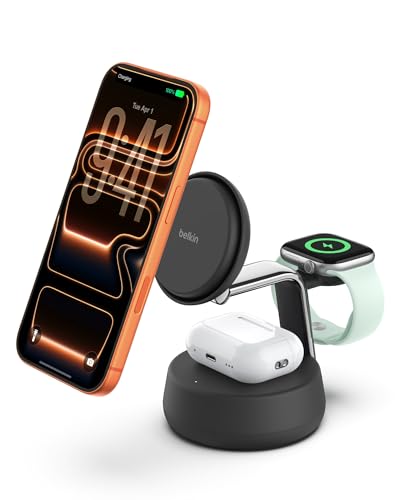
| 9.1 | 3-in-1 Qi2 25W magnetic charging dock with cooling fan | 25W iPhone (Qi2), plus Apple Watch and AirPods spots | 3 charging spots; USB-C input, 45W adapter included | None (no battery, must be plugged in) | |
| 9.0 | GaN wall charger with robot face display (non-folding prongs) | 100W total; USB-C1 or C2 alone up to 100W | 3 USB-C, 1 USB-A | None (wall charger) | |
| 8.8 | GaN wall charger with color smart display | 140W from USB-C1 or C2 alone; 134W with all four ports in use | 3 USB-C (140W, 140W, 40W) + 1 USB-A (33W) | None: plug-in wall charger, no battery | |
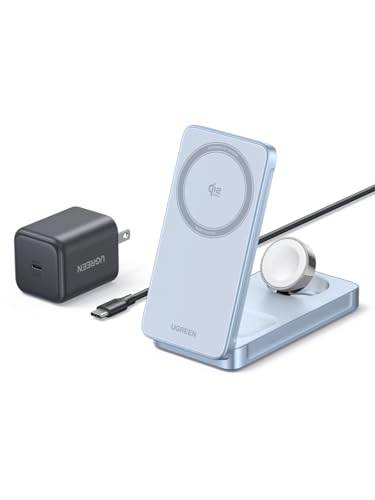
| 8.8 | 3-in-1 foldable Qi2.2 25W wireless charging station | 25W iPhone, 5W Apple Watch, 5W AirPods | 3 charging spots; USB-C input, 45W adapter included | None (no battery, must be plugged in) | |
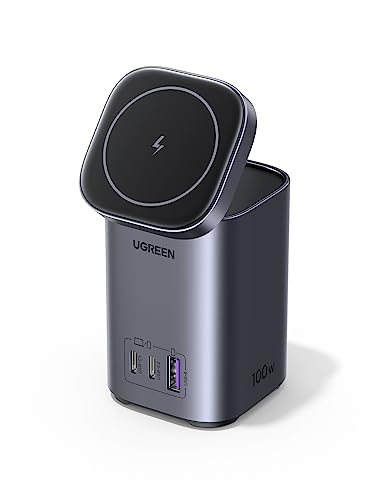
| 8.5 | GaN desktop charger with tilting 15W magnetic wireless stand | 100W total; 100W from one USB-C; 15W magnetic pad | 2 USB-C, 1 USB-A, 1 magnetic wireless pad | None (plug-in station, no battery) | |
| 8.4 | 3-in-1 Qi2 wireless charging pad with pop-up phone arm | 15W iPhone, 5W Apple Watch, 5W AirPods | 3 charging spots; USB-C input, 45W adapter included | None (no battery, must be plugged in) | |
| 8.2 | 3-in-1 foldable Qi2 wireless charging pad | 15W phone, 5W Apple Watch, earbuds spot | 3 charging spots; USB-C input | None (no battery, must be plugged in) |
1. Anker Prime Charging Station (8-in-1, 240W): Best Charging Station Overall
This is the station we'd put on almost any busy desk. Each of its four USB-C ports can give up to 140W on its own, enough for a 16-inch MacBook Pro, and it adds two USB-A ports plus two pop-up AC outlets for a lamp or monitor. A screen shows the live watts on every port.
Picture a home office shared by two people: a gaming laptop pulling close to 100W, a Steam Deck at 45W, and both phones topping up. wwjoshdew ran that kind of mix at once without a hiccup. The Anker app can switch the AC outlets off from another room or on a schedule, and Fstoppers found it never got hot while a laptop and several devices charged.
The catch is the power brick. It's a large proprietary block on the cord, it can crowd a power strip, and there's no easy spare if you lose it. The USB-A ports only give 12W, and no cables come in the box. So would we buy it? For a desk full of gear, yes. Want a cleaner block with no brick and no AC? The Anker Prime 250W (#2) is the pick.
Best for: Home offices and shared desks that charge laptops, tablets, phones and accessories and also need a couple of AC outlets.
Skip it if: You don't need AC outlets and would rather skip the external power brick. The Anker Prime Charger 250W (#2) is the better pick.
Pros
- Two laptops, two phones and two AC plugs from one outlet
- Any USB-C port gives up to 140W on its own
- Screen shows live watts per port
- App can switch AC outlets off remotely or on a schedule
Cons
- Large proprietary power brick on the cord
- USB-A ports top out at 12W
- Warm to the touch even when idle
Hands-on reviews behind this pick
- Fstoppers
Show the verdict
A slim, well-built desk hub that charged a laptop and several devices quickly without getting hot; the big proprietary power brick and short Bluetooth range keep it a desk and road-trip tool.
- LanOC Reviews
Show the verdict
A thin desktop station with 240W across four 140W-capable USB-C ports, two USB-A, two AC outlets and a handy display, held back by a bulky plug-end power brick that crowds power strips.
- wwjoshdew
Show the verdict
He ran a phone, a Pixel, a gaming laptop near 100W and a Steam Deck at 45W at once and loved the per-port readout and app controls; just don't lose the proprietary power brick.
2. Anker Prime Charger (250W, 6 Ports, GaNPrime): Best Desktop Charging Station for Two Laptops
If two big laptops live on your desk, this is the cleaner way to charge them. The first USB-C port gives up to 140W and the other three up to 100W each, all from one solid block with a plain two-prong cord and no external brick.
Say you and a partner both work from the dining table on deadline days, one on a 16-inch MacBook Pro and one on a Windows laptop. FamilyGeekery pulled about 140W from one port and 100W from a second at the same time. Turn the knob and a 2.26-inch screen lets you pick a port and set Port Priority, so the laptop that matters most gets power first. There's also a Dual-Laptop mode, and the two USB-A ports give 22.5W for a phone or earbuds.
Here's the downside. There are no AC outlets, the clock screen feels pointless, and it costs as much as some laptop docks. So is it worth it over the Prime 8-in-1? Only if you don't need AC plugs. Charging a crowd of phones and tablets instead of laptops? The UGREEN Nexode 200W (#3) does it for far less.
Best for: Desks with two power-hungry laptops, such as a 16-inch MacBook Pro plus a second work machine.
Skip it if: You mostly charge phones and tablets for a family. The UGREEN Nexode 200W 8-Port (#3) is the better pick.
Pros
- 140W plus 100W ran two big laptops at once
- Big screen and knob set port priority on the spot
- Plain two-prong cord, no external brick
- Heavy, solid build with grippy feet
Cons
- No AC outlets
- Clock feature adds little and has no alarm
- Premium price for a desk charger
Hands-on reviews behind this pick
- The AU Review
Show the verdict
One of the best home charging setups for many devices: small, versatile and easy to run from its screen and knob, with useful power modes; the clock feels pointless, but it's hard not to recommend.
- FamilyGeekery
Show the verdict
He bought it himself and calls it worth every penny for high-powered gear: about 140W from one port and roughly 233W across two, with a solid build, though it's pricey and lacks AC outlets.
3. UGREEN Nexode 200W 8-Port Desktop Charging Station: Best Charging Station for Family Counters
For a family charging spot, this gives you the most ports for the money. You get six USB-C and two USB-A ports, and three of the USB-C ports reach 100W each. That's enough for a MacBook Air or 14-inch MacBook Pro plus every phone and tablet in the house.
Picture the kitchen counter at 7 a.m. on a school day: two kids' tablets, three phones, a parent's laptop and a pair of earbuds, all on one block that stands upright on its included stand. The 6.6 ft cord reaches the outlet behind the toaster. Cubed3 found it stable and cool under heavy load, and a 16-inch MacBook Pro reached about 40% in 30 minutes on a 100W port. PPS at 45W keeps Galaxy phones on Super Fast Charging.
But know the split. With all eight ports busy, the top three get 65W, 45W and 45W, while the other five share just 30W between them. There's no 140W port, and at about 1.5 lb it's a desk piece, not a travel one. Worth it? For a family, easily. Need full speed for a 16-inch MacBook Pro? Go with the Anker Prime 8-in-1 (#1).
Best for: Families who charge lots of phones and tablets in one spot, and two-laptop desks with a MacBook Air or 14-inch Pro.
Skip it if: You own a 16-inch MacBook Pro and want it at full speed. The Anker Prime Charging Station 8-in-1 (#1) is the better pick.
Pros
- Eight ports, three of them 100W
- Runs two MacBook Pros at full speed together
- Upright stand and 6.6 ft power cord
- Strong value for the port count
Cons
- No 140W port for a 16-inch MacBook Pro
- Slow ports share just 15W with all eight busy
- Heavy for travel at about 1.5 lb
Hands-on reviews behind this pick
 Macworld
Show the verdict
Remarkable value for eight ports with three 100W USB-C, ideal for MacBook Air, 14-inch Pro, iPad and iPhone owners, but with no 140W port it won't fast-charge a 16-inch MacBook Pro.
- Cubed3
Show the verdict
A stable, cool-running desk hub that replaces a pile of chargers and ran two MacBook Pros at full speed; its weight makes it better for hotels and studios than for quick trips.
4. Belkin UltraCharge Pro 3-in-1 Magnetic Charging Dock (Qi2 25W): Best Wireless Charging Station for iPhone
This is the Apple 3-in-1 we'd want on a nightstand. The iPhone snaps on at 25W Qi2, and a small fan blows across the back of the phone to keep heat down. The Apple Watch and AirPods charge beside it, and a 45W adapter comes in the box.
Say you get home at 11 p.m., drop your iPhone, Watch and AirPods on it half-asleep, and need all three ready for a 6 a.m. flight. The weighted base doesn't budge when you dock with one hand. Tech Edition saw an iPhone go from zero to about 50% in 25 minutes, with all three spots holding speed together. Android Authority measured a phone running 6 to 8°F cooler with the fan on, and Qi2 Android phones charge on it too.
The flip side: Android Authority can hear the fan's whine, and it costs more than most wireless stations. A switch on the back turns the fan off for light sleepers. So would we buy it? For an iPhone that runs hot, yes. Want 25W for less, in a shape that folds for travel? See the UGREEN MagFlow (#7).
Best for: iPhone, Apple Watch and AirPods owners who charge all three at once on a nightstand or desk, especially if the phone runs hot.
Skip it if: You want fast Apple charging at a lower price, in a shape that folds for travel. The UGREEN MagFlow 3-in-1 Foldable (#7) is the better pick.
Pros
- 25W Qi2 phone charging close to wired speed
- Fan kept a phone 6-8F cooler in testing
- Weighted base allows one-handed docking
- 45W adapter in the box
Cons
- Small fan whine is audible
- Pricey for a wireless charger
- Built-in Watch puck is wasted on Android
Hands-on reviews behind this pick
 Android Authority
Show the verdict
Months of use won him back to wireless charging: the fan kept a Galaxy S25 Edge 6 to 8F cooler and even cooled it mid-charge, though the whine is audible and the Watch puck suits Apple users.
- Tech Edition
Show the verdict
A stable, quiet dock that charged an iPhone to about 50% in 25 minutes and ran cooler than usual, with all three spots holding speed at once; best for people deep in Apple gear.
5. UGREEN Uno Charger 100W: Best Small Desk Charger for Four Devices
Not every desk needs a big station. If you charge a laptop, a phone and two small things, this little block does it from the outlet behind your monitor. Its top USB-C port gives the full 100W, and UGREEN says it takes a 16-inch MacBook Pro to 43% in 30 minutes.
Picture a dorm desk with a MacBook Air, an iPhone, a game controller and wireless earbuds. With all four connected, the top two ports keep 45W and 30W, and TechRadar charged a Galaxy A35 to full in about an hour and a half that way. PPS on the USB-C ports keeps Galaxy phones on Super Fast Charging, and the robot face reacts as devices charge.
The bottom two ports fall to 7.5W each with everything plugged in, fine for earbuds but slow for a tablet. There's no cable in the box, and the prongs don't fold. Is it enough for you? If four devices is your limit, yes. Need more ports for a family? The UGREEN Nexode 200W (#3) has eight. For one or two devices, we rank single chargers for one or two devices in our main guide.
Best for: Students and desk workers who charge one laptop, one phone and a couple of small accessories.
Skip it if: You need more than four ports for a whole family. The UGREEN Nexode 200W 8-Port (#3) is the better pick.
Pros
- 100W from one USB-C port runs a MacBook-class laptop
- Top two ports keep 45W and 30W with all four in use
- PPS on the USB-C ports for Samsung fast charging
- Charming robot face that reacts to charging status
- Detachable feet cover the prongs for travel
Cons
- No charging cable in the box
- Prongs don't fold; the feet act as a cover instead
- Lower two ports drop to 7.5W with all four in use
- Heavier than a plain block at about 244 g
- Display could be brighter at an angle
Hands-on reviews behind this pick
- TechRadar
Show the verdict
TechRadar calls it one of the best wall chargers around: very fast four-port charging, fair value against rivals and a fun emoji display, with only a slightly dim screen and no cable.
- wwjoshdew
Show the verdict
A protocol-packed charger that impressed him: the top USB-C port gives the full 100W and the most fast-charge standards, the split favours the top ports, and it can run four devices at once.
6. Anker Charger (140W, 4-Port, PD 3.1): Best Travel Charger for Multiple Devices
When your charging station has to fit in a laptop bag, this is the one. Either of the first two USB-C ports gives up to 140W on its own, the plug folds flat, and a color screen shows the watts on each port and the temperature. A 5 ft 240W USB-C cable comes in the box.
Say you're at a three-day conference with a 16-inch MacBook Pro, an iPad and an iPhone, and the only plug is behind the hotel desk. One block covers all of it. MacSources watched an iPhone 16 Pro gain 40% in 38 minutes and ease off from about 20W to 7W as it neared full, and Techsquare charged a Galaxy S24 Ultra from empty in under 80 minutes.
The split is the catch. Two laptops share 70W and 70W, the third USB-C is only 40W, and Techtest saw it throttle from 140W to about 120W after roughly 30 minutes at full load. The ports face down, so the screen often points at the floor. Worth packing? For one big laptop plus extras, yes. Staying at a desk with two laptops? The Anker Prime 250W (#2) is better. For lighter bags, see our pocket GaN chargers for travel.
Best for: Travelers who carry a big laptop plus a tablet and phone and want one block in the bag.
Skip it if: You charge two laptops at a desk every day. The Anker Prime Charger 250W (#2) is the better pick.
Pros
- Either main USB-C port can push the full 140W
- Live per-port wattage and temperature on the display
- Downward-facing ports keep cables from bending
- Includes a braided 5 ft 240W USB-C cable
- Foldable plug and compact size for a 140W unit
Cons
- Two laptops at once get only 70W each
- Third USB-C port tops out at 40W
- Heavy for a carry-on compared with 65W-100W blocks
- Display faces away from you on many wall outlets
- Lab test: drops to about 120W after 30 min at full load
Hands-on reviews behind this pick
- MacSources
Show the verdict
A powerful, well-designed charger that suits frequent travelers and multi-device users, with a genuinely useful real-time display and good cable, though it costs more than many rivals.
- Techtest
Show the verdict
A very good but not outstanding 140W charger: compact, light and well built, with a useful display and wide PPS range, held back by throttling after about 30 minutes at full load.
- Adam Talks Tech
Show the verdict
Highly recommended for anyone who wants lots of power for a laptop, tablet and phone in a small, sleek package; you mainly pay extra for the screen, compact size and included cable.
7. UGREEN MagFlow 3-in-1 Foldable Wireless Charging Station (Qi2 25W): Best Value 3-in-1 Charging Station
This gets you 25W iPhone charging and a full Apple trio for a mid-range price. The phone pad charges at Qi2.2 25W, the Watch and AirPods spots give 5W each, and a 45W adapter and 1 m cable come in the box.
Picture a week at your in-laws' place: you fold it to about the size of a thick phone, toss it in your bag, and set it up on the guest-room dresser. The top panel tilts up to 70 degrees, so the phone stays readable as a bedside clock. 9to5Toys took an iPhone 16 Pro from 5% to 50% in just over 30 minutes, and an Apple Watch SE 3 filled in about 75 minutes. iPhone J.D. used it for weeks, hotel stays included.
There's no fan, so the phone and pad get warm on long sessions, and it sits a little tall to slide under a monitor. Is it worth paying more for the Belkin? Only if heat bothers you. For a smaller puck that disappears in a jacket pocket, the Anker MagGo (#10) is the pick.
Best for: iPhone, Apple Watch and AirPods owners who want 25W charging at a mid price, at home and on trips.
Skip it if: Your phone runs hot on wireless chargers. The Belkin UltraCharge Pro 3-in-1 (#4) with its fan is the better pick.
Pros
- 25W iPhone charging in a fold-flat travel shape
- 45W adapter and cable included
- Tilts up to 70 degrees for StandBy viewing
- Watch and AirPods spots hide when folded
Cons
- No fan, so phone and pad get warm
- Sits a bit tall to slide under a monitor
Hands-on reviews behind this pick
- iPhone J.D.
Show the verdict
An excellent travel 3-in-1 that worked very well for weeks, including hotel stays: it folds small with no protruding parts and uses a standard USB-C charger and cable you can reuse.
- 9to5Toys
Show the verdict
A solid upgrade for a desk or nightstand: an iPhone 16 Pro hit 50% in just over 30 minutes and a Watch SE 3 filled in about 75 minutes, though phone and pad get warm without a fan.
8. UGREEN Nexode 100W Charging Station with 15W MagSafe Stand: Best Charging Station with a MagSafe Stand
This one solves a specific desk: a laptop plugged in by cable and an iPhone you want propped up where you can see it. Two USB-C ports give up to 100W on their own, there's a USB-A port, and a 15W magnetic pad tilts up so the phone sits in StandBy as a clock or photo frame.
Say you take video calls all afternoon with a MacBook Air open and want your iPhone upright beside it for messages. iMore charged an iPhone 15 Pro Max to 60% and a 16-inch MacBook Pro to 50% in just over half an hour. It's smaller than a soda can on the desk and heavy enough not to tip.
The 100W is shared, though. Once the phone is on the pad, the laptop port drops to 65W, and there's no spot for an Apple Watch. The cable is long and stiff, too. Would we buy it? For a laptop and an iPhone, yes. Want your Watch and AirPods on the same base? Get the Belkin UltraCharge Pro (#4). And to get full speed from each port, buy the right USB-C cables for each port.
Best for: Desk workers with one laptop and an iPhone who want the phone upright in StandBy while they work.
Skip it if: You want your Apple Watch and AirPods charging on the same base. The Belkin UltraCharge Pro 3-in-1 (#4) is the better pick.
Pros
- Wired laptop charging and a magnetic iPhone stand in one
- Pad tilts up for StandBy on the desk
- Smaller than a soda can on the desk
- Sturdy, heavy build
Cons
- Laptop port drops to 65W with the pad in use
- No Apple Watch charger
- Stiff, long power cable
Hands-on reviews behind this pick
- iMore
Show the verdict
A sturdy, surprisingly compact hub that took an iPhone 15 Pro Max to 60% and a 16-inch MacBook Pro to 50% in about half an hour, held back by no Watch charger and a stiff cable.
- Digital Camera World
Show the verdict
One beautifully organized desktop: it hit its advertised outputs and ran a MacBook Air while an iPhone charged on the pad, but output drops fast with many devices and the combinations confuse.
9. Satechi Qi2 Trio Wireless Charging Pad: Best Premium Charging Pad for Nightstands
If the charger sits on your nightstand every night, this is the one that looks the part. It's a solid aluminum pad. The iPhone charges flat or on a pop-up arm that holds it in any orientation, and the Apple Watch stands upright for Nightstand mode.
Picture a bedside table you share: one person's iPhone on the raised arm as an alarm clock, a Watch charging upright for the morning, AirPods on the flat spot. AppleInsider used it this way for weeks, and its Series 10 Watch was full whenever it was needed. A 45W adapter, a USB-C cable and international plug adapters come in the box. Series 7 and later Watches get fast charging.
The catch is speed. The phone tops out at 15W, and BGR saw about 30% added in 30 minutes, slower than the 25W stations above. The cable is short, it takes up more room than a stand, and a Pro Max can need nudging into place. Worth it? If looks and build matter most, yes. Want 25W at a lower price? The UGREEN MagFlow (#7) is quicker.
Best for: Apple owners who want a well-built, good-looking 3-in-1 pad for a nightstand or desk.
Skip it if: You care more about speed than looks. The UGREEN MagFlow 3-in-1 Foldable (#7) charges at 25W for less.
Pros
- Solid aluminum build feels premium
- Phone flat or raised on an arm for StandBy
- 45W adapter and travel plugs included
- Watch stands up for Nightstand mode
Cons
- Phone tops out at 15W
- Short USB-C cable
- Takes more desk space than a stand
Hands-on reviews behind this pick
 BGR
Show the verdict
Qi2 makes this premium aluminum pad well worth the update, adding about 30% to an iPhone in 30 minutes with a 45W brick included; the cable is short and a Pro Max can need repositioning.
- AppleInsider
Show the verdict
Unbeatable convenience and as fast as wireless charging got at the time, in a metal build that oozes quality; it isn't cheap, and future Apple Watch support is the one question mark.
10. Anker MagGo Wireless Charging Station (3-in-1, Foldable Pad): Best Pocket-Size Charging Station for Apple
This is the Apple 3-in-1 for people who never want to leave it behind. It folds shut into a puck about 2.4 inches square, roughly the size of an AirPods case, and opens into a pad for an iPhone at 15W, an Apple Watch and AirPods.
Say you're a nurse who sleeps at your partner's place twice a week. It lives in your work bag, and the full trio charges from whatever USB-C adapter is there. TechRadar charged an iPhone 13 Pro fully in 1 hour 56 minutes and an Apple Watch Series 9 in 1 hour 3 minutes. Each spot keeps charging if you lift another device off. The adapter set adds a 40W adapter and a 5 ft cable.
But it's light, so it slides around on a desk, and pulling the phone off takes two hands. The Watch sits low for Nightstand mode, and the phone tops out at 15W. If you bring your own adapter, it needs 36W or more. So would we buy it? To carry daily, yes. For a fixed nightstand, the weighted Belkin UltraCharge Pro (#4) is better.
Best for: iPhone, Apple Watch and AirPods owners who carry their charger between homes, offices and hotels.
Skip it if: Your charger stays on one nightstand and you want it to stay put. The Belkin UltraCharge Pro 3-in-1 (#4) is the better pick.
Pros
- Folds into a palm-size puck for travel
- 15W Qi2 phone charging plus Watch and earbuds at once
- 40W adapter and 5 ft USB-C cable in the adapter set
- Fast Apple Watch charging, works with loop bands
- Each spot charges without restarting the others
Cons
- Light pad slides around on desks
- Hard to pull the phone off one-handed
- Watch sits low for nightstand mode
- Stand mode is landscape-only at one angle
- Phone charging tops out at 15W
Hands-on reviews behind this pick
- TechRadar
Show the verdict
A cleverly designed, palm-size travel charger with good iPhone and Apple Watch speeds; it slides around on a desk and is hard to unhook one-handed, but the quality justifies the cost.
- GIGAZINE
Show the verdict
Presents it as a compact, flexible and easy charger: it folds to a one-hand puck, the bendy silicone joints let it prop a phone up, and the box includes a 40W adapter and long cable.
- Adam Talks Tech
Show the verdict
Highly recommended as a travel 3-in-1: lighter and smaller than Anker's folding stand and trouble-free in use, though weak as a stand and the Watch sits lower than he likes at night.
Best charging stations for multiple devices buying guide for 2027
How many watts does a charging station for multiple devices need?
Add up what you charge at the same time, then leave room. A phone wants 20W to 45W, a tablet about 30W, a MacBook Air 45W to 65W and a 16-inch MacBook Pro up to 140W. A laptop, tablet and two phones together want roughly 150W.
That's why the big stations lead this list. The Anker Prime 8-in-1 (#1) shares 240W, the Anker Prime 250W (#2) shares 250W and the UGREEN Nexode 200W (#3) shares 200W. A 100W block like the UGREEN Uno (#5) is plenty for one laptop and a phone, but it can't keep a big laptop at full speed with three other things connected.
So buy for your busiest hour, not an average day. And remember the headline number is a total that gets shared, which the next question covers.
How do multi-device charging stations split power between ports?
The total on the box is shared, and the split gets tighter as you plug more in. The UGREEN Nexode 200W (#3) gives 65W, 45W and 45W to its top three ports with all eight busy, while the other five share 30W. The UGREEN Uno (#5) keeps 45W and 30W up top with four devices, and drops its bottom pair to 7.5W.
Two laptops are the real test. The Anker Prime 250W (#2) gave about 140W and 100W to two ports at once, and the Anker 140W (#6) splits 70W and 70W. Even desk blocks with a wireless pad share: the UGREEN Nexode 100W (#8) drops its laptop port to 65W once a phone sits on the pad.
So plug the laptop into the top or main port, and give earbuds and watches the slow ones. Check the port labels or the maker's split chart before you buy.
Is a wireless or a wired charging station better for an iPhone, Apple Watch and AirPods?
Get a wireless 3-in-1 if your Apple gear is the main thing you charge, and a wired station if laptops are part of the mix. Wireless stations hold one iPhone, one Watch and one set of AirPods, and nothing else.
Speed now depends on the standard. Qi2 25W stations like the Belkin UltraCharge Pro (#4) and the UGREEN MagFlow (#7) got iPhones to about 50% in 25 to 30 minutes. The 15W Satechi Trio (#9) and Anker MagGo (#10) are slower. Wireless also runs warmer, which is why the Belkin's fan matters: it kept a phone 6 to 8°F cooler.
Wired stations win on raw speed and on everything that isn't an Apple trio. You can also mix: the UGREEN Nexode 100W (#8) charges a laptop by cable and an iPhone on a magnetic pad, and a wired station can feed a 3-in-1 from one of its USB-C ports.
Do you need special cables for a multi-port charging station?
Yes, for laptops above 60W. A USB-C cable needs a 5A rating to carry 100W, and a 240W-rated cable to carry the 140W that a 16-inch MacBook Pro takes from the Anker Prime 8-in-1 (#1), Anker Prime 250W (#2) or Anker 140W (#6).
Most stations don't include cables. The Anker Prime stations, the UGREEN Nexode 200W (#3) and the UGREEN Uno (#5) leave them out, or include one only in some bundles, while the Anker 140W (#6) includes a 5 ft 240W cable. Wireless stations come with their own cable and adapter.
Galaxy phones that charge at 45W also need a 5A cable to reach full Super Fast Charging speed. Count your cables before you buy the station, and check each one's rating.
Where should a charging station for multiple devices go in your home?
Put it where the devices already end up at night, then match the station to that spot. A kitchen counter needs a long cord and an upright shape, which is why the UGREEN Nexode 200W (#3) with its stand and 6.6 ft cord works there. A desk wants per-port control, like the screens on the Anker Prime 8-in-1 (#1) and 250W (#2).
A nightstand calls for a wireless 3-in-1 with a phone angle you can read in bed: the Belkin UltraCharge Pro (#4) or the Satechi Trio (#9). Light sleepers can switch off the Belkin's fan. If the spot changes every week, a folding pad like the Anker MagGo (#10) or UGREEN MagFlow (#7) travels with you.
Leave space for heat, too. Every station here gets warm under load, so keep vents clear and don't bury it under papers.
Best charging stations for multiple devices: frequently asked questions
What is the best charging station for multiple devices?
The Anker Prime Charging Station 8-in-1 is our top pick. Each of its four USB-C ports gives up to 140W on its own, it adds two USB-A ports and two AC outlets, and a screen shows every port's watts. For two big laptops without AC plugs, get the Anker Prime 250W. For a family on a budget, the UGREEN Nexode 200W.
Can I charge a laptop and a phone on the same charging station?
Yes, as long as the station has enough watts left for the laptop. The UGREEN Uno 100W keeps 45W on its top port with four devices connected, which suits a MacBook Air. For a 16-inch MacBook Pro plus phones, the Anker Prime 8-in-1 or Anker Prime 250W give 140W from one port. Plug the laptop into the main port.
What's the best charging station for an iPhone, Apple Watch and AirPods?
The Belkin UltraCharge Pro 3-in-1 is our pick. It charges an iPhone at 25W Qi2 while a fan keeps it 6 to 8°F cooler, with spots for the Watch and AirPods and a 45W adapter in the box. The UGREEN MagFlow 3-in-1 Foldable also gives 25W for less, and the Anker MagGo folds smallest for travel.
Is a charging station with AC outlets worth it?
It is if your charging spot also powers a lamp, monitor or speaker. The Anker Prime Charging Station 8-in-1 adds two pop-up AC outlets to its six USB ports, and the app can switch them off on a schedule. If everything you own charges over USB, the Anker Prime 250W gives more USB-C power without an external brick.
Are multi-device charging stations safe to leave plugged in overnight?
Yes, the ones here include protections against overheating and electrical faults, and devices slow their own charging near full. The UGREEN Nexode 200W guards against over-voltage, over-current, short circuits and overheating, and the Anker Prime 8-in-1 adds surge protection and temperature monitoring. Keep vents clear, since they all get warm under load.


