
The 10 Best 3D Printers for Kids in 2027
That hot nozzle sits inches from small fingers. We weighed safety, easy apps and print reliability to pick the best 3D printers for kids in 2027, by age.

Affiliate Disclosure: As an Amazon Associate, we may earn a commission from qualifying purchases, and it never changes our picks.
Our picks at a glance

10.0/10Score

$249.00
as of Nov 10, 2026, 11:15 UTC
9.7/10Score
$399.00
as of Nov 10, 2026, 11:15 UTC

9.6/10Score
$379.00
as of Nov 10, 2026, 11:15 UTC

9.3/10Score
$419.00
as of Nov 10, 2026, 11:15 UTC

8.8/10Score
$369.00 $439.00 Save 16%
as of Nov 10, 2026, 11:15 UTC

8.7/10Score
$549.99 $649.99 Save 15%
as of Nov 10, 2026, 11:15 UTC

8.5/10Score
$299.99 $359.99 Save 17%
as of Nov 10, 2026, 11:15 UTC

8.4/10Score
$349.00
as of Nov 10, 2026, 11:15 UTC

8.1/10Score
$249.00 $299.00 Save 17%
as of Nov 10, 2026, 11:15 UTC

7.0/10Score
$199.00 $219.00 Save 9%
as of Nov 10, 2026, 11:15 UTC
Product prices and availability are accurate as of the date/time indicated and are subject to change. Any price and availability information displayed on Amazon.com at the time of purchase will apply to the purchase of this product.
How we rank best 3D printers for kids?
We start with kid safety, because a hot nozzle and a moving bed are the real risks at home, so enclosures, PLA-friendly printing and low fumes count most. Next comes how easy it is for kids: a phone app, auto leveling and one-tap printing keep them making things instead of waiting on you. Reliable prints follow, since one failed dragon can end the hobby. Design and build covers size, noise and sturdiness for a bedroom, den or classroom, and value checks that a child can grow into it. That puts the Bambu Lab A1 mini first.
 Kid Safety30%
Enclosed hot parts, PLA-friendly printing and low fumes matter most when a child is near the printer.
Easy for Kids25%
Easy for Kids25%A simple app, auto leveling and one-tap printing keep kids creating instead of waiting for an adult to fix settings.
Reliable Prints20%
Reliable Prints20%Failed prints and clogs are how kids lose interest, so a printer that works every time keeps the hobby alive.
 Design and Build15%
Size, noise, an enclosure and sturdy parts decide whether it fits a bedroom, a classroom or a kitchen counter.
 Value10%
Parents want a printer a child can grow into without paying for features a beginner won't use.
Best 3D printers for kids compared
Swipe sideways to see every spec.
| Product | Score | Build Volume | Print Speed | Materials | Leveling |
|---|---|---|---|---|---|
| 10.0 | 180 x 180 x 180 mm | Up to 500 mm/s | PLA, PETG, TPU, PVA (no ABS or fiber-filled) | Fully automatic, plus auto Z-offset | |
| 9.7 | 256 x 256 x 256 mm | Up to 500 mm/s (250 mm/s recommended) | PLA, PETG, ABS, ASA, TPU, PC, PA, CF/GF blends | 121-point auto leveling, auto Z-offset | |
| 9.6 | 220 x 220 x 220 mm | Up to 600 mm/s travel, 20,000 mm/s² acceleration | PLA, PETG, ABS, ASA; TPU and CF blends on 0.6/0.8 mm nozzles | Full-auto multi-point leveling | |
| 9.3 | 256 x 256 x 256 mm | Up to 500 mm/s | PLA, PETG, TPU, PVA | Fully automatic, plus auto Z-offset | |
| 8.8 | 220 x 220 x 250 mm, enclosed | Up to 600 mm/s | PLA, PETG, TPU, ABS, ASA, PC, PA and CF blends | Fully automatic, with input shaping calibration | |
| 8.7 | 250 x 250 x 250 mm | Up to 600 mm/s (300 mm/s recommended) | PLA, PETG, ABS, ASA, TPU (direct feed), CF blends | LeviQ 3.0 auto leveling, auto Z-offset | |
| 8.5 | 260 x 260 x 260 mm | Up to 600 mm/s (300 mm/s recommended) | PLA, PETG, TPU, PVA, PLA-CF, PETG-CF, ASA | LeviQ 3.0 auto leveling with auto Z-offset | |
| 8.4 | 220 x 220 x 220 mm, open frame | Up to 600 mm/s, 20,000 mm/s² acceleration | PLA, PETG, TPU, PLA-CF, PETG-CF; ABS/ASA with enclosure kit | One-click auto leveling with auto Z-offset | |
| 8.1 | 220 x 220 x 220 mm, open frame | Up to 600 mm/s, 20,000 mm/s² acceleration | PLA, PETG; TPU, PLA-CF, PETG-CF with 0.6 mm nozzle | Fully automatic (Automatic Datum Management) | |
| 7.0 | 220 x 220 x 250 mm | Up to 250 mm/s | PLA, PETG, TPU | Auto (CR Touch) with auto Z-offset |
1. Bambu Lab A1 mini: Best 3D Printer for Kids Overall
If your child is between 8 and 12 and you'll be in the room, this is the printer we'd buy. It arrives built and tuned, checks its own bed level, Z-offset and flow before every print, and reaches a first print in about 20 minutes. Kids pick a model in the Bambu Handy app and press print.
Say it's 3:45 on a Tuesday. Your 9-year-old picks a dinosaur on the phone, and the toy sits on the kitchen table before dinner. Silent mode stays under 48 dB, so homework carries on beside it. Tools, spare parts and sample models come in the box.
But it's open frame, so the hot nozzle and moving bed stay in reach, and the 180 mm bed is small. Owners on the Bambu Lab forum report that a June 2026 firmware update makes it ask to purge filament after a cold start. Isn't an enclosed printer safer? It is, but a child this age needs you nearby with any printer, and this is the easiest one to get right while you are. Can't always be in the room? The enclosed Flashforge Adventurer 5M Pro (#3) keeps the hot parts behind a door.

Best for: Parents of 8 to 12 year olds who want a first printer that works from day one, with an adult nearby.

Skip it if: You can't always be in the room while it prints. The enclosed Flashforge Adventurer 5M Pro (#3) keeps the hot nozzle and bed behind a door.
Pros
- Pre-assembled; first print in about 20 to 30 minutes
- Automatic leveling, Z-offset and flow calibration
- Excellent print quality and dimensional accuracy
- Quiet enough to run in an office
- Optional AMS lite adds 4-color printing
- Easy-to-order spare parts and quick-swap hot end
Cons
- Small 180 mm build volume
- No ABS, ASA or abrasive filaments on the stock setup
- Built-in camera is low quality and laggy
- Small 2.4-inch touchscreen
- Multicolor prints create lots of purge waste
- Wi-Fi works on 2.4GHz only
Hands-on reviews behind this pick
- PCMag
Show the verdict
An Editors' Choice budget printer nearly perfect for beginners: set up in under 20 minutes, first-rate benchmark prints and trouble-free running, held back only by its small bed and tiny screen.
- 3D Print Dood
Show the verdict
After nine months of regular use on a self-bought unit, the most reliable of his several printers: consistent quality with no tinkering and easy upkeep, let down by the bed size and camera.
- Rad Dad's Print Lab
Show the verdict
Still one of the best ways to start 3D printing after 900 hours: prints great, quiet, beginner-friendly automation and quick spare parts; the build volume and poor camera are what age it.
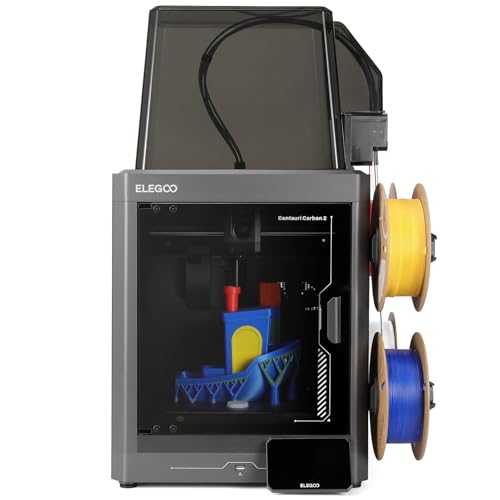
2. Elegoo Centauri Carbon 2 Combo: Best Enclosed Color 3D Printer for Families
Here's the printer for a family that wants color and a closed door. The CC2 Combo is an enclosed CoreXY with Elegoo's four-color CANVAS system built in, so the hot nozzle and the 110 C bed stay behind glass while kids watch the layers grow. Color changes are the part it gets right: PCMag ran a 40-hour multicolor print with no help, and Aurora Tech logged over 2,000 swaps with only two false errors.
Picture two siblings on a rainy weekend, printing a four-color board game set while the printer hums under 45 dB. Setup takes 15 to 20 minutes with an on-screen wizard, a 121-point calibration handles leveling, and you don't need a cloud account. The 256 mm cube fits bigger pieces than the Bambu A1 mini.
The software is rougher, though. Time estimates run short on long color jobs, remote sends sometimes don't start, and the spools hang in the open on the side. If a jam ever happens, you'll unscrew the toolhead hub to free the tubes. Our call: for color behind a door, it's the one. For the simplest app, the Bambu Lab A1 Combo (#4) is easier.
Best for: Families who want colorful prints from a closed printer that kids can watch safely.
Skip it if: You want the simplest app for a younger child and you'll supervise an open frame. The Bambu Lab A1 Combo (#4) is the better pick.
Pros
- Enclosed four-color printing at a low price
- 350 C hardened nozzle handles engineering filaments
- Reliable color swaps over long multi-day prints
- Auto spool backup keeps prints going
- No cloud account required
Cons
- PTFE tubes nearly impossible to pull from the hub
- Spool holders fit some third-party spools poorly
- Slicer time and waste estimates run optimistic
- TPU needs a bypass part and Canvas unplugged
- No heated chamber
Hands-on reviews behind this pick
- PCMag
Show the verdict
PCMag finds the CC2 Combo a dependable enclosed four-color workhorse with excellent output and strong engineering-filament results, forgiving rough software, a basic camera and purge waste.
- Tom's Hardware
Show the verdict
Tom's Hardware calls the CC2 a delightful, budget-friendly CoreXY whose awkward-looking Canvas system works reliably, though spool holders, high-temp loading and a slick cold plate need work.
- Aurora Tech
Show the verdict
Aurora Tech names it the best-value enclosed multicolor printer: solid build, fast low-waste color swaps and great accuracy, with average speed, average surface finish and firmware quirks.
3. Flashforge Adventurer 5M Pro: Best Enclosed 3D Printer for Classrooms
For a classroom or homeschool table, this is the one we'd set up. Everything hot sits inside a closed, metal-framed body, and a dual HEPA and activated carbon filter cleans the air it vents. Its adaptive venting means you can keep the lid and door shut even for PLA, which also keeps the noise down. Flashforge rates its low-noise mode at 50 dB.
So picture third period: 25 students, and a plate of name tags printing behind the door while you teach. It arrives 95% assembled and runs about 10 minutes of auto calibration before the first job. You get Wi-Fi, Ethernet, USB and the FlashMaker app, plus a 640 x 480 camera to check on prints.
The launch software was weak, and while later updates fixed Wi-Fi printing from OrcaSlicer, two problems remain. Leveling failed on some first runs in Tom's Hardware's review, and the textured plate often needed glue for good adhesion. It's also one color, for good. Should you buy it? For a room full of kids, yes. Want color behind a door? The Elegoo Centauri Carbon 2 Combo (#2) adds four.
Best for: Teachers, homeschool families and parents who want the hot parts closed off and the air filtered.
Skip it if: Your kids want multicolor prints. The Elegoo Centauri Carbon 2 Combo (#2) is the better pick.
Pros
- Fast CoreXY printing in a compact enclosed body
- Tool-free quick-swap nozzles
- Lid and door can stay closed for PLA
- HEPA and carbon filtration included
- Handles PLA, PETG, ABS, ASA and CF blends
- Wi-Fi plus Ethernet
Cons
- Single color only; no multi-color upgrade
- Auto leveling failed on some attempts in testing
- Low-resolution camera
- No filament retraction in the change menu
- Filament runout sensor was off by default
- Firmware and software less polished than Bambu
Hands-on reviews behind this pick
- Tom's Hardware
Show the verdict
Impressive enclosed CoreXY hardware with lightning-fast speeds, held back at launch by thin slicer profiles, spotty auto leveling, a weak webcam and a TPU jam; a pick for tinkering prosumers.
- Daniel Crosslink
Show the verdict
After about 6 kg of filament, a genuinely good hardware deal that just works, fast and reliable with smart venting and easy nozzle swaps, clouded mainly by mediocre, closed firmware.
- FauxHammer
Show the verdict
A solid, compact CoreXY with print quality on par with far pricier machines and clever venting and nozzle swaps, let down at launch by weak software, cloud and app support from Flashforge.
4. Bambu Lab A1 Combo: Best Multicolor 3D Printer for Young Makers
If your kid lives for color, this is where we'd point you. The A1 Combo is the A1 mini's big sibling, with the same self-calibration and phone app on a 256 mm bed, plus an AMS lite that feeds four spools. Assembly takes about 15 minutes, and it checks bed level, Z-offset and nozzle pressure before every print.
Imagine a 10-year-old printing a rainbow dragon for a friend's birthday party, picked with one tap from MakerWorld. The prints look great and it stays under 48 dB in silent mode. But color is slow and wasteful: a print that took 2 hours 40 minutes in one color took 6 hours 46 minutes in three at Tom's Hardware.
Two owner patterns are worth knowing. Heavy users on the Bambu Lab forum report AMS lite slots that stop feeding as the feeders wear, and some A1 owners report power-board failures that Bambu fixes under warranty, so register it. So would we buy it? For a supervised kid, yes. For color behind glass, see the Elegoo Centauri Carbon 2 Combo (#2).
Best for: Creative kids who want colorful toys and gifts, with a parent supervising.
Skip it if: You want the color prints behind a closed door. The Elegoo Centauri Carbon 2 Combo (#2) is the better pick.
Pros
- Near plug-and-play setup and auto calibration
- Four-color printing with the included AMS lite
- Quiet enough to run next to a desk
- Excellent print quality at high speed
- Quick-swap nozzle and easy spare parts
Cons
- Open frame: no ABS or ASA
- Multicolor prints waste a lot of filament
- Purge flinger and AMS lite take up desk space
- Live-view camera has a very low frame rate
Hands-on reviews behind this pick
- CNET
Show the verdict
CNET calls the A1 Combo the best consumer 3D printer its reviewer has used, with flawless setup and superb prints, held back only by heavy color-change waste and an unreliable purge flinger.
- Tom's Hardware
Show the verdict
Tom's Hardware rates the A1 Combo a quiet, reliable, fast bed slinger and an easy entry to four-color printing for anyone who sticks to PLA and PETG, though the AMS lite eats desk space.
- Rad Dad's Print Lab
Show the verdict
After about 1,400 hours, this long-term owner says the A1 still prints great and almost never needs attention, making it a top beginner value in 2026 despite a weak camera and open frame.
5. Creality K1C: Best 3D Printer for STEM Teens
A teen who's moved past toys and into CAD needs a printer that can keep up, and the K1C does. It's an enclosed CoreXY with a carbon filter and a hardened nozzle, so it handles carbon-fiber blends, nylon, ABS and ASA, the stiff stuff robotics parts are made from. It's quick too: a speed Benchy took 13 minutes 53 seconds at Tom's Hardware.
Say your 15-year-old starts a motor mount for the robotics club's bot before homework. The AI camera streams it, so they can check it from another room instead of hovering. TechRadar measured an average XY error of 0.035 mm, close enough for parts that bolt together. Creality Cloud is optional, and LAN and USB printing work without it.
It's loud, though, and quiet mode is really slow mode. New owners on the Creality forum keep hitting uneven first layers on the smooth plate, fixed with Z-offset tuning or the textured plate. The rear spool path is clumsy too. Is it the one for you? For a hands-on teen, yes. If noise matters, the Anycubic Kobra S1 Combo (#6) is quieter.
Best for: STEM-curious teens who design their own parts and want room to grow into engineering filaments.
Skip it if: Your teen prints in a bedroom or den where noise matters. The quieter Anycubic Kobra S1 Combo (#6) is the better pick.
Pros
- Very fast: 13:53 speed Benchy in Tom's Hardware's test
- Enclosed, solid CoreXY with a carbon filter
- Hardened unicorn nozzle handles carbon-fiber filament
- AI camera with timelapse included
- Auto leveling with a nozzle-wiping brush on the bed
- Accurate: 0.035 mm average XY error at TechRadar
Cons
- Awkward rear spool holder and reverse Bowden path
- Smooth PEI plate needs glue stick
- Loud hotend fan; quiet mode is much slower
- Proprietary nozzle and wiper-strip build plate
- Smaller bed than newer budget rivals
- 2025 revision removed root access to Klipper
Hands-on reviews behind this pick
- Tom's Hardware
Show the verdict
What the original K1 should have been: a fast, enclosed, open Klipper CoreXY with a better toolhead and standard AI camera, though the filament path is poor and the plate needs glue.
- TechRadar
Show the verdict
Comes close to ticking every box: build quality beyond its class, fast prints, an integrated AI camera and clog-free extruder for users from schools to enthusiasts, though speed costs some quality.
- Two Moose Design
Show the verdict
After about 100 hours it has been far better on first layers than his K1 Max and prints beautifully on stock Orca profiles; a top contender, with a slightly sloped bed and Creality QC risk.
6. Anycubic Kobra S1 Combo (ACE 2 Pro): Best Quiet Enclosed 3D Printer for Teens
Noise is the thing most teen printers get wrong, and this is the closed printer we'd pick when it matters. The Kobra S1 is an enclosed CoreXY with a quiet mode Anycubic rates as low as 44 dB, and TechRadar found it noticeably quieter than other CoreXY machines. Its single-color precision is among the best TechRadar has measured.
So picture a teen starting a PLA volcano for the science fair in the den at 9 p.m. The ACE 2 Pro keeps the filament dry at up to 65 C while it prints, so a long job doesn't fail on damp plastic. And the 250 mm cube takes bigger models than the K1C's 220 mm bed.
Color is the weak spot. Swaps are slow (ModBot saw multicolor jobs run about 25% longer than on Bambu printers), and one dragon wasted more filament than the model itself at Tom's Hardware. The reviews covered the earlier ACE Pro unit; the ACE 2 Pro changes drying and feeding, not the printer. So would we buy it? For mostly one-color prints, yes. For raw speed and an AI camera, the Creality K1C (#5) fits better.
Best for: Teens printing in a bedroom or den who want a closed, quiet printer and mostly print one or two colors.
Skip it if: Your teen wants the fastest single-color parts and a built-in AI camera. The Creality K1C (#5) is the better pick.
Pros
- Enclosed CoreXY with four-color system included
- Built-in filament dryer works while printing
- Excellent single-color print quality
- Quiet in operation
- Expandable to 16 colors
Cons
- Color swaps are slow, adding hours to big prints
- Heavy purge waste with little slicer control
- Toolhead is hard to access when clearing jams
- Waste chute at the back, needs wall clearance
- TPU cannot run through the color unit
Hands-on reviews behind this pick
- TechRadar
Show the verdict
TechRadar finds the Kobra S1 Combo an outstanding value multi-filament printer with some of the best single-material precision it has tested, though multi-color printing is relatively slow.
- Tom's Hardware
Show the verdict
Tom's Hardware calls the Kobra S1 a dependable, set-and-forget CoreXY with a handy heated ACE unit, held back by a slicer that hides and barely controls how much filament color changes waste.
- ModBot
Show the verdict
ModBot likes the solid hardware, consistent color swaps, great PLA prints and the heated ACE unit, but found PETG and ABS profiles undercooked, color swaps slow and the toolhead painful to unclog.
7. Anycubic Kobra X: Best Cheap Multicolor 3D Printer for Kids
Want color for less? The Kobra X is the pick we'd make on a tighter budget. Instead of a separate feeder box, the four-color system sits in the toolhead and the spools ride on top, so it takes up far less table. A cutter just 10 mm from the nozzle is why swaps are quicker: about 35 seconds each against 90+ on a Bambu Lab A1 in Tom's Hardware's test, finishing a 776-swap castle 10 hours sooner.
Picture a fourth grader's solar system project: eight four-color planets printing on a corner desk while you help with spelling. It levels itself, the 720p camera spots spaghetti failures, and it even feeds TPU in multicolor. The 260 mm cube is the biggest here.
The trade-offs are open-air spools that soak up moisture, awkward loading when spools are full, and an extruder that's tricky to strip after a jam. It's also new, so long-term durability isn't proven yet. Our verdict: on a budget with a parent nearby, yes. For the most polished app, the Bambu Lab A1 Combo (#4) wins.
Best for: Budget-minded parents who want color prints for a supervised child.
Skip it if: You want the most proven app and a longer track record. The Bambu Lab A1 Combo (#4) is the better pick.
Pros
- Four colors built in, no separate AMS box
- Much faster color swaps and less purge waste
- Feeds TPU and odd-sized spools in multicolor
- Reliable auto leveling and excellent first layers
- Uses any filament brand and spool size
- Expandable to 19 colors later
Cons
- Top-mounted spools are awkward to load when full
- Open spools have no drying without ACE 2 Pro
- Multicolor prints still waste filament
- Extruder is complex to take apart after a jam
- Camera angle is poor for time-lapses
Hands-on reviews behind this pick
- Tom's Hardware
Show the verdict
Tom's Hardware calls the Kobra X an excellent entry-level four-color printer whose toolhead color system swaps fast, handles TPU and wastes far less than rivals, making it an easy recommendation.
- FauxHammer
Show the verdict
FauxHammer calls the Kobra X the best medium-size bed slinger on the market for sensible features and value, with clever built-in four-color feeding, but warns long-term quality is still unproven.
- 3D Print Dood
Show the verdict
3D Print Dood calls it an excellent entry-level multicolor printer with top print quality and a space-saving spool design, but says purge waste on color changes is its one real problem.
8. Flashforge AD5X: Best Easy Color 3D Printer for First-Timers
Buying it as a gift? This is the color printer least likely to spoil the morning. A complete beginner at AppleInsider had four-color prints coming off it quickly, with high-quality results and almost no failures. Setup is mounting the screen, the color module, spool holders and four tubes, then it self-checks and levels.
So imagine Christmas morning: the box is open by 9, and a four-color toy is off the plate by lunch. Four sample coils come in the box, and the nozzle swaps without tools. FauxHammer found it dependable over weeks of color swaps, though AppleInsider measured fans around 60 dB with peaks near 75.
Here's what's missing: no camera, no light and no enclosure, and the purge waste drops out the back unless you print a catcher. The bundled Orca-Flashforge slicer crashed often at Tom's Hardware, so we'd install standard OrcaSlicer, which has an AD5X profile. So would we buy it? As a first-day gift, yes. For a camera and app, the Bambu Lab A1 Combo (#4) is ahead.
Best for: Gift buyers and families who want color printing that works on the first day.
Skip it if: You want a camera and app to watch prints from the couch. The Bambu Lab A1 Combo (#4) is the better pick.
Pros
- Four-color IFS built into the frame, no separate box
- Excellent print quality in PLA, PETG and TPU
- Mostly assembled; running in minutes
- Auto leveling and Z-offset worked every time
- Tool-free quick-swap nozzle
Cons
- Open frame; enclosure is a DIY kit with printed parts
- No camera or lighting without add-ons
- Color swaps waste a lot of filament
- Bundled Orca-Flashforge slicer crashed often in one test
- Resistive touchscreen needs firm presses
Hands-on reviews behind this pick
- Tom's Hardware
Show the verdict
A stripped-down CoreXY with excellent print quality and reliable color swaps, held back by a buggy Flashforge slicer and missing lights, camera and enclosure that cost extra.
- AppleInsider
Show the verdict
An easy first 3D printer that made four-color prints simple for a complete beginner, with high-quality results; filament waste, open-air spools and a rear power switch are the tradeoffs.
- FauxHammer (YouTube)
Show the verdict
After weeks of use it simply works: easy to set up, stable, quiet and good at printing, but plain, with no camera, a stiff resistive screen and a DIY enclosure kit.
9. Flashforge Adventurer 5M: Best Fast 3D Printer for Impatient Kids
Short attention spans need fast results, and the 5M delivers them. It's an open-frame CoreXY that printed a Benchy in 26.8 minutes at TechGearLab, the fastest in that lineup, and setup took about 12 minutes with hands-off leveling. A child sees a toy appear before boredom wins.
Say practice ends at 5:30 and dinner's at 6. That's enough time for a small spinning top, and the quick-swap nozzles mean a clog is a seconds-long fix. Figure Feedback ran one for more than a year without a hardware failure. It sticks to PLA and PETG, plus TPU with the 0.6 mm nozzle.
The catches add up, though. It's loud, it vibrates, and the hot end is in the open. Default prints showed rough corners and strings at TechGearLab until tuned, and the app can drop its connection. Some new owners on the V1 Engineering forum hit partial nozzle clogs within weeks. Worth it? For speed with supervision, yes. For quiet, polished prints, the Bambu Lab A1 mini (#1) is better.
Best for: Families who want quick single-color prints with an adult supervising.
Skip it if: You want quiet running and great prints with no tuning. The Bambu Lab A1 mini (#1) is the better pick.
Pros
- Very fast CoreXY: 26.8-minute Benchy in GearLab's test
- Setup in about 12 minutes; mostly preassembled
- Hands-off auto leveling, no adhesion issues on textured PEI
- Tool-free quick-swap nozzles in four sizes
- Even bed heating: 2.6°C gradient measured
- Mostly metal frame that held up for a year of use
Cons
- Open frame; ABS not supported without the add-on enclosure
- Average out-of-box print quality: corners, bridging, strings
- Loud with plenty of vibration
- Flash Maker app and slicer link can drop connection
- Klipper locked down; full control only in Orca-Flashforge
- 220 mm build volume is small for helmets and cosplay
Hands-on reviews behind this pick
- TechGearLab
Show the verdict
A fast, consistent, beginner-friendly printer that is quick to set up and won't let you down, though out-of-box print quality is only average and getting the best results takes slicer tuning.
- Figure Feedback
Show the verdict
After more than a year nothing has broken and speed and quality still hold up, making it one of the best values going; the software, locked-down firmware and small bed are the weak points.
- JokOfAllTrades
Show the verdict
A complete beginner had it printing within about 45 minutes and was impressed by quality and build; it is loud, vibrates and heats slowly without an enclosure, but he highly recommends it.
10. Creality Ender-3 V3 SE: Best Cheap 3D Printer for Teen Tinkerers
For an older teen who'd rather understand a printer than just press print, the Ender-3 V3 SE is a cheap way in. It arrives about 90% built and takes around 15 minutes to finish, and its auto leveling with an auto Z-offset gives dependable first layers. The direct-drive extruder prints flexible TPU well.
Picture a Saturday at the basement workbench: a 16-year-old and a parent tighten the wheels, swap the stock plate for PEI and print a test cube. That's the kind of owner it suits. Files go over an SD card, since there's no Wi-Fi or app, and a speed Benchy took 41 minutes at Tom's Hardware, slower than everything else here.
The open frame leaves the nozzle and bed fully exposed, so it's not for young kids. The stock PC plate wore out after two prints for ModBot, and owners on the Creality forum report a CR Touch error loop, usually fixed by freeing a stuck probe pin. So would we buy it? For a tinkering teen, yes. Want an enclosure and Wi-Fi? Step up to the Creality K1C (#5).
Best for: Older teens who want to learn how a printer works and enjoy tinkering, with a parent around.
Skip it if: Your teen wants Wi-Fi, an enclosure and a camera. The Creality K1C (#5) is the better pick.
Pros
- Very low price for auto leveling and direct drive
- About 15 minutes to assemble
- Direct drive prints TPU well
- Reliable first layers from auto Z-offset
Cons
- Stock PC-coated plate wears quickly
- Open frame with exposed hot parts
- Knob-driven screen, laggy menus, loud beeps
- No Wi-Fi; slower than newer budget printers
- Wheels need correct tensioning
Hands-on reviews behind this pick
- Tom's Hardware
Show the verdict
Tom's Hardware calls the Ender 3 V3 SE a beginner's dream that brings former luxuries like excellent auto leveling and direct drive to a very low price, though the PC-coated plate disappoints.
- Maker's Muse
Show the verdict
Maker's Muse finds the V3 SE far better than the original Ender 3 and a good cheap starter, but says a slightly bigger budget buys a much smoother experience, citing a laggy screen and plate.
- ModBot
Show the verdict
ModBot calls the V3 SE a capable, easy-to-build entry printer that printed a full blaster project well, but criticizes the PC bed that wore out fast, fiddly wheels and the loud menu beeps.
Best 3D printers for kids buying guide for 2027
What age is right for a child's first 3D printer?
Around 8 is a sensible start, with an adult running the printer beside them. Kids that age can pick a model in an app and press print, but they'll grab a print that looks done. For 8 to 12 year olds, we'd choose the Bambu Lab A1 mini or A1 Combo with a parent in the room, or the enclosed Flashforge Adventurer 5M Pro if you can't always watch.
From about 13, teens can learn CAD and design their own parts, which is where the Creality K1C and Anycubic Kobra S1 Combo earn their place. Teens who like taking things apart will get the most from the Ender-3 V3 SE.
And Toybox? It's made for young kids, with 7,000+ toys in its catalog, but it prints a cube about 3 inches across, needs Wi-Fi and its app, and licensed toys cost extra. The Alpha Four only launched in October 2026, so we'd start with the A1 mini. On a tight budget at any age? Our list of budget 3D printers with the most value goes further.
Should a kid's 3D printer be enclosed?
Yes, if a child will ever be near it without you. An enclosure puts the hot nozzle and moving bed behind a door, which is the simplest way to stop a curious hand mid-print. It isn't a babysitter, though: kids still need an adult close by. On this list, the Elegoo Centauri Carbon 2 Combo, Flashforge Adventurer 5M Pro, Creality K1C and Anycubic Kobra S1 Combo are fully enclosed.
Open-frame printers like the Bambu Lab A1 mini, A1 Combo, Anycubic Kobra X and Flashforge AD5X are easier and often cheaper, and they're fine when an adult stays in the room. An enclosure also cuts noise and holds in fumes, so it's worth it for a shared space. If quiet matters as much as safety, our guide to family 3D printers quiet enough for home covers more options.
Are 3D printer fumes safe in a child's bedroom?
We wouldn't run any 3D printer where a child sleeps. The EPA says printing releases VOCs and ultrafine particles small enough to reach deep into the lungs, that ABS gives off more particles than PLA, and that studies so far have focused only on adults.
So follow the advice the EPA passes on from NIOSH: lower-emission filament, an enclosure, ventilation, and less time sitting next to the printer. In practice that means PLA, a ventilated room like a den or garage, and a door you can close. The Flashforge Adventurer 5M Pro adds HEPA and activated carbon filtering, and the Creality K1C and Anycubic Kobra S1 Combo come with carbon filters. Open frames like the A1 mini are best in a room with a window.
Why are resin 3D printers a bad fit for kids?
Because the liquid itself is the hazard. Resin printers build parts from a liquid resin that irritates skin and can cause a lasting allergy with repeated contact, so resin safety guides call for nitrile gloves every session, real ventilation and keeping resin away from children.
Prints also need washing and curing before bare hands can touch them, which is a lot of chemistry for a 10-year-old's craft project. That's why every pick on this list is a filament printer that melts plastic like PLA. If your child wants small figures, the Bambu Lab A1 mini prints them well without any of that.
Which 3D printer apps are easiest for kids to use?
Bambu Lab's are the easiest. The Bambu Handy app and the MakerWorld library let a child pick a model and print it with one tap on the A1 mini and A1 Combo, and the printer handles calibration on its own. That's the main reason both sit high on this list.
Anycubic's app runs the Kobra X and Kobra S1 Combo, Flashforge's FlashMaker app covers the Adventurer 5M Pro and 5M, and Elegoo's printer works without a cloud account. Creality Cloud is optional on the K1C. The Ender-3 V3 SE has no app at all, so files go on an SD card. If you're also choosing a paper printer for homework and forms, the main TechFloe printer guide has the picks.
Best 3D printers for kids: frequently asked questions
What is the best 3D printer for kids?
For most families, it's the Bambu Lab A1 mini. It arrives built, calibrates itself before every print, runs under 48 dB in silent mode and prints from a phone app, so kids get results fast. It's open frame, so stay nearby. Want the hot parts enclosed? Get the Elegoo Centauri Carbon 2 Combo for color or the Flashforge Adventurer 5M Pro.
What age is appropriate for a 3D printer?
Around 8, with an adult running it beside them, is a sensible start. The Bambu Lab A1 mini suits 8 to 12 year olds with a parent in the room. Teens of 13 and up can learn CAD on the enclosed Creality K1C, and older tinkerers will enjoy the Ender-3 V3 SE.
Are 3D printers safe for kids to use?
They can be, with supervision and the right setup. The nozzle and bed get hot and the parts move, so an enclosed printer like the Flashforge Adventurer 5M Pro or Elegoo Centauri Carbon 2 Combo is safest. Print PLA in a ventilated room, never where a child sleeps.
Which filament is safest for kids to print with?
PLA. The EPA notes that ABS releases more ultrafine particles than PLA, and every printer on this list prints PLA well. Start with the Bambu Lab A1 mini and plain PLA, and save ABS or ASA for an enclosed, filtered printer like the Creality K1C, used by a teen.
Can kids use a Bambu Lab A1 Mini on their own?
Kids can run the app on their own, but they shouldn't be alone with the printer. Picking a model and pressing print is easy, and calibration is automatic. The open frame leaves the hot nozzle and moving bed in reach, though. If you can't always be in the room, the enclosed Flashforge Adventurer 5M Pro keeps those parts behind a door.