
The 10 Best 4K Gaming Monitors in 2027
Many 4K OLEDs gray out under a lamp, and cheap 4K panels smear. We weighed HDR, speed, ports and burn-in cover to rank the best 4K gaming monitors of 2027.

Affiliate Disclosure: As an Amazon Associate, we may earn a commission from qualifying purchases, and it never changes our picks.
Our picks at a glance

10.0/10Score

$1,299.00
as of Nov 11, 2026, 11:42 UTC

9.9/10Score
$899.99
as of Nov 11, 2026, 11:42 UTC
9.7/10Score
$1,098.50
as of Nov 11, 2026, 11:42 UTC

9.6/10Score
$1,001.79
as of Nov 11, 2026, 11:42 UTC

9.1/10Score
Currently out of stock at Amazon.
View on Amazon
8.7/10Score
$751.41 $799.99 Save 6%
as of Nov 11, 2026, 11:42 UTC
8.7/10Score
$299.99 $349.99 Save 14%
as of Nov 11, 2026, 11:42 UTC

8.7/10Score
$1,638.55 $1,999.99 Save 18%
as of Nov 11, 2026, 11:42 UTC

7.5/10Score
$279.99 $299.99 Save 7%
as of Nov 11, 2026, 11:42 UTC

7.2/10Score
$349.99
as of Nov 11, 2026, 11:42 UTC
Product prices and availability are accurate as of the date/time indicated and are subject to change. Any price and availability information displayed on Amazon.com at the time of purchase will apply to the purchase of this product.
How we rank best 4K gaming monitors for you?
We start with picture quality and HDR, because the point of 4K is detail you can see and night scenes that stay black. Smoothness and speed come next, since refresh rate and pixel response decide whether your GPU's frames look crisp or smeared. Value matters because the card or console you own sets how much refresh is worth paying for. Design and build covers the stand, the coating and burn-in cover, and ports and features check DP 2.1, HDMI 2.1, USB-C and a KVM for every device on your desk.
 Picture Quality and HDR30%
At 4K the whole point is detail and depth, so contrast, HDR brightness and color decide what you're paying for.
Smoothness and Speed25%
Smoothness and Speed25%A 4K screen that blurs in motion wastes a strong GPU, so refresh rate and pixel response come next.
 Value20%
4K panels range widely in price, and the GPU or console you own decides how much refresh is worth buying.
 Design and Build15%
Big 4K screens need a sturdy, adjustable stand, and OLEDs need burn-in care and warranty cover.
Ports and Features10%
Ports and Features10%DP 2.1, HDMI 2.1 for consoles, USB-C and a KVM decide how many devices share the screen.
Best 4K gaming monitors compared
Swipe sideways to see every spec.
| Product | Score | Size | Resolution | Refresh Rate | Panel |
|---|---|---|---|---|---|
| 10.0 | 31.5-inch (32-inch class), flat | 3840 x 2160 (4K UHD) | 240Hz, adaptive sync, G-SYNC Compatible | 4th-gen QD-OLED, glossy BlackShield Film, DisplayHDR 500 TB | |
| 9.9 | 32 inches (31.5-inch class), flat | 3840 x 2160 (4K UHD) | 240Hz, G-Sync Compatible, 48-240Hz VRR | QD-OLED, glossy, DisplayHDR True Black 400 | |
| 9.7 | 26.5-inch viewable (sold as 27-inch), flat | 3840 x 2160 (4K), about 163 PPI | 240Hz, 0.03ms GtG; FreeSync Premium Pro, G-Sync Compatible | Glossy QD-OLED, DisplayHDR 400 True Black, Dolby Vision | |
| 9.6 | 32 inches (31.5-inch viewable) | 3840 x 2160 (4K UHD); 1920 x 1080 in dual mode | 240Hz at 4K, 480Hz at 1080p | WOLED with TrueBlack Glossy coating | |
| 9.1 | 31.5 inches (32-inch class), flat, 16:9 | 3840 x 2160 (4K UHD), 140 PPI; 1080p in dual mode | 240Hz at 4K, 480Hz at 1080p dual mode | Tandem WOLED, RGB stripe, glossy, DisplayHDR True Black 400 | |
| 8.7 | 31.6 in viewable (32-inch class), flat | 3840 x 2160 (4K UHD), about 140 ppi | 120Hz, AMD FreeSync Premium Pro, HDMI 2.1 VRR | QD-OLED, DisplayHDR True Black 400, Dolby Vision, 1000-nit peak | |
| 8.7 | 27 inches, 16:9, flat | 3840 x 2160 (4K); 1920 x 1080 in dual mode | 160Hz at 4K, 320Hz at 1080p (DFR dual mode) | IPS, Mini LED with 1,152 dimming zones, 95% DCI-P3 | |
| 8.7 | 45-inch ultrawide, 800R curve | 5120 x 2160 (5K2K), 2560 x 1080 in Dual-Mode | 165Hz native, 330Hz in Dual-Mode; FreeSync Premium Pro, G-Sync | Matte WOLED (RGWB), DisplayHDR True Black 400 | |
| 7.5 | 27-inch flat | 3840 x 2160 (4K), about 163 PPI | 120Hz, 4ms GtG; FreeSync Premium, VRR 48-120Hz | IPS, 350 nits, 1,500:1, 99% sRGB, no local dimming | |
| 7.2 | 27-inch flat | 3840 x 2160 (4K), about 163 PPI | 120Hz, 4ms GtG (Extreme); FreeSync Premium | IPS, 350 nits, 1,500:1, 99% sRGB, no local dimming |
1. ASUS ROG Swift OLED PG32UCDM Gen3 (PG32UCDM3): Best 4K Gaming Monitor Overall
Own a top-tier GPU and game mostly after dark? Start here. It runs 4K at 240Hz on Samsung's fourth-gen QD-OLED panel with near-instant response and very low input lag, so a strong card's frames land crisp instead of smeared. The change you'll see first is the BlackShield film, which tames the purple cast older QD-OLEDs get under room light.
Picture Alan Wake 2 at 4K late at night: the flashlight slices through black woods, and the desk lamp grays the shadows far less than on an older QD-OLED. HardForum owners say the coating barely reflects, though one found the stand too tall even at its lowest. The power supply is built in, and 90W USB-C, a KVM and two HDMI 2.1 ports handle a laptop and a PS5 too.
But it has weak spots. Blacks still lift in a bright room more than on a glossy WOLED, anti-flicker modes didn't work in TFTCentral's VRR test, and there are no speakers. Seeing the original PG32UCDM? It lacks this coating and DP 2.1. Our call: in a dim room on a top GPU, buy it. Want the same class for less? The MSI MPG 322URX (#2) is the smarter buy.

Best for: PC gamers with an RTX 4080 or 5080-class GPU who want the best 32-inch 4K OLED picture, plus a console on the side.

Skip it if: You want a full 32-inch 4K OLED for less and game in a dim room. The MSI MPG 322URX (#2) is the better pick.
Pros
- Superb 4K OLED picture with deep blacks, no blooming
- BlackShield coating cuts purple tint in lit rooms
- Full 4K 120Hz, VRR and Dolby Vision for consoles
- Near-instant response and very low input lag
- USB-C with 90W charging and a KVM switch
- Very accurate colors in sRGB mode
- 3-year warranty that covers burn-in
Cons
- Only a small brightness gain over the original
- Blacks still turn gray in bright rooms vs WOLED
- Noticeable VRR flicker in some scenes
- Stand sits high and takes a lot of desk space
- No built-in speakers
- Not worth it for original PG32UCDM owners
Hands-on reviews behind this pick
- TFTCentral
Show the verdict
Another excellent QD-OLED that beats the original with BlackShield Film, DP 2.1 and richer features, though brightness gains are modest and VRR anti-flicker didn't work when tested.
- RTINGS
Show the verdict
Incredible for PC and console gaming, with near-instant response, low lag and fantastic HDR from a sharp 4K OLED; its main weakness is that blacks still look gray in well-lit rooms.
- The Display Guy
Show the verdict
Probably the best QD-OLED monitor of the year: better bright-room handling, tougher coating, DP 2.1 and excellent accuracy, though HDR brightness has barely moved and it lags OLED TVs.
2. MSI MPG 322URX QD-OLED: Best Value 4K 240Hz OLED Gaming Monitor
Here's the thing about the ASUS at #1: most of what you pay for is here too. The MPG 322URX runs 4K at 240Hz with elite motion and very low input lag. It has full-bandwidth DP 2.1, two HDMI 2.1 ports and 98W USB-C, and its three-year warranty covers burn-in.
Say one desk is shared by a gaming PC and a work laptop. The KVM moves your keyboard and mouse between them, and the USB-C cable charges the laptop while it drives the screen. MSI puts HDMI 2.1 and DisplayPort 2.1 cables in the box, the power supply is internal, and the stand adjusts for height, tilt, swivel and pivot.
But it's a step behind the Gen3 in daylight. SDR is dimmer, blacks look grayer under room lights, and HDR makes you pick between a bright mode that dims big bright scenes and an accurate one capped near 450 nits. It performs just like MSI's older 321URX, so owners of that one should stay put. Is it for you? In a dim gaming room, yes. Game by a window? Spend up for the ASUS PG32UCDM Gen3 (#1).
Best for: PC gamers who want a complete 32-inch 4K OLED with every port and mostly play in a dim room.
Skip it if: Your desk faces a bright window or lamps. The ASUS ROG Swift PG32UCDM Gen3 (#1) is the better pick.
Pros
- 4K 240Hz with OLED speed and 0.1ms processing delay
- Full DP 2.1 UHBR20 and two HDMI 2.1 ports
- 98W USB-C, KVM and internal power supply
- 3-year warranty covering burn-in
Cons
- Dimmer in SDR than the ASUS PG32UCDM Gen3
- Glossy QD-OLED raises blacks in lit rooms
- HDR modes force a brightness or accuracy choice
Hands-on reviews behind this pick
- RTINGS
Show the verdict
A premium 32-inch 4K 240Hz QD-OLED that delivers a premium experience even among rivals, with a KVM and UHBR20 bandwidth; brighter-room buyers do better with the ASUS PG32UCDM or its Gen3.
- Monitors Unboxed
Show the verdict
A good monitor that performs just like MSI's earlier 321URX, with elite motion and acceptable calibration; DisplayPort 2.1 adds little in practice, so it is only worth buying at close to the older model's price.
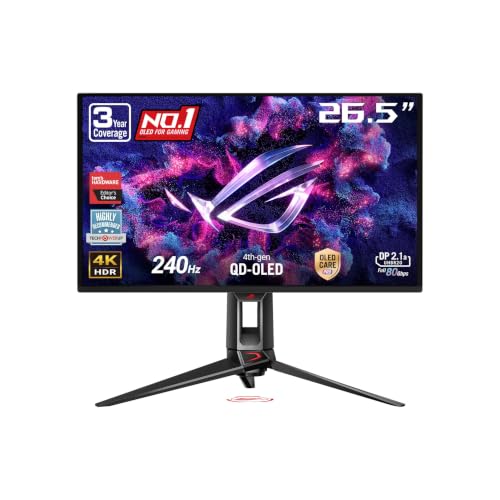
3. ASUS ROG Swift OLED PG27UCDM: Best 27-Inch 4K Gaming Monitor
If 32 inches feels like too much screen at your desk, this is the 4K OLED we'd get. Shrinking 4K to 27 inches gives about 163 pixels per inch, and the text is the cleanest of any desktop OLED in Monitors Unboxed's review. It still runs 240Hz over uncompressed DP 2.1, with OLED response and very low lag.
Say you're reading tiny item stats in Baldur's Gate 3 from arm's length. They stay crisp, and combat animations stay clear at high frame rates. The box holds a DP 2.1 cable plus HDMI and USB-C cables, and you get 90W USB-C, a KVM and a headphone jack. Owners of the older 32-inch PG32UCDM on the ROG Forum point newcomers here, because it launched with the anti-flicker and OLED care tools they waited months for.
The downside is QD-OLED's gray blacks under room light, plus VRR flicker when frame rates jump, and there are no speakers. Should you get it? On a shallow desk with a top GPU, yes. Sit farther back and want more immersion? The ASUS PG32UCDM Gen3 (#1) is the better fit.
Best for: Players who sit close on a normal-depth desk and want 4K OLED sharpness without a 32-inch screen.
Skip it if: You sit farther back and want a bigger, more immersive screen. The ASUS ROG Swift PG32UCDM Gen3 (#1) is the better pick.
Pros
- Text as sharp as a 27-inch 4K LCD
- Near-instant response and very low input lag
- Full 4K 240Hz over DP 2.1 without compression
- HDMI 2.1 runs 4K 120Hz on PS5 and Xbox
- Very accurate sRGB mode out of the box
- Proximity sensor blanks screen when you step away
- 3-year warranty that covers burn-in
- USB-C 90W charging and a KVM switch
Cons
- Blacks turn gray in bright rooms
- Noticeable VRR flicker with swinging frame rates
- HDR modes trade brightness against accuracy
- Burn-in risk for all-day desktop work
- No built-in speakers
- Needs a high-end GPU to use 4K 240Hz
Hands-on reviews behind this pick
- RTINGS
Show the verdict
A fantastic PC and console gaming monitor with razor-sharp motion, low lag and deep blacks in the dark; ambient light grays its blacks, VRR flicker shows up and static desktop use risks burn-in.
- PCMag
Show the verdict
An Editors' Choice: a lightning-fast 4K OLED with excellent color, very low input lag and a deep feature set that justifies its high price; the tripod stand and lack of speakers are the only gripes.
- Monitors Unboxed
Show the verdict
An excellent, feature-packed 4K OLED with the best desktop OLED text so far, but not a revolution: it is a shrunk 32-inch QD-OLED that keeps raised blacks in bright rooms and HDR dimming trade-offs.
4. ASUS ROG Strix OLED XG32UCWMG: Best Dual-Mode 4K Gaming Monitor
Not every 4K buyer only plays slow, pretty games, and this monitor is for the one who doesn't. It's a 32-inch 4K 240Hz WOLED with a dual mode that drops to 1080p at 480Hz on a hotkey. TFTCentral measured 0.47ms average response with no overshoot, so motion stays clean in both modes.
So try this: Red Dead Redemption 2 at 4K after dinner, then one button press and a ranked Valorant match runs at 480Hz before bed. The TrueBlack glossy coating keeps blacks deep in a lit room, which the QD-OLEDs above can't match, and HDR highlights peak close to 1,300 nits. Two HDMI 2.1 ports and an auto KVM cover a console and a second PC.
But you give up a few things. Lamps in front of it show up as crisp reflections, full-screen SDR is only about 250 nits, and VRR flicker shows as frame rates change. DisplayPort 1.4 with compression still carries 4K 240Hz, but USB-C charges at just 15W and there's no Dolby Vision. Worth it? For mixed gaming, yes. Need fringe-free text all day too? The ASUS PG32UCWM (#5) fixes that.
Best for: Players who mix 4K single-player games with competitive shooters on the same 32-inch screen.
Skip it if: You read and write text on it all day and hate color fringing. The ASUS ROG Swift PG32UCWM (#5) is the better pick.
Pros
- Glossy WOLED: clear image, blacks stay deep in light
- 4K 240Hz plus 1080p 480Hz dual mode
- Near-instant response and low input lag
- Bright HDR highlights, close to 1,300 nits peak
- HDMI 2.1 for 4K 120Hz on PS5 and Xbox
- Neo Proximity Sensor and 3-year burn-in warranty
Cons
- Mirror-like reflections from bright direct lights
- VRR flicker with changing frame rates
- Only about 250 nits full-screen in SDR
- USB-C charges at just 15W
- Burn-in risk for static work
- HDR modes over-brighten mid-tones by default
Hands-on reviews behind this pick
- RTINGS
Show the verdict
Incredible for PC gaming and remarkable for consoles in 4K mode, with near-instant response, low lag and inky blacks in any room; VRR flicker and limited glare-fighting brightness hold it back.
- TFTCentral
Show the verdict
A great screen whose TrueBlack glossy coating gives a sharp, punchy image with better blacks, paired with strong 4K 240Hz gaming, very low lag and a full feature set; HDR accuracy could improve.
- Monitors Unboxed
Show the verdict
The best 32-inch 4K WOLED yet: the new glossy coating avoids QD-OLED's raised blacks, dual mode adds 480Hz, and the reviewer happily recommends it over most 32-inch 4K QD-OLEDs.
5. ASUS ROG Swift OLED PG32UCWM: Best 4K Gaming Display for Work and Play
Text is where OLED monitors usually let workers down, and that's the problem this one solves. It's the first 32-inch 4K OLED with an RGB stripe Tandem WOLED panel, and TFTCentral says it finally makes text perfect. You still get 4K at 240Hz or 1080p at 480Hz, Dolby Vision and full DP 2.1 UHBR20.
Imagine a full day in a code editor with no colored fringes around the letters, then Doom: The Dark Ages at 4K 240Hz on the same glossy panel. The coating keeps blacks deep with the lights on, and 90W USB-C with a KVM lets a work laptop and a gaming PC share it. Worried about static toolbars? HDTVTest found it one of the most retention-resistant WOLEDs it has tested, and burn-in is covered for three years.
Here's the catch. It's dimmer than the other 32-inch 4K OLEDs here, QD-OLEDs show wider and brighter color, and it costs more than comparable QD-OLEDs. RTINGS also notes VRR flicker in dark scenes and that 1440p doesn't work properly on Xbox. Bottom line: if text fills your workday, it's the one to get. If HDR games come first, the MSI MPG 322URX (#2) gives more punch for less.
Best for: PC users who code or write all day and game at night, and can't stand color fringing on OLED text.
Skip it if: HDR games matter more to you than text. The MSI MPG 322URX (#2) is the better pick.
Pros
- RGB stripe panel ends WOLED text fringing
- Glossy coat keeps blacks deep in lit rooms
- 4K 240Hz plus 1080p 480Hz dual mode
- Full DP 2.1 UHBR20, no DSC needed
- USB-C 90W and KVM switch
- 3-year warranty covers burn-in
Cons
- Dimmer than rival 4K OLEDs in SDR and HDR
- Narrower color gamut than QD-OLED
- Higher power use without the white subpixel
- Large three-prong stand eats desk space
- VRR flicker in dark scenes
- Priced above similar 4K QD-OLEDs
Hands-on reviews behind this pick
- TFTCentral
Show the verdict
Another excellent ASUS OLED: the RGB stripe panel finally makes text perfect and lifts HDR color volume, but it is dimmer than rival 32-inch 4K OLEDs and raises questions on power use and lifespan.
- RTINGS
Show the verdict
A fantastic, versatile OLED gaming monitor with dual mode, high-bandwidth ports, Dolby Vision and a KVM, plus fringe-free text; it is less bright than the PG32UCDM Gen3 and less vivid than QD-OLED.
- Monitors Unboxed (YouTube)
Show the verdict
One step forward, two steps back: better text, color brightness and dark uniformity, but lower brightness and new panel dimming leave 2026 QD-OLEDs ahead for HDR. Far too expensive at launch.
6. Dell 32 Plus 4K QD-OLED (S3225QC): Best 4K OLED Monitor for Movies and Games
Movies and story games fill more of your evenings than ranked matches? Then this is the OLED we'd point you to. It's a 32-inch 4K QD-OLED at 120Hz with HDR highlights measured around 950 nits, Dolby Vision and near-full DCI-P3 color. The surprise is the five-speaker bar, loud and clear enough to skip a soundbar, though bass is thin.
Picture a rainy Sunday: a 4K HDR movie, then a cozy story game, all through the monitor's own speakers with nothing else on the desk. One 90W USB-C cable runs and charges a laptop, the stand tilts, swivels and adjusts height, and HDMI 2.1 gives a console 4K 120Hz with VRR.
The limits are ports and speed. There's one HDMI, no DisplayPort, no KVM and no headphone or audio out, and 120Hz caps a fast GPU. SDR tops out near 250 nits on a full white screen, and blacks go purple in a bright room. If movies and story games come first, we'd buy it. For fast PC gaming, the MSI MPG 322URX (#2) is the better OLED.
Best for: Players who want a 4K OLED for movies, story games and photo work, with good speakers and no need for more than 120Hz.
Skip it if: You play fast PC games and want 240Hz and more ports. The MSI MPG 322URX (#2) is the better pick.
Pros
- Deep blacks and vivid QD-OLED color in dark rooms
- HDR highlights measured around 950 nits
- Five-speaker spatial audio beats most monitors
- 90W USB-C for one-cable laptop hookup
- Low input lag and very sharp motion
- Stand adjusts height, tilt, swivel and slant
Cons
- No DisplayPort input and only one HDMI port
- No 3.5mm audio out or HDMI eARC
- Dim full-screen SDR, around 240-250 nits
- Blacks look purple in bright rooms
- Burn-in risk with static office work
- Capped at 120Hz, with some VRR flicker
Hands-on reviews behind this pick
- RTINGS
Show the verdict
Excellent for gaming and editing thanks to near-infinite contrast, bright highlights and sharp motion, but only good for office work given text fringing and burn-in risk.
- PCMag
Show the verdict
Several monitors in one: a sharp 4K QD-OLED with superb contrast, full color coverage and punchy speakers that suits creative work, movies and casual gaming; ports are limited.
- Level1Techs
Show the verdict
A shockingly good deal of a QD-OLED he bought several of for work, with a nice stand and decent calibration, but the missing DisplayPort and 5Gbps USB are real gotchas.
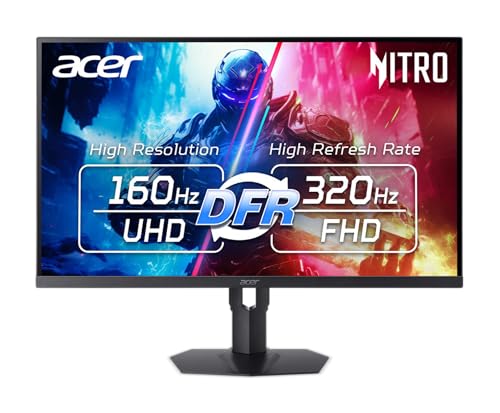
7. Acer Nitro XV275K P5: Best Budget 4K Mini LED Gaming Monitor
A mid-range graphics card and a 4K screen can get along fine, and this Acer is how. The XV275K P5 is a 27-inch IPS with a 1,152-zone Mini LED backlight that runs 4K at 160Hz, or 1080p at 320Hz in its dual mode, and being an LCD means no burn-in to babysit.
Say you've got an RTX 4070-class card. Older games and indies run at 4K 160Hz, and newer shooters switch to 1080p 320Hz with one button. HDMI 2.1 carries full 4K without compression, while its DisplayPort 1.4 input needs it. There's 90W USB-C, a KVM, a stand that tilts, swivels, pivots and rises, and HDMI and USB-C cables in the box.
But the picture trails the OLEDs above. Local dimming only works in HDR, so SDR blacks look gray, and RTINGS found haloing around subtitles plus black crush in dark scenes. The OSD buttons are clunky and the tripod stand is wide. Would we? For a mid-range PC that also does work, yes. Just want sharp 4K for less? The Dell S2725QS (#9) is cheaper.
Best for: Mid-range GPU owners who want 4K for work and lighter games plus a fast 1080p mode for shooters.
Skip it if: You mostly want sharp 4K for work and console games and don't need a fast mode. The Dell S2725QS (#9) is the better pick.
Pros
- Sharp 4K text for work, 320Hz 1080p mode for fast games
- Very bright in HDR thanks to the Mini LED backlight
- USB-C with 90W charging and a built-in KVM switch
- HDMI 2.1 suits PS5 and Xbox at high refresh rates
- Low input lag in both 4K and 1080p modes
- Sturdy stand with height, tilt, swivel and pivot
Cons
- Local dimming works only in HDR; SDR blacks look gray
- Visible haloing around subtitles and bright objects
- Clunky OSD buttons under the bottom bezel
- Needs calibration for accurate color work
- Wide tripod stand takes up a lot of desk space
Hands-on reviews behind this pick
 Gizbot
Show the verdict
After a month as a daily monitor it proved a strong 4K, Mini LED, 160Hz all-rounder for gaming, work and video, though gaming-first buyers happy at 1440p may prefer an OLED.
- RTINGS
Show the verdict
A solid mid-range 4K Mini LED gaming monitor with a useful dual mode and USB-C hub, held back by HDR-only local dimming, black crush and haloing that leave it behind pricier rivals.
- RTINGS Computer
Show the verdict
Not the best monitor out there, but a versatile jack-of-all-trades that punches above its weight on value, with a clear gaming upgrade over the P3 and weaker local dimming.
8. LG UltraGear 45GX950A-B: Best 5K2K Ultrawide Gaming Monitor
Want your games to wrap around you rather than sit in front of you? This is the ultrawide we'd buy. It isn't 16:9 4K: it's a 45-inch 5120 x 2160 screen, so it carries more pixels than 4K across a 21:9 curve and fixes the soft text of older 45-inch OLEDs. Dual-Mode trades that for 2560 x 1080 at 330Hz when a shooter needs speed.
Think Microsoft Flight Simulator: the cockpit stretches past the edge of your vision, and the matte WOLED keeps morning sun off the instruments. PCMag measured 96.1% DCI-P3 and low input lag, and you get DP 2.1, two HDMI 2.1 ports, 90W USB-C and speakers.
Now the catches. The 800R curve is strong, so desk work bends, and a PS5 or Xbox shows black bars because consoles don't output ultrawide. Mac owners on MacRumors find macOS scaling awkward at this size, while Windows looks better. The warranty is two years with burn-in cover not in writing, and it needs a very strong GPU. The verdict? For sims on a big desk, yes. Prefer a flat 16:9 screen? Get the ASUS PG32UCDM Gen3 (#1).
Best for: High-end PC owners who want a huge wraparound screen for flight sims, racing and cinematic games.
Skip it if: You want a flat 16:9 screen that also suits consoles and desk work. The ASUS ROG Swift PG32UCDM Gen3 (#1) is the better pick.
Pros
- Huge, immersive 45-inch 21:9 screen
- 5K2K sharpness, far better than older 45-inch OLEDs
- Dual-Mode switches to 330Hz for shooters
- Matte WOLED keeps blacks deep in lit rooms
- Low input lag and near-instant response
- Bright HDR highlights with no panel dimming
- USB-C 90W and built-in speakers
Cons
- Aggressive 800R curve distorts desktop work
- Matte coating adds grain and haze up close
- Bright colors less vivid than QD-OLED
- Two-year warranty; burn-in not written out
- Edges dim from power control, menu can't disable
- Very demanding to drive at 5K2K
Hands-on reviews behind this pick
- PCMag
Show the verdict
An Editors' Choice beast for gamers with a powerful GPU: tremendous OLED picture, wide color and multiple resolution and refresh modes; gains over the old 45-inch are incremental, the price steep.
- RTINGS
Show the verdict
A fantastic, versatile PC gaming ultrawide thanks to Dual-Mode, deep blacks and sharp motion, but niche: bright colors lag QD-OLED, SDR is dim against glare and the 800R curve needs getting used to.
- Monitors Unboxed
Show the verdict
An excellent, immersive ultrawide whose 5K2K panel finally fixes 45-inch text clarity; held back by a curve he finds far too strong, split HDR modes and a short, vague burn-in warranty.
9. Dell S2725QS (Dell S 27 4K / 27 Plus 4K): Best Cheap 4K Gaming Monitor
This is the cheapest 4K monitor we'd actually recommend for gaming, as long as you know what you're getting. It's a sharp 27-inch IPS at 4K and 120Hz, and its two HDMI ports are genuine HDMI 2.1, so a PS5 or Xbox runs 4K 120Hz with VRR. PC Monitors measured very accurate sRGB color and about 2.75ms of input lag.
Picture a day of docs and email in crisp 4K, then Stardew Valley or a slow RPG on your budget build at night. The stand adjusts height, tilt, swivel and pivot, the speakers do fine for casual use, and an HDMI cable comes in the box. RTINGS forum owners rate it highly for the money, though a few had to tweak settings because colors looked greenish or warm.
Speed is what you give up. Pixels averaged about 8ms at 120Hz, so a quick 180 in a shooter leaves a smudgy trail, and without local dimming HDR falls flat. There's no USB or headphone jack, and the stand wobbles a little. Right for you? For work and console play, it is. Want a fast mode for shooters? The Acer Nitro XV275K P5 (#7) has 320Hz.
Best for: Buyers who want 4K sharpness for work and casual or console games more than fast motion.
Skip it if: You play fast shooters and want a high-refresh mode. The Acer Nitro XV275K P5 (#7) is the better pick.
Pros
- Sharp 4K text and detail at 27 inches
- True HDMI 2.1: 4K 120Hz with VRR on PS5 and Xbox
- Accurate sRGB mode out of the box
- Fully adjustable stand with pivot
- Flicker-free backlight with low input lag
- Speakers better than most monitor speakers
Cons
- Slow pixel response blurs fast motion
- HDR is basic: no local dimming
- Stand wobbles a little
- No USB ports or headphone jack
- No 1440p 120Hz mode on Xbox
Hands-on reviews behind this pick
- RTINGS
Show the verdict
A budget-friendly 4K work monitor with accurate colors and good brightness that adds 120Hz and HDMI 2.1 for console play; barebones on extras, a little wobbly, and weak in HDR.
- Creative Bloq
Show the verdict
An easy, affordable way into 4K: sharp, accurate out of the box and smooth at 120Hz for casual gaming, with a smart white design, let down mainly by harsh speakers and an awkward pivot.
- PC Monitors
Show the verdict
An aggressively priced 4K all-rounder with respectable IPS contrast, strong color consistency and good speakers, but its pixel response is too slow to be a true 120Hz gaming monitor.
10. Dell 27 Plus 4K USB-C Monitor (S2725QC): Best 4K USB-C Gaming Monitor for Laptops
Laptop first, games second: that's the desk this Dell is built for. It's the same sharp 27-inch 4K 120Hz IPS class as the S2725QS, but it swaps DisplayPort for a USB-C port with 65W charging, plus a small hub with another USB-C and two USB-A ports.
So your work laptop docks with one USB-C cable at 9am, and a gaming laptop or console on HDMI 2.1 runs 4K at 120Hz in the evening. Apple Silicon users on MacRumors worried about flicker, but early buyers on M2 MacBook Airs report none. A 1m USB-C cable is in the box, the power supply is internal, and Dell lists a one-year warranty.
Here's what to weigh before buying. PC builders in the Dell Community point out there's no DisplayPort, so a desktop GPU needs HDMI 2.1 for 4K 120Hz. Fast games show blurry trails, HDR is weak, the stand wobbles and there's no headphone jack. So would we buy it? With a laptop, yes. On a desktop tower, the Dell S2725QS (#9) costs less and adds DisplayPort.
Best for: Laptop or Mac users who want single-cable 4K for work and a console or casual games after hours.
Skip it if: You game on a desktop tower and want DisplayPort. The Dell S2725QS (#9) is the better pick.
Pros
- Sharp 4K text on a 27-inch screen
- 120Hz over HDMI 2.1, 4K 120Hz on consoles
- Low input lag at any refresh rate
- USB-C with 65W charging for laptops
- Accurate sRGB mode for photo work
- Even backlight and usable built-in speakers
- Fully adjustable stand, built-in power supply
Cons
- Blurry motion trails in fast games
- Weak HDR with gray blacks, no local dimming
- Stand wobbles and drifts out of position
- No audio jack and no KVM switch
- No DisplayPort input, USB-C only for DP
- Xbox can't run 1440p at 120Hz
Hands-on reviews behind this pick
- RTINGS
Show the verdict
A cost-friendly 4K work monitor with useful gaming perks: HDMI 2.1, 120Hz and an accurate sRGB mode make it fine for console play after work, but poor motion handling limits it as a gaming screen.
- The AU Review
Show the verdict
One of the most well-rounded 4K monitors for the money: crisp 4K, a smooth 120Hz and single-cable USB-C charging suit work and gaming; speakers are just okay and brightness is limited in direct light.
- Jerry Schulze
Show the verdict
A great budget display for Macs that he bought two of: even backlight, high contrast, smooth 120Hz and surprisingly usable speakers, with only nitpicks like a wobbly stand and 65W charging.
Best 4K gaming monitors buying guide for 2027
What GPU or console do you need for a 4K gaming monitor?
You need more graphics power than you'd think, so match the screen to what you own. 4K has 2.25 times the pixels of 1440p, which is why a 4K 240Hz panel only pays off with an RTX 4080 or 5080-class card or better. That's the desk for the ASUS PG32UCDM Gen3, MSI MPG 322URX or ASUS PG27UCDM.
On a mid-range card, a dual-mode screen is the smarter buy. The Acer Nitro XV275K P5 runs lighter games at 4K 160Hz and flips to 1080p 320Hz when frame rates matter, and the ASUS XG32UCWMG does the same at 4K 240Hz and 1080p 480Hz.
Consoles are simpler. A PS5 or Xbox tops out at 4K 120Hz, so you need HDMI 2.1 far more than 240Hz, and even the Dell S2725QS has it. If a PS5 is your main machine, start with 4K monitors matched to PS5 features.
Is a 27-inch or 32-inch 4K gaming monitor better?
Pick 27 inches if you sit close or want the sharpest text, and 32 inches if you want immersion and have a deeper desk. At 27 inches, 4K works out to about 163 pixels per inch, so the ASUS PG27UCDM, Acer Nitro XV275K P5 and both Dell 27-inch models look crisp at arm's length.
At 32 inches you drop to about 140 pixels per inch, which still looks sharp from a normal seat, and games fill more of your view. That's where the ASUS PG32UCDM Gen3, MSI MPG 322URX, ASUS XG32UCWMG, ASUS PG32UCWM and Dell S3225QC sit.
Check the stand too. The PG32UCDM Gen3 sits high even at its lowest, and the PG32UCWM and Acer use wide feet that eat desk space. Bigger still? The 45-inch LG 45GX950A needs a large desk and a very strong GPU.
Is a 4K OLED gaming monitor worth it over Mini LED or IPS?
Yes, if you game in a dim room and can afford it, because OLED gives you true blacks and near-instant motion that LCDs can't match. Every 240Hz pick here is OLED for that reason.
But the coating matters as much as the panel. QD-OLEDs like the MSI MPG 322URX and ASUS PG27UCDM show gray blacks under room light, while glossy WOLEDs like the ASUS XG32UCWMG and PG32UCWM keep blacks deep, at the cost of mirror-like reflections from lamps.
Mini LED is the middle road. The Acer Nitro XV275K P5 gets very bright in HDR with no burn-in risk, though it halos around subtitles and dims only in HDR. A plain IPS like the Dell S2725QS is the cheapest 4K, with sharp text and no real HDR. Pick it for work and casual games, not dark horror nights.
Do you need DisplayPort 2.1 on a 4K gaming monitor?
Not usually. DisplayPort 2.1 at UHBR20 carries 4K 240Hz with no compression, and the ASUS PG27UCDM, MSI MPG 322URX and ASUS PG32UCWM all have it. But the ASUS XG32UCWMG runs 4K 240Hz over DisplayPort 1.4 with compression, and in practice the difference is small.
HDMI 2.1 matters more if a console shares the desk, because it's what unlocks 4K 120Hz and VRR on a PS5 or Xbox. Most picks here have two HDMI 2.1 ports; the Dell S3225QC has just one.
The trap is the opposite problem. The Dell S2725QC and S3225QC have no DisplayPort at all, so a desktop graphics card has to use HDMI 2.1 for 4K 120Hz. If USB-C matters, check the wattage: the XG32UCWMG's 15W won't charge a laptop, while the MSI's 98W will.
When is 1440p smarter than a 4K gaming monitor?
1440p is smarter when your graphics card is mid-range and you mostly play fast shooters, because you'll get far more frames for less money. 4K is sharper, but a screen your card can't feed just shows you a slower game.
So be honest about your card and your games. If you want 4K for work and slower games but still want speed sometimes, the Acer Nitro XV275K P5's 1080p 320Hz mode covers both. If 4K is only for spreadsheets and console nights, the Dell S2725QS does it for the least.
And if neither sounds like you, look at value 1440p monitors for mid-range GPUs, or browse the complete list of gaming monitors we recommend across every resolution and budget.
Best 4K gaming monitors: frequently asked questions
What is the best 4K gaming monitor?
For most high-end PC gamers, it's the ASUS ROG Swift PG32UCDM Gen3: a 32-inch 4K 240Hz QD-OLED with a coating that keeps blacks deeper in lit rooms, DP 2.1, two HDMI 2.1 ports and 3-year burn-in cover. Want nearly the same for less? Get the MSI MPG 322URX. On a budget, the Dell S2725QS is the cheap 4K we'd buy.
Is 4K worth it for gaming?
Yes, if your graphics card or console can feed it and you sit close enough to see the detail. Text and textures look far sharper than at 1440p. On a mid-range PC, a dual-mode screen like the Acer Nitro XV275K P5 gives you 4K for slower games and 1080p 320Hz for shooters.
What GPU do I need for a 4K 240Hz monitor?
We'd want an RTX 4080 or 5080-class card or better, since 4K asks a GPU to draw 2.25 times as many pixels as 1440p. With that, the ASUS PG32UCDM Gen3 or MSI MPG 322URX makes sense. With an RTX 4070-class card, the Acer Nitro XV275K P5 at 4K 160Hz is the better match.
27-inch or 32-inch for 4K gaming?
Go 27-inch if you sit close or want the sharpest text, since 4K packs about 163 pixels per inch there; the ASUS PG27UCDM is our pick. Go 32-inch for immersion on a deeper desk, at about 140 pixels per inch, with the ASUS PG32UCDM Gen3.
Will a 4K OLED gaming monitor get burn-in?
It can, mostly from static taskbars and toolbars during long desktop work. That's why we favor models with burn-in cover: the ASUS PG32UCDM Gen3, PG27UCDM and PG32UCWM and the MSI MPG 322URX all include 3-year warranties that cover it. Want zero risk? The Acer Nitro XV275K P5 is Mini LED, so it can't burn in.
