
The 10 Best Security Cameras for Home in 2027
Three apps, five cameras and a fee each? Our room-by-room picks of the best security cameras for home in 2027 weigh coverage, night video and free storage.

Affiliate Disclosure: As an Amazon Associate, we may earn a commission from qualifying purchases, and it never changes our picks.
Our picks at a glance

10.0/10Score

$119.99 $139.99 Save 14%
as of Nov 15, 2026, 23:31 UTC
9.9/10Score
$379.99 $469.99 Save 19%
as of Nov 15, 2026, 23:31 UTC

9.3/10Score
$64.99 $69.99 Save 7%
as of Nov 15, 2026, 23:31 UTC

9.1/10Score
$219.99
as of Nov 15, 2026, 23:31 UTC
8.8/10Score
$129.00
as of Nov 15, 2026, 23:31 UTC

8.8/10Score
$89.98 $139.99 Save 36%
as of Nov 15, 2026, 23:31 UTC
Ends in 8 hours

8.5/10Score
$59.98
as of Nov 15, 2026, 23:31 UTC
8.2/10Score
Currently out of stock at Amazon.
View on Amazon
8.1/10Score
$44.97
as of Nov 15, 2026, 23:31 UTC

7.6/10Score
$15.99 $39.99 Save 60%
as of Nov 15, 2026, 23:31 UTC
Limited time deal
Product prices and availability are accurate as of the date/time indicated and are subject to change. Any price and availability information displayed on Amazon.com at the time of purchase will apply to the purchase of this product.
How we rank best security cameras for home?
We rank on what a whole house needs, starting with Room and Yard Coverage, because wide views, zoom and pan-tilt decide how many cameras you buy. Picture and Night Vision come next, since the clip you check after a 2 a.m. noise has to show a face. Then One App and Privacy, so every camera lives in one place and stays out of family time, and Free Storage, because five cameras on monthly plans add up. Design and Build closes it out: weatherproof outside, small and quiet inside. That puts the eufy Indoor Cam S350 first.
Room and Yard Coverage25%
Wide views, zoom and pan-tilt decide how many cameras you need to cover the living room, driveway and backyard.
Picture and Night Vision20%
Clear faces indoors and a readable driveway at night are what you'll actually look at after something happens.
One App and Privacy20%
A whole-home setup is only easy if indoor and outdoor cams share one app, with modes that stop recording when the family is home.
Free Storage20%
Five or six cameras on monthly plans add up fast, so free local storage keeps a whole-home system affordable.
Design and Build15%
Weatherproofing outside and a small, quiet body inside decide whether the camera fits the spot you have in mind.
Best security cameras for home compared
Swipe sideways to see every spec.
| Product | Score | Resolution | Power | Storage | Subscription |
|---|---|---|---|---|---|
| 10.0 | 4K wide lens plus 2K telephoto, 3x optical zoom | Plug-in, 5V/2A over USB-C; no battery | microSD up to 128GB, eufy HomeBase, or optional cloud | None needed; AI detection and local recording are free | |
| 9.9 | 4K (3840 x 2160), 135-degree view, 8x digital zoom | Battery with built-in solar panel; 2 hours of sun a day claimed | HomeBase 3: 16GB built in, 2.5-inch drive slot up to 16TB | None needed; optional eufy cloud and monitoring plans | |
| 9.3 | Two 2K (2304x1296) lenses: fixed wide plus pan/tilt zoom | Wired, 5V adapter with a 3 m (about 10 ft) USB-C cable | microSD up to 512GB; cloud with Tapo Care | None for AI detection; Tapo Care for cloud and rich alerts | |
| 9.1 | 4K (3840 x 2160) at 15fps, 110-degree view, 355/90 pan/tilt | 20,000mAh battery; optional 6W solar panel via USB-C | microSD up to 512GB; Reolink Home Hub optional | None needed; optional Reolink cloud plan | |
| 8.8 | 2K (2560 x 1440) HDR, 152-degree view, 6x digital zoom | Wired: attached 10 ft USB-C cable and 7.5W adapter | Cloud only; 6 hours of 10-second event previews free | Google Home Premium for 30-60 days of history and Gemini AI | |
| 8.8 | 4K (3840 x 2160), 145-degree view | 7,800mAh battery with sun-tracking solar panel; USB-C charging | microSD up to 512GB (not included); no cloud option | None; all features work without a plan | |
| 8.5 | 4K (3840 x 2160), 105.4-degree view, 360 x 180 pan/tilt | Wired, USB-C pigtail, 5V/2A indoor adapter included | microSD up to 512GB (not included); cloud with Cam Plus | Cam Plus needed for smart AI alerts and cloud clips | |
| 8.2 | 1080p HDR at 30fps, 130-degree view, 6x digital zoom | Hardwired 100-240V AC; camera has 6Ah backup battery | Cloud; 3 hours of free event history | Google Home Premium for 60-day history and 24/7 video | |
| 8.1 | 2.5K QHD (2560x1440), 115.8° diagonal view | Wired, 6-ft micro USB cable and indoor adapter | microSD up to 256GB (not included); cloud with Cam Plus | Cam Plus needed for AI smart alerts and cloud video clips | |
| 7.6 | 2K (2560 x 1440), 138-degree diagonal view | Plug-in, USB-C cable and indoor 5V adapter | Cloud with Blink plan, or USB drive via Sync Module (extra) | Blink plan needed for recorded clips and person alerts |
1. Eufy Indoor Cam S350: Best Home Security Camera Overall
This is the camera we'd put in the room your family lives in. Two lenses do the work of two cameras: a 4K wide view of the whole space, and a 2K telephoto with 3x optical zoom that swings toward whatever moved. The head pans a full 360 degrees and tilts 75 quietly, and returns to a home position so your motion zones stay put.
It pays off on a weeknight. The kids are doing homework at the dining table while you're upstairs, and one camera covers the table, the couch and the back door. Person and pet detection is free, clips go to a microSD card up to 128GB or a eufy HomeBase, and privacy mode turns the lens to the wall during family time. It plugs in over USB-C and has no battery. Set it to save the wide lens only, because saving both lenses at once stacks them into one softer file.
The weak spot is software. Owners on the eufy forum keep asking for app fixes like bulk download and full landscape mode, and Google Home support is spotty. Would we buy it? For an Alexa or app-only home, yes. On Google Home, the Nest Cam Indoor (#5) fits better.
Best for: Families and pet owners who want one camera to cover the main living space with no fee.
Skip it if: Your home runs on Google Home and you want camera feeds on a Nest display. The Google Nest Cam Indoor (Wired, 3rd Gen) (#5) is the better pick.
Pros
- Sharp 4K wide view plus a 2K zoom lens
- Smooth, quiet pan and tilt with reliable AI tracking
- Accurate person and pet detection with no subscription
- Free local storage on microSD or a eufy HomeBase
- Home position and presets keep zones consistent
- Clear night vision past 25 feet indoors
Cons
- App is cluttered, with settings buried in menus
- Dual-lens recording drops both feeds to lower quality
- No Apple HomeKit; Google Home support is spotty
- Indoor only and needs constant power
- Night vision is black and white only
Hands-on reviews behind this pick
- CNET
Show the verdict
One of the best indoor cams for detail and tracking, with superb dual-lens video, quiet movement and accurate detection, but you have to put up with a janky app and unreliable Google Home support.
- Trusted Reviews
Show the verdict
Has nearly everything: two lenses, no monthly fees, smart people and pet detection, pan and tilt that really works and stunning 4K, though recording both lenses at once noticeably degrades quality.
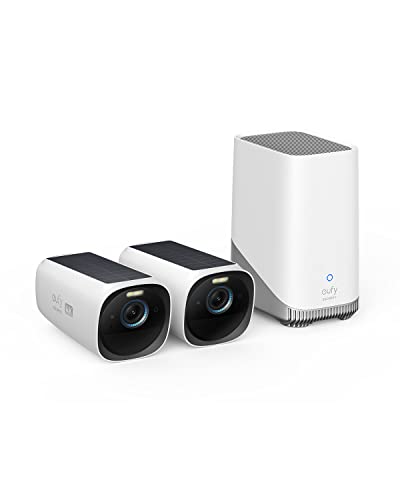
2. Eufy eufyCam S330 (eufyCam 3): Best Outdoor Cameras for Home with No Fees
So the S350 has the inside covered. This kit handles the outside, in the same app, with no monthly bill. Each camera records 4K through a 135-degree lens, and the HomeBase 3 hub runs person, pet, vehicle and face recognition locally. It holds 16GB out of the box and takes a 2.5-inch drive up to 16TB, so clips never leave your house.
Now say a neighbor's teenager cuts across the back lawn on a Saturday. Instead of three vague motion pings, you get one alert flagging a face it doesn't know. Setup through the hub takes minutes, and PCMag charged the batteries once for about eight hours before solar took over. After that, each panel wants about 2 hours of direct sun a day.
Sun is the catch. One owner swapped two S330s with identical settings and found one stays topped up while the other goes flat every 2 to 3 weeks, and low winter sun slows charging for others. There's no 24/7 recording or HomeKit either. Our call? For a sunny yard with no fee, buy it. For one sunny gate and no hub, the Baseus S2 (#6) is simpler.
Best for: Homeowners adding outdoor cameras to an indoor eufy setup without any monthly bill.
Skip it if: You only need one outdoor camera and don't want a hub. The Baseus Security S2 Outdoor Camera 4K (#6) is the better pick.
Pros
- No monthly fee for 4K recording and AI alerts
- Solar panel kept cameras charged in reviewers' tests
- Razor-sharp 4K daytime video with accurate color
- Free on-device facial recognition via HomeBase 3
- Local storage expands up to 16TB with a 2.5-inch drive
- Very few false alerts in hands-on testing
Cons
- Needs about 2 hours of direct sun a day
- 135-degree view is narrower than some rivals
- No Apple HomeKit support
- No 24/7 continuous recording
- Some owners see solar charging fall short in winter
- Moving subjects blur at night
Hands-on reviews behind this pick
- PCMag
Show the verdict
A slick solar-powered outdoor camera that records razor-sharp 4K, needs almost no charging and adds smart person, pet, vehicle and face alerts, though it skips Apple HomeKit support.
- Trusted Reviews
Show the verdict
The outdoor system to buy for quality 4K recording and smart detection with no ongoing cost; solar panels end charging chores, but the 16GB base wants a drive and the kit isn't cheap.
3. TP-Link Tapo C246D HybridCam Duo: Best Driveway Camera for Home on a Budget
Here's the cheapest way on this list to watch a whole driveway and still see faces. The fixed lens covers about 125 degrees, and the second lens pans, tilts and zooms toward whatever moved. Both shoot 2K, and it can also flag line crossing and tampering for free.
A delivery van parks across the end of your drive on a Thursday morning. The wide view keeps the van in frame, while the zoom lens trails the driver up the path, so you see the face and the box. Person, pet and vehicle detection costs nothing, and clips go to a microSD card up to 512GB. You'll need an outdoor outlet close by, because the cord is about 10 feet. Mount it at wall height: the fixed lens tilts only 10 degrees, so up under the eaves it sees the roofline.
Tracking can get confused when a lot is moving at once, and an owner on TP-Link's forum reports it showing offline remotely after reboots while still working at home. Worth it? For a quiet driveway on a budget, yes. For a big lot with no outlet, the Reolink Altas PT Ultra (#4) reaches further.
Best for: Budget homeowners with an outdoor outlet by the garage.
Skip it if: You have no outdoor outlet, or a large lot to cover. The Reolink Altas PT Ultra (#4) is the better pick.
Pros
- Wide view and zoomed tracking in one camera
- Free person, pet and vehicle detection
- Detected a person at 40 ft in testing
- Records locally to microSD, no plan needed
- Quiet pan and tilt motors
- Simple setup in the Tapo app
Cons
- Fixed lens tilts only 10°, awkward high up
- 2.4GHz Wi-Fi only, no Ethernet
- Tracking gets confused by busy scenes
- Snapshot alerts need Tapo Care
- Moving subjects blur in infrared at night
- Limited smart-home automations
Hands-on reviews behind this pick
- SecurityBros
Show the verdict
A reasonable choice for the money, especially for existing Tapo users: two lenses and simple setup, but don't expect much from the 3MP sensors or from auto-tracking in busy areas.
- nextpit
Show the verdict
Strong value: the two-camera idea works in practice, tracking is reliable and it runs without a cloud plan, but smart-home support is thin, with no Matter and only modest automations.
- LifeHackster
Show the verdict
Performed well overall with clear video thanks to the zoom lens and fast free alerts, but slow smart spotlights and a fixed lens that barely tilts limit where it can be mounted.
4. Reolink Altas PT Ultra: Best Backyard Security Camera for Big Lots
One camera, one whole backyard. That's the pitch, and it mostly delivers. It pans 355 degrees and tilts 90, tracks people, vehicles and animals, and records 4K with ColorX color night video that keeps detail far from the house. Up to 10 seconds of pre-recording means you see the gate open, not just someone already through it.
Here's the moment it's for. The kids are playing by the swing set at the far end of the yard while you're making dinner. You open the app in the kitchen, turn the camera and follow them. With no outlet out there, it runs on a 20,000mAh battery, topped up by the 6W solar panel in this listing. Footage goes to a microSD card up to 512GB with no subscription, and it works with Alexa and Google Assistant, not HomeKit.
Battery life is where opinions split. On a north-facing wall, The Gadgeteer lost 65% in under a week, and Home Assistant owners saw fast drain until an integration update let the camera sleep. It's bulky and isn't rated below 14F. Should you get one? For a big, sunny lot, yes. For a small sunny side yard, the Baseus S2 (#6) is easier.
Best for: Families with a large backyard or long lot who want one camera to cover it all.
Skip it if: You only need to watch a small sunny side yard or gate. The Baseus Security S2 Outdoor Camera 4K (#6) is the better pick.
Pros
- Crisp 4K with readable license plates
- ColorX night video stays detailed at distance
- 10-second pre-recording catches the full event
- Huge battery allows continuous recording
- No subscription for local storage
- Pan and tilt cover nearly 360 degrees
Cons
- Very large and heavy for a home camera
- Real battery life can fall far short of claims
- 6W solar panel charges slowly
- Continuous recording drains it in days
- Lights blow out in night footage
- Not rated below 14F; no HomeKit
Hands-on reviews behind this pick
- Tom's Guide
Show the verdict
Recommended for covering a wide area: 360-degree 4K with excellent ColorX night footage, continuous recording and no subscription, though it's bulky, lacks HomeKit and has limited cold tolerance.
- The Gadgeteer
Show the verdict
A great camera on every count but power: 4K, pre-recording and tracking all impressed, yet the battery fell far short of Reolink's claims and solar was slow, so the reviewer could not recommend it.
- SafeWise
Show the verdict
A gargantuan but brilliant camera: sharp 4K day and night, highly customizable settings, near-full pan-tilt coverage and a battery that, with the solar panel, makes it close to maintenance-free.
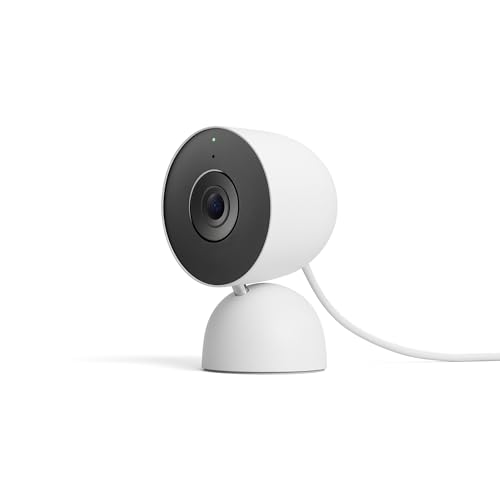
5. Google Nest Cam Indoor (Wired, 3rd Gen): Best Home Camera for Google Households
If your thermostat, speakers and displays are already Google, this is the indoor camera that fits. Its feed and alerts live in the same Google Home app, and it works with Gemini for Home. The hardware is a real upgrade too: 2K HDR video, a 152-degree view, and alerts that arrive quicker and more accurately than on earlier Nest cams.
Here's where it pays off. You're upstairs folding laundry when the front door clicks at 4 p.m. You ask the Nest display on the dresser to show the front room, and it's your teen back from practice. Setup is plugging it in and scanning a QR code, the 10-foot USB-C cable is attached, and it's built for indoor use only.
But the free plan is thin. You get 6 hours of event previews capped at 10 seconds, and there's no microSD slot to fall back on. Google Home Premium adds 30 or 60 days of history, and the Advanced tier adds 10 days of 24/7 video. If you own the 2nd gen, the design is the same, so the upgrade is mostly the sharper picture. Is it worth it? In a Google home, yes. For no fees, the eufy S350 (#1) is the pick.
Best for: Google Home families who want every camera, speaker and display in one app.
Skip it if: You don't want to pay a monthly plan to keep footage. The eufy Indoor Cam S350 (#1) is the better pick.
Pros
- Sharper 2K video and a wider 152-degree view
- Plug-in setup in minutes with a QR code
- Faster, more accurate alerts than the last Nest cams
- Animated alerts that zoom in on the subject
- Built for Google Home and Gemini; works with Alexa
Cons
- Free plan keeps only 6 hours of short previews
- Best AI features need a Google Home Premium plan
- No local storage
- Face and pet recognition still makes mistakes
- Looks and mounts just like the 2nd gen
- Indoor only
Hands-on reviews behind this pick
- WIRED
Show the verdict
A clear leap over the last Nest cams and the smartest indoor camera around, with crisp video and accurate alerts, but the best Gemini smarts need a pricey plan and there's no local storage.
- Carl Pugh
Show the verdict
Not a must-have upgrade for 2nd gen owners, but the sharper 2K image and slightly wider view make it the clear model to buy for anyone getting a first or another Nest indoor cam.
6. Baseus Security S2 Outdoor Camera 4K: Best Solar Security Camera for a Sunny Yard
Every home has one spot the cables won't reach, and this is the camera for it. The Baseus S2 records 4K through a 145-degree lens, runs on a 7,800mAh battery and carries a solar panel that turns to follow the sun. On Julie Strietelmeier's deck railing, it sat at 100% for weeks, rainy days included.
Think of the side gate the kids use as a shortcut. You screw the metal bracket to the post, sync it in the app with no hub, and you're done, with no wire run along the fence. Radar plus PIR sensing tells people, pets and vehicles apart, face ID recognizes saved faces, and it's IP67 against rain. It works with Alexa and Google Home.
Here's the trade-off. There's no cloud backup, so if someone takes the camera, the microSD card goes with it. The card isn't in the box and must be formatted FAT32, and overnight condensation hazed night clips in one long run. Good enough? For a sunny gate, yes. For full-yard coverage with a hub and storage at home, the eufyCam S330 (#2) does more.
Best for: Homes with a sunny side gate or fence line and no outlet.
Skip it if: You want several outdoor cameras sharing one hub with storage inside the house. The eufy eufyCam S330 (#2) is the better pick.
Pros
- Sun-tracking solar panel keeps the battery topped up
- Sharp 4K daytime video with a wide 145-degree view
- Radar plus PIR cuts false alerts
- Reliable person, pet and vehicle detection plus face ID
- No subscription; free local storage
- Fast, well laid out app; no hub needed
Cons
- No cloud or NVR backup if the camera is stolen
- Needs its own microSD card, formatted FAT32
- Only two activity zones and two privacy zones
- Solar depends on a sunny mounting spot
- One reviewer saw overnight lens condensation
Hands-on reviews behind this pick
- PCWorld (TechHive)
Show the verdict
With steady sun, its tracking solar panel makes it one of the few outdoor cameras that can run truly unattended, adding crisp 4K, accurate radar-assisted alerts and subscription-free storage.
- How-To Geek
Show the verdict
A versatile, easy outdoor camera whose solar panel held its charge indefinitely, with reliable human detection and good low-light sensitivity, let down by FAT32-only cards and some night fogging.
7. Wyze Cam Pan v4: Best Pan-Tilt Home Camera for Pet Owners
Pets don't sit still, and a fixed camera loses them the moment they leave the rug. This one turns to follow. It pans 360 degrees and tilts 180, records in 4K, and its smart tracking sticks to the type of subject you pick, so the dog stays in frame instead of the curtains.
You're on a 2 p.m. video call and the dog wanders from the couch to the kitchen. The camera turns with it, and later you can check whether that was a snack raid. It records 24/7 to a microSD card up to 512GB for free, has a 60-lumen spotlight for color night video and a physical privacy mode, and it listens for smoke and CO alarms. It's IP65, but the adapter in the box is indoor only.
The catch is the plan: smart AI alerts and cloud clips need Cam Plus after a 30-day trial. And owners on the Wyze forum report waypoints and home position drifting after tracking. Our verdict? For pets on a budget, buy it. For free AI alerts and a real zoom lens, the eufy S350 (#1) is worth the step up.
Best for: Pet owners on a budget who want the camera to follow the dog from room to room.
Skip it if: You want free AI alerts and an optical zoom lens. The eufy Indoor Cam S350 (#1) is the better pick.
Pros
- Crisp 4K detail for a budget pan/tilt camera
- Smart tracking follows people, pets or vehicles
- Spotlight gives color night video
- 24/7 local recording to microSD
- Indoor or outdoor with IP65 rating
- Quiet motors, fast notifications
Cons
- Best AI alerts need a Cam Plus plan
- Owners report fixation on parked cars
- Waypoint drift and Wi-Fi drops for some
- Fixed pigtail cable, indoor-only adapter
- Narrow 105-degree lens
- Recording can start late on small subjects
Hands-on reviews behind this pick
- Tom's Guide
Show the verdict
An Editor's Choice: crisp 4K, smart tracking, color night video and local recording at a low price make it the pan-tilt camera to beat, though smart features need a plan and the view could be wider.
- HomeCamCafe
Show the verdict
The most capable budget pan/tilt camera, with 4K clarity, snappy tracking and real color night vision, held back by inconsistent motion detection and the best AI features sitting behind Cam Plus.
- Gear Diary
Show the verdict
Easy to recommend as an affordable add-on: quick setup, good tracking, solid night vision and 24/7 microSD recording, though subscription-locked features and an indoor-only adapter feel like gotchas.
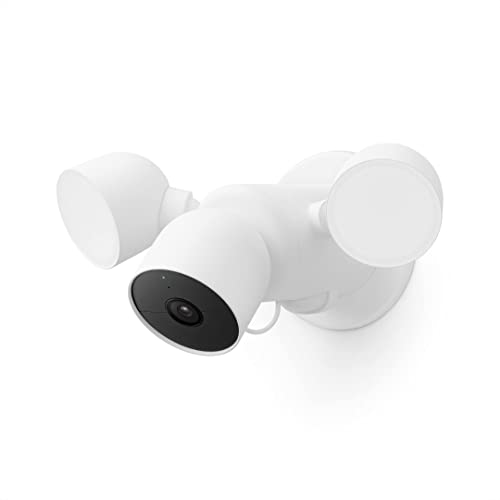
8. Google Nest Cam with Floodlight (wired): Best Floodlight Security Camera for Home
A dark driveway is where a floodlight earns its keep, and this one pairs bright lights with Google's alerts. Two adjustable panels put out up to 2,400 lumens, and the camera can decide when to switch them on. The 1080p HDR camera handles the glare well and tells people, vehicles and animals apart for free.
You pull into the drive at 11 p.m. with every light off. The floodlights snap on before you open the car door, and the clip lands in the Google Home app beside your indoor Nest cams. It's hardwired to an existing junction box, which takes about 30 minutes if you're comfortable with wiring, and a 6Ah battery keeps the camera running in an outage.
The downsides are real. Free history is just 3 hours, there's no siren, alerts cool off for about 10 minutes between notifications, and owners have reported wired units falling back to battery and going offline. Would it be our pick? To replace a wired light in a Google home, yes. With no junction box, the solar Baseus S2 (#6) needs no wiring at all.
Best for: Google Home owners replacing an existing wired floodlight over the driveway.
Skip it if: There's no junction box where you want the camera. The Baseus Security S2 Outdoor Camera 4K (#6) is the better pick.
Pros
- Bright 2,400-lumen adjustable lights
- Clear 1080p HDR video that handles the lights
- Free person, vehicle and animal alerts
- Camera can decide when the lights turn on
- Backup battery records through power cuts
- Strong magnetic camera mount
Cons
- Only 1080p against 2K and 4K rivals
- Just 3 hours of free history
- Needs a junction box and wiring skills
- Light and camera controls split in the app
- No siren; long notification cool-off
- Whole unit must be replaced if an LED fails
Hands-on reviews behind this pick
 Android Authority
Show the verdict
A good Nest Cam with a very bright, well-controlled floodlight that works well once installed, but setup is clunky, the price isn't justified and it really only suits Google die-hards.
- Reviewed
Show the verdict
A pricey but proficient floodlight cam: easy app, solid security features and impressive video and brightness, best for Google Home homes, while a limited view and wired-only install hold it back.
- LifeHackster
Show the verdict
Pretty good 1080p video that adapts well to the bright lights, free 3-hour history and quick first alerts, undercut by the convoluted Google Home app, no siren and a 10-minute notification cool-off.
9. Wyze Cam v4: Best Cheap Porch Camera for Home
Not every corner of the house needs a flagship camera. For a back porch, patio or garage beside an outlet, this one does the basics well and leaves room in the budget for more. It shoots 2.5K through a 116-degree lens, has a spotlight and starlight sensor for color night video, and it's IP65 for covered outdoor spots.
Someone knocks at the back door while you're in the shower. With a microSD card in, the camera records 24/7 for free, so you can scroll back and see who it was. Faces stay clear to about 10 feet and soften past 15. Setup over Bluetooth takes under five minutes, and there's a 99 dB siren and two-way talk.
Here's the catch. Without Cam Plus you get snapshot alerts with a 5-minute cooldown and no person detection. The cable is 6 feet, the adapter is indoor only, and owners report v4 cams dropping offline every few days, often fixed with router or adapter changes. Our take? For an extra spot on a tight budget, it's an easy yes. To cover a whole driveway, the Tapo C246D (#3) is the smarter step up.
Best for: Buyers filling extra spots like a back porch or garage on a tight budget.
Skip it if: You want one camera to watch a whole driveway with free AI alerts. The TP-Link Tapo C246D HybridCam Duo (#3) is the better pick.
Pros
- Sharp 2.5K picture for a very cheap camera
- Good infrared and color night vision up close
- Records 24/7 to a microSD card with no plan
- Easy Bluetooth setup in a few minutes
- Weather resistant for porch or patio use
- Few false alerts once zones are set
Cons
- Person, pet and package alerts need Cam Plus
- Free plan: snapshots only and a 5-minute cooldown
- Wired only; included adapter is for indoors
- 2.4GHz Wi-Fi only, no Apple Home
- Faces get muddy beyond about 15 feet
- Some owners see cameras drop offline
Hands-on reviews behind this pick
- GearLab
Show the verdict
A top indoor and outdoor pick on a tight budget: sharp 2.5K day and night video, a simple app and useful detection zones, though wired power limits where it can go.
- Android Police
Show the verdict
Strong image quality for the money and free local recording make it a fine close-range outdoor camera, but Wyze's security record makes it a harder sell for indoor use.
- PCWorld
Show the verdict
A very cheap camera with crisp day and night images and easier setup; a great first camera or v3 upgrade, but only an evolutionary step over the v3 Pro, with smart alerts behind a plan.
10. Blink Mini 2K+: Best Extra Room Camera for Alexa Homes
Once the main rooms are covered, the spare bedroom, hallway and garage still need eyes, and this is the cheap way to add them in an Alexa home. The Mini 2K+ records sharp 2K video through a 138-degree lens, sits on a flexible ball-joint mount and plugs in over USB-C. Two-way audio is clear, and it can double as a chime for a Blink doorbell.
It's 10:30 p.m., you're in bed, and you can't remember shutting the garage side door. You ask the Echo Show to bring up the garage and check, no phone needed. With a Blink plan, person and vehicle alerts come through fast and accurate, and an optional weather-resistant adapter lets it work outside too.
But that plan is the deal. Without it, or a Sync Module with a USB drive, the camera saves no clips, and motion recording can be oversensitive, filling the app with empty clips. There's no Google Home or Apple Home support. Who should buy it? An Alexa home already paying for Blink. For free 24/7 local recording, the Wyze Cam v4 (#9) is the better buy.
Best for: Alexa homes adding cheap cameras to extra rooms.
Skip it if: You don't want to pay a plan just to keep clips. The Wyze Cam v4 (#9) is the better pick.
Pros
- Sharp, detailed 2K daytime video
- Tiny body with a flexible ball-joint mount
- Built-in spotlight for color night video
- Fast, accurate person and vehicle alerts (with plan)
- Works smoothly with Alexa and Echo Show
- Can go outdoors with the optional power adapter
Cons
- Little use without a subscription or Sync Module
- Infrared night video can look grainy at range
- Motion recording can be oversensitive
- 2.4GHz Wi-Fi only
- No Google Home or Apple Home support
- Outdoor power adapter costs extra
Hands-on reviews behind this pick
- PCMag
Show the verdict
A compact, affordable indoor camera with sharp 2K video, quick and correct alerts, accurate AI descriptions and seamless Alexa use; a solid value, though recorded video sits behind a plan.
- Trusted Reviews
Show the verdict
A solid, dinky camera for inside or out with crisp 2K video, strong HDR, a bright spotlight and reliable alerts; only a good pick if you are happy to pay for a subscription to unlock it.
- PCWorld
Show the verdict
Recommended as a cheap, compact step up from the Mini 2 with better image quality, but setup was fiddly, motion recording far too sensitive, IR night video mediocre and a plan nearly required.
Best security cameras for home buying guide for 2027
How many security cameras does a home need?
Most homes need one camera for the main living space and one for each door or approach you care about, not one per room. Count entry points, then add the big open spaces.
So here's how we'd start. In an apartment or small home, the eufy Indoor Cam S350 covers the main room and a Wyze Cam v4 watches the door. A family house with a yard adds the eufyCam S330 kit for the front and back, plus a Tapo C246D on the driveway. On a big lot, one Reolink Altas PT Ultra can sweep the whole backyard.
Wide views and zoom cut the count, because one S350 or C246D does the job of two fixed cameras.
Where should I put security cameras around my house?
Put cameras where people come and go: the front door, the driveway, the back door or gate, and the room the family uses most. Then check power and sun before you pick a model.
Wired cameras need an outlet close by. The Tapo C246D's cord is about 10 feet and the Wyze Cam v4's is 6, and both ship with indoor adapters. Mount the Tapo at wall height, since its fixed lens tilts only 10 degrees. Solar cameras like the eufyCam S330 and Baseus S2 need direct sun, so skip shaded or north-facing walls. The Nest Cam with Floodlight needs a junction box where the light goes.
For a gate or fence line far from power, we cover wire-free cameras for spots without an outlet in their own guide.
Should I buy indoor or outdoor security cameras first?
Start with the camera that answers your biggest worry. If you want to check on kids, pets or a babysitter, buy indoor first. If packages, cars or a dark driveway keep you up, start outside.
Indoors, the eufy Indoor Cam S350 is our pick for a busy main room, and the Wyze Cam Pan v4 is the cheaper way to follow a pet. Outside, the eufyCam S330 kit covers the front and back with no fee, and the Tapo C246D handles a driveway on a budget. Buying inside and out from one brand now saves an app headache later.
If you're still comparing all your options, see every security camera we'd buy, by budget.
How do home security cameras protect family privacy indoors?
The best ones let you shut the camera off without unplugging it. The eufy Indoor Cam S350 has a privacy mode that turns the lens to face the wall, and the Wyze Cam Pan v4 has a physical privacy mode, so the couch isn't on camera during movie night.
Where your footage lives matters too. The S350, eufyCam S330, Tapo C246D, Reolink Altas PT Ultra and Baseus S2 all save clips locally, so footage stays in your house. The Nest Cam Indoor, Nest Cam with Floodlight and Blink Mini 2K+ rely on the cloud for history.
Wyze's past security incident still makes some people wary of putting its cameras indoors. If that's you, keep the Wyze picks on the porch or in the garage.
Can I run all my home security cameras in one app?
Yes, if you stay with one brand. The eufy Indoor Cam S350 and eufyCam S330 share the eufy app, the Nest Cam Indoor and Nest Cam with Floodlight share Google Home, and the two Wyze cameras share the Wyze app.
Mixing brands is where it gets messy. Every camera on this list works with Alexa in some way, so an Echo Show can be a shared screen, but each brand still has its own app for settings and clips. Google Home owners should know the S350's Google support is unreliable, so pair Nest cams with Nest. The Tapo C246D also supports RTSP and ONVIF for recorders and home hubs.
For an Alexa home with a few more rooms to fill, we round up budget indoor cams under $25 for spare rooms separately.
Best security cameras for home: frequently asked questions
What is the best security camera system for a home?
For most families, we'd pair the eufy Indoor Cam S350 inside with the eufyCam S330 kit outside. Both live in the eufy app, record locally and need no monthly plan. If your home runs on Google, the Nest Cam Indoor (Wired, 3rd Gen) is the better indoor pick.
How many security cameras do I need for my house?
Most homes need one for the main living space plus one for each door or approach you care about. A family house with a yard often lands on an S350 inside, a two-camera eufyCam S330 kit for front and back, and a Tapo C246D on the driveway.
Where should security cameras be placed at home?
Cover the front door, driveway, back door or gate, and the main family room. Wired cameras like the Tapo C246D need an outlet nearby and work best at wall height. Solar ones like the eufyCam S330 and Baseus S2 need a wall with direct sun.
Are indoor security cameras a privacy risk?
They can be, so pick one you can switch off and that keeps footage at home. The eufy Indoor Cam S350 turns its lens to the wall in privacy mode and records to a microSD card, with no cloud plan needed. The Wyze Cam Pan v4 also has a physical privacy mode.
Can I mix security camera brands in one app?
Not fully. Every camera on this list works with Alexa in some way, so an Echo Show can show several brands, but settings and clips stay in each brand's own app. For one app, stick to a brand: eufy's S350 and S330, or Google's Nest Cam Indoor and Floodlight.

