The 9 Best Affordable Printers in 2027
The printer with the lowest sticker price often costs the most to run. We ranked the best affordable printers for 2027 on refills, duplex and Wi-Fi setup.

Affiliate Disclosure: As an Amazon Associate, we may earn a commission from qualifying purchases, and it never changes our picks.
Our picks at a glance

10.0/10Score

$229.99 $269.99 Save 15%
as of Nov 11, 2026, 17:47 UTC

9.6/10Score
$179.99
as of Nov 11, 2026, 17:47 UTC
9.4/10Score
$307.98 $329.99 Save 7%
as of Nov 11, 2026, 17:47 UTC

9.0/10Score
$269.99
as of Nov 11, 2026, 17:47 UTC

8.8/10Score
$199.99 $248.99 Save 20%
as of Nov 11, 2026, 17:47 UTC

8.7/10Score
$274.99
as of Nov 11, 2026, 17:47 UTC

8.5/10Score
$209.98
as of Nov 11, 2026, 17:47 UTC

8.4/10Score
$99.98 $109.99 Save 9%
as of Nov 11, 2026, 17:47 UTC

7.0/10Score
$79.99 $107.99 Save 26%
as of Nov 11, 2026, 17:47 UTC
Product prices and availability are accurate as of the date/time indicated and are subject to change. Any price and availability information displayed on Amazon.com at the time of purchase will apply to the purchase of this product.
How we rank best affordable printers for you?
We start with ink and toner costs, because on a budget the refills, not the printer, decide what you really spend in year one. Value for the money comes next: auto duplex, a scanner or a document feeder at a low price is what makes a cheap printer a good deal. Print quality matters for homework, forms and the odd photo. Easy Wi-Fi setup counts because you want to print from your phone on the first try. Design and build covers the footprint, tray and screen on a small desk. That puts the Canon MegaTank G3290 first.
 Ink and Toner Costs30%
On a tight budget, refills decide the real price: a cheap printer with pricey cartridges costs more within a year than a tank or laser.
Value for the Money20%
Value for the Money20%Auto duplex, a scanner or an ADF at a low upfront price is what makes a budget printer feel like a good deal.
 Print Quality20%
Homework, forms and resumes should come out crisp, and the odd photo shouldn't look washed out.
Easy Wi-Fi Setup15%
Easy Wi-Fi Setup15%Students and parents want to print from a phone or laptop on the first try, without driver hunts or dropouts.
 Design and Build15%
A small footprint, a sensible tray and a usable screen matter on a dorm desk or a kitchen counter.
Best affordable printers compared
Swipe sideways to see every spec.
| Product | Score | Technology | Color | Print Speed | Duplex |
|---|---|---|---|---|---|
| 10.0 | Ink tank inkjet (MegaTank, pigment black, dye color) | Color | 11 ipm black / 6 ipm color (ISO) | Auto two-sided printing; flatbed scanner, no ADF | |
| 9.6 | Monochrome laser, TN830 toner and separate DR830 drum | No, black and white only | Up to 36 ppm (black) | Auto duplex printing (no scanner) | |
| 9.4 | Ink tank inkjet (EcoTank, pigment black, dye color) | Color | 15 ppm black / 8 ppm color (ISO) | Auto two-sided printing; flatbed scanner, no ADF | |
| 9.0 | Monochrome laser (TN830 toner, DR830 drum) | Monochrome | Up to 34 ppm (rated); PCMag measured 35 ppm | Auto two-sided printing; ADF scans one side only | |
| 8.8 | MegaTank refillable ink tank inkjet (GI-21 ink) | Color | Up to 11 ppm black, 6 ppm color (rated) | Manual only (driver-guided page flip) | |
| 8.7 | LED laser-class (toner, separate drum) | Color, print only (no scanner) | 27 ppm rated; 28.8 ppm measured by PCMag | Auto two-sided printing | |
| 8.5 | Cartridge inkjet all-in-one with fax (INKvestment) | Yes, four LC506 ink cartridges | Up to 20 ppm black, 19 ppm color | Auto duplex printing; 20-page ADF scans one side only | |
| 8.4 | Cartridge inkjet (LC501, pigment black, dye color) | Color, 4 individual cartridges | Up to 16 ppm black / 9 ppm color | Auto 2-sided printing; 20-sheet ADF scans one side only | |
| 7.0 | Cartridge inkjet, 2 cartridges (PG-275 black, CL-276 color) | Color | About 8 ppm black measured (TechGearLab), 5 ppm duplex | Yes, automatic 2-sided printing |
1. Canon MegaTank Pixma G3290: Best Affordable Printer Overall
If you want color without counting pages, this is the printer we'd buy. The ink is the reason. A full set of GI-21 bottles is rated for about 6,000 black and 7,700 color pages, and color ink costs sit well below average. That's the same ink and rating as the cheaper G3270 (#5), but this one adds auto duplex and a 2.7-inch color touchscreen.
Say it's 9 p.m. and your kid's 12-page book report needs printing in color, two-sided. The G3290 flips the pages itself, and its duplex text was the quickest of the ink tanks Tom's Guide had recently run. Setup takes patience: you fit two printheads, fill keyed bottles that only go in the right tank, and let the ink charge. Then the Canon PRINT app joins your Wi-Fi with no password typing, though there's no Ethernet port.
The trade-offs are paper handling and speed. It has one 100-sheet rear tray, no document feeder, and mixed color pages crawl along at about two a minute. So would we buy it? For a home that prints color every week, yes. If your pages are nearly all black text, the Brother HL-L2460DW (#2) is faster and never dries out.

Best for: Students, parents and budget buyers who print color every week and want two-sided pages without flipping them by hand.

Skip it if: You want more black ink in the box and a faster rated black page. The Epson EcoTank ET-2980 (#3) is the better pick.
Pros
- Very low ink costs, especially for color
- High-quality text, graphics and glossy photos
- Auto duplex, fastest duplex text in its test group
- 2.7-inch color touchscreen
- Huge page yields from one bottle set
- Easy Wi-Fi setup through the Canon PRINT app
Cons
- Only a 100-sheet rear tray
- No ADF or USB thumb drive port
- Average print and copy speeds
- Basic PC scanning software
- Touchscreen menus can be fiddly
Hands-on reviews behind this pick
- Tom's Guide
Show the verdict
A recommended entry-level ink tank for people on a budget: very low ink costs, high image quality and consistent, if average, speed. Basic software and one small tray are the main trade-offs.
- Professor Printer
Show the verdict
Hands-on setup walkthrough that finds the keyed ink bottles foolproof and the phone-based Wi-Fi setup a real step up for Canon, though the touchscreen sometimes needed a few taps.
2. Brother HL-L2460DW: Best Budget Laser Printer for Text
Here's the printer for anyone who mostly prints words. It's a small mono laser rated at 36 pages a minute, and PCMag measured 37 on text. Toner is a dry powder, not liquid ink, so nothing dries out between jobs. That alone fixes the streaky-page problem that ruins cheap inkjets.
Picture 7:30 a.m., 50 pages of lecture slides, and an 8 a.m. class. Single-sided, it's done in under two minutes. Two-sided slows to about 8.5 pages a minute in Digital Trends' run, so start it while you pack your bag. Set it up through the Brother Mobile Connect app, because typing a Wi-Fi password on the one-line screen with arrow keys is tedious. Ethernet is there if your router sits close. The box has a 700-page starter toner and a drum rated for about 15,000 pages.
The limits are clear. It can't scan, copy or print color, and dark fills and photos show banding. Is it the right buy for a text-only desk? Easily. Need to scan and copy too? The Brother MFC-L2820DW (#4) adds a feeder and copier and takes the same TN830 toner.
Best for: Students and remote workers who print black text and never want to deal with dried-out ink again.
Skip it if: You need to scan or copy documents too. The Brother MFC-L2820DW (#4) is the better pick.
Pros
- Fast: 36 to 37 ppm measured on text
- Low cost per page with XL toner
- Auto duplex printing
- Ethernet plus dual-band Wi-Fi
- Toner won't dry out between uses
- Compact, well-built and easy app setup
Cons
- Black and white only, no scanner
- One-line mono display is fiddly for Wi-Fi setup
- Slow first page out versus rivals
- Duplex printing much slower than simplex
- Small starter toner (700 pages)
- Banding in graphics and solid dark fills
Hands-on reviews behind this pick
 Digital Trends
Show the verdict
Surprisingly fast for such an inexpensive mono laser with few tradeoffs: crisp text, easy setup, low supply costs and a full tray, with only a basic display and slowish duplex holding it back.
- PCMag
Show the verdict
An impressive little laser value: speed, quality and a low running cost suit small and home offices with moderate print needs, though the one-line LCD is awkward and the cheapest pages need XL toner.
- RTINGS
Show the verdict
A well-built budget print-only laser with high page yields and quick output, ideal for occasional return labels without clog worries and for heavy document printing alike, but it can't scan.
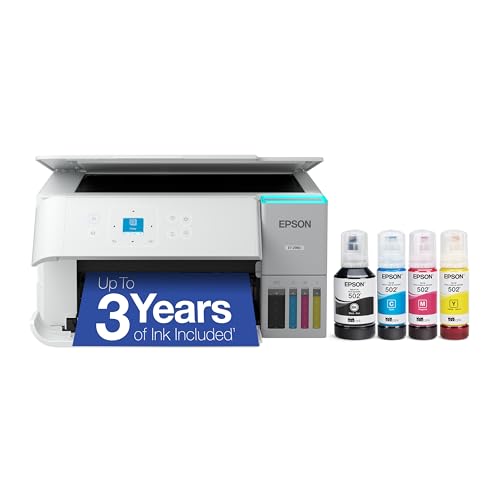
3. Epson EcoTank ET-2980: Best Cheap Ink Tank Printer for Homework
So what if your house prints a little almost every day? Then this EcoTank earns its spot. Epson rates the bottles in the box for up to three years of average use, which PCMag puts at about 6,600 black and 5,500 color pages. The keyed bottles only fit their own tank, so a refill on the kitchen table stays clean.
Say your kid prints a history worksheet and goes straight at it with a yellow highlighter. Prints resisted both highlighter and water in PCMag's checks, so the words stay put. It prints two-sided by itself, and the control panel tilts up so you can read it from a chair. Text is good rather than the sharpest, and photos suit a school poster more than a frame. You connect over Wi-Fi or USB, with no Ethernet.
The everyday annoyances are small but real. WIRED saw a 30 to 45 second wait before wireless jobs start, the screen is thumb-sized, and there's no document feeder. Ink can also dry if it sits for weeks. So would we buy it? For steady family printing, yes. Want a big touchscreen instead? The Canon MegaTank G3290 (#1) has a 2.7-inch one.
Best for: Families printing homework, worksheets and color pages several times a week.
Skip it if: You want a big touchscreen instead of a thumb-sized display. The Canon MegaTank G3290 (#1) is the better pick.
Pros
- Very low ink cost per page
- Years of ink in the box
- Auto duplex printing
- Keyed bottles make refills clean and mistake-proof
- Good color and photo prints for the class
- Ink resists smudging and highlighter
Cons
- Only a 100-sheet rear paper tray
- No ADF: flatbed scanning one page at a time
- Tiny 1.44-inch screen with many menu pages
- No Ethernet port
- Wi-Fi jobs can take 30-45 seconds to start
- Ink can dry out if unused for weeks
Hands-on reviews behind this pick
- PCMag
Show the verdict
An excellent light-duty inkjet for home or home office, with low running costs, snappy speeds and more than acceptable output, held back by a single 100-sheet tray and flatbed-only scanning.
- WIRED
Show the verdict
Turned the reviewer into an ink tank convert: clean setup, lots of ink and efficient, clean prints. Only the undersized paper tray and slow start of wireless jobs hold it back.
- RTINGS.com
Show the verdict
An improved ET-2850 with sharper black text, quicker printing and better color, plus an impressive gamut for occasional photos and great value over time, but its scanner is only adequate.
4. Brother MFC-L2820DW: Best Affordable Printer for Paperwork
Now, if you scan and copy as well as print, this is the Brother laser to get. The MFC-L2820DW is rated at 34 pages a minute and adds a 50-sheet document feeder, a copier, fax and a 2.7-inch color touchscreen. How-To Geek pushed just over 23 images a minute through that feeder.
Picture tax season. You drop a 15-page return into the feeder, tap scan, and it lands as one file you can email to your accountant. Ethernet and dual-band Wi-Fi keep it reachable, and the Brother app doesn't make you create an account. Inside you'll find a 700-page starter toner fitted to a drum rated for about 15,000 pages. Bring your own USB cable.
Here's the catch. The feeder reads one side at a time, so two-sided bank statements mean flipping the stack and running it again. The glossy screen catches overhead glare, and photos come out dark. Skip Brother's Refresh toner plan if you dislike subscriptions, because a cancelled plan can deactivate its cartridge. Our call? For text paperwork, it's an easy yes. Never scan? The Brother HL-L2460DW (#2) is all you need.
Best for: Remote workers and side hustlers who scan, copy and print multi-page text documents.
Skip it if: You only print and never scan. The Brother HL-L2460DW (#2) is the better pick.
Pros
- Fast, sharp black text
- Prints, copies, scans and faxes
- 50-sheet ADF up to legal size
- Auto duplex printing
- Ethernet plus dual-band Wi-Fi
- Brother app works without an account login
Cons
- No automatic duplex scanning
- Starter toner rated for only 700 pages
- Poor for photos and gradients
- Duplex printing slows it down noticeably
- Glossy screen is hard to read under lights
- No USB cable in the box
Hands-on reviews behind this pick
- RTINGS
Show the verdict
An excellent mono laser AIO for small offices: sturdy, outstanding print quality, fast and cheap per page, with detailed scans; the ADF is slowish and lacks duplex scanning, which a sibling adds.
- PCMag
Show the verdict
A solid choice for a small or home office tight on space: compact, quick and sharp on text, with a 50-sheet ADF and duplex printing, but no duplex scanning and pricey next to discounted rivals.
- How-To Geek
Show the verdict
A highly recommended, easy-to-use mono laser AIO for small businesses and families: it beat its rated speed and prints crisp text, though the touchscreen is small and photos are not its job.
5. Canon PIXMA G3270: Best Low-Cost Color Printer for Dorms
This one's for the small desk. The G3270 is a compact MegaTank at about 13 pounds, and its bottles are rated for about 6,000 black and 7,700 color pages, or more in economy mode. That's a lot of color on a student budget.
Say your dorm desk has one free shelf and your chemistry lab report is sitting on your phone. The G3270 fits the shelf, prints over AirPrint or the Canon PRINT app, and Digital Trends got a full-page borderless photo in about a minute. Speed is the price you pay, though: PCMag found it the slowest in its comparison group. Two-sided means the driver tells you when to flip the pages. There's no document feeder, and the app scans at only 300 dpi.
Wi-Fi is the bigger worry. G3270 owners on Canon's forum describe it going offline mid-job on Macs and iPhones, or after a Windows restart until they reinstall it. Canon's US store also marks it discontinued, though new units are still on sale. So would we buy it? For a cramped desk, yes. With room to spare, the Canon MegaTank G3290 (#1) adds auto duplex and a touchscreen.
Best for: College students and light family printers with a small desk and modest volume.
Skip it if: You print long two-sided reports. The Canon MegaTank G3290 (#1) is the better pick.
Pros
- Very low ink running cost
- Thousands of pages from the included ink
- Good glossy photo prints for the class
- Sharp text documents
- Compact and light at 13.2 pounds
- Easy Wi-Fi and phone setup
Cons
- Slow printing
- No automatic duplex printing
- No ADF; letter-size flatbed only
- Single 100-sheet paper tray
- Small monochrome screen, fixed angle
- Color accuracy is only fair
Hands-on reviews behind this pick
- Digital Trends
Show the verdict
A home printer done right: affordable to buy and run, easy to set up and capable of great glossy photo prints, though it is slow and lacks duplex and an ADF for office work.
- PCMag
Show the verdict
A touch above entry level for a tank printer, with Wi-Fi and mobile printing and a low running cost even for color; a good home fit if you can live with slow speed, one tray and manual duplex.
- RTINGS
Show the verdict
A basic tank AIO with a huge page yield and cheap refills, sharp documents and fairly detailed images; color accuracy is sub-par, and slow speed plus no duplex make long documents tedious.
6. Brother HL-L3280CDW: Best Affordable Color Laser Printer
But what if you need color and also go weeks without printing? An ink tank can dry out in that gap. This color laser can't, because toner is dry powder. That's the whole case for it, and it backs that up with excellent text and accurate color.
Picture a Monday after six quiet weeks. You need a color sales chart for a 9 a.m. Zoom call, and it comes out clean on the first try. PCMag measured 28.8 pages a minute single-sided, and Popular Mechanics got through its runs with no jams or software hiccups. Setup works from the 2.7-inch touchscreen or the Brother Mobile Connect app, and Gigabit Ethernet sits beside dual-band Wi-Fi. The starter toners come preinstalled, but there's no USB cable.
The trade-off is cost per color page. Color toner isn't cheap, it only prints, and at about 34 pounds it wants a sturdy shelf. So would we buy it? If you print mostly black text with some color, yes. If color is rare, the Brother HL-L2460DW (#2) handles the text for less.
Best for: Home offices printing mostly black text with some color charts and flyers, sometimes weeks apart.
Skip it if: You never print in color. The Brother HL-L2460DW (#2) is the better pick.
Pros
- Excellent, crisp text and accurate color
- Fast for its class, beat its rated speed
- Wi-Fi, Ethernet, Wi-Fi Direct and USB
- Easy setup and clear 2.7-inch touchscreen
- Sturdy build; no jams in testing
- Toner does not dry out between uses
Cons
- Print only: no scanner or copier
- Color toner costs are fairly high
- No paper tray expansion
- No super-high-yield toner support
- Bulky and heavy for a home desk
Hands-on reviews behind this pick
- PCMag
Show the verdict
A relatively fast color laser-class printer with top-notch print quality and broad connections, but fairly high color toner costs make it best for offices that print mostly in black and white.
- Popular Mechanics
Show the verdict
An excellent, headache-free home office laser: fast, reliable and built like a tank with sharp prints and easy setup. It skips scanning, but it is worth paying more to escape cheap printers.
- RTINGS.com
Show the verdict
A great print-only color laser that stands out for its sturdy build, outstanding print quality and fast speeds, though the lack of any scanner may be a dealbreaker for many buyers.
7. Brother MFC-J4355DW: Best Budget Printer with ADF and Fax
Not ready for a big tank, but tired of cartridges that run dry by Friday? That's where Brother's INKvestment design fits. Its cartridges go much further than most, and the four starters in the box are rated for about 1,800 black and 750 color pages before you buy a thing.
Say it's tax season and a shoebox of receipts sits on the table. You load 20 at a time, and the feeder scans them into Dropbox, Google Drive or OneDrive at about 8 pages a minute. The fax covers the one office that still won't take email. Text is sharp, photos print borderless, and setup through Brother Mobile Connect is easy, though it asks for a Brother account. You get Wi-Fi and USB, but no Ethernet and no USB cable in the box.
The limits are paper and screen. The tray holds 150 sheets, the 1.8-inch display isn't a touchscreen, and two-sided originals go on the glass. Like any inkjet, it can clog if it sits idle. Worth it? For a family that scans and faxes now and then, yes. For heavy text, the Brother MFC-L2820DW (#4) costs less per page.
Best for: Parents and light home workers who need a feeder and fax without paying for a supertank.
Skip it if: You print lots of black text and scan paperwork weekly. The Brother MFC-L2820DW (#4) is the better pick.
Pros
- Very high page yields for a cartridge inkjet
- Sharp text and detailed photos
- ADF for multi-page scans and copies
- Auto duplex printing and fax
- Compact footprint
- Easy setup with the Mobile Connect app
Cons
- ADF can't scan both sides automatically
- No Ethernet port or touchscreen
- Small 150-sheet tray
- Middling color accuracy in RTINGS' tests
Hands-on reviews behind this pick
- RTINGS
Show the verdict
RTINGS calls it an excellent jack-of-all-trades: very good print quality, outstanding page yields for a cartridge inkjet and a detailed ADF scanner, though it barely improves on the J4335DW.
- ReviewedByPhil
Show the verdict
Phil finds print quality very good, with true-to-screen photos and clean text, and setup easy via the app, but notes the ADF can't do two-sided scans and there is no Ethernet port.
8. Brother MFC-J1360DW (Work Smart 1360): Best Cheap All-in-One Printer for Forms
Here's the thing: you rarely get a document feeder at this price. This compact Brother adds a 20-sheet one plus auto duplex printing, and its document printing and scanning are excellent.
Picture a Saturday at the kitchen table with a five-page rental application. You drop the pages in the feeder, and they come back as one scan while you fill in the next form. The 150-sheet paper drawer slides in underneath, so it doesn't sprawl across the table. It works with Windows, Mac, Linux and phones, and the Brother app doesn't push you to sign up. Scans can come out slightly crooked, though, and the feeder reads one side only.
Running cost is the real catch. Starter cartridges are rated for about 200 pages each, and Printer Insider suggests it for homes printing under about 40 pages a month. Color is slow, photos look muted, and the printhead can clog if it sits idle. So would we buy it? For light forms and homework, yes. Want cartridges that go much further? The Brother MFC-J4355DW (#7) is the step up.
Best for: Families printing forms and homework who scan a multi-page document now and then.
Skip it if: You want cartridges that last much longer between refills. The Brother MFC-J4355DW (#7) is the better pick.
Pros
- ADF and auto duplex printing at a budget price
- Excellent document print and scan quality
- 150-sheet drawer tray keeps the footprint compact
- Mobile app works without forcing an account
- Separate color cartridges, high-yield option
- Works with Windows, Mac, iPhone, Android and Linux
Cons
- Slow color printing
- ADF scans one side only and can skew pages
- Muted photo color with some banding in gradients
- Small 1.8-inch non-touch screen
- Cartridges cost far more per page than ink tanks
- Can clog if left idle; printhead not replaceable
Hands-on reviews behind this pick
- RTINGS
Show the verdict
A good household printer with excellent document quality, an ADF and outstanding scans, plus better yields than most rivals in its class; color speed is slow and it is not ideal if it sits idle.
- Printer Insider
Show the verdict
Recommended for homes that mostly print documents: duplex, an ADF, a compact drawer tray and a no-login app; skip it for photos, where colors look dull next to an EcoTank.
9. Canon Pixma TR4720: Best Cheap Printer for Occasional Use
And if you barely print at all? Then the TR4720 is the one cartridge-hungry printer we'd still consider. It's a compact four-in-one with a 20-sheet feeder, fax, auto duplex printing and photos that look rich and accurate for the class.
Say this month you need one return label and one 4x6 photo for a birthday card. That's exactly its job. Setup from the Canon PRINT app took TechGearLab about six minutes, though Professor Printer needed Canon's separate setup software on Windows. Don't push paper too far into the front tray on the first start, or it can jam. Wi-Fi is 2.4 GHz only.
Everything else is slow and pricey. TechGearLab measured about 8 pages a minute in black, nearly five minutes for a full-page photo and the highest cost per page in its group, while text looked grayish. Would we buy one? Only for a few pages a month. Print documents weekly? The Brother HL-L2460DW (#2) costs far less to run.
Best for: Very light users who print a handful of pages a month and want a decent photo now and then.
Skip it if: You print documents every week. The Brother HL-L2460DW (#2) is the better pick, or the Canon MegaTank G3290 (#1) if you need color.
Pros
- Photos far better than most budget rivals
- ADF and auto duplex at an entry price
- Easy setup from the Canon PRINT app
- Compact footprint
Cons
- Extremely low cartridge yields
- Highest ink cost per page in TechGearLab's test
- Slow, with a long warm-up before printing
- Grayish, uneven text and duplex smearing
- Slow ADF, no duplex scanning
Hands-on reviews behind this pick
- RTINGS
Show the verdict
Offers auto duplex, an ADF and photos far nicer than most rivals in its class, but it is poor value overall because page yields are extremely low and it takes a while to warm up before printing.
- TechGearLab
Show the verdict
An exceptional printer for photos but underwhelming for documents, with grayish text, slow output and the highest operating cost in the test group, so most buyers have better all-round options.
Best affordable printers buying guide for 2027
Is a cheap cartridge printer a false economy?
Usually, yes, if you print more than a few pages a week. The printer is cheap because the cartridges aren't. The Canon Pixma TR4720 shows it well: it costs little upfront and prints lovely photos, but it had the highest cost per page in TechGearLab's group. The Brother MFC-J1360DW's starter cartridges are rated for about 200 pages each.
Ink tanks flip that math. You pay more on day one, but the bottles in the box carry you for thousands of pages: about 6,000 black and 7,700 color on the Canon MegaTank G3290, and up to three years of average use on the Epson EcoTank ET-2980. Refills are bottles you pour in, not cartridges.
So the rule is simple. Print a few pages a month? A cartridge model like the TR4720 is fine. Print homework or forms weekly? Spend more now on the G3290 or ET-2980, and you'll spend less every month after. For a cartridge printer that's easier on refills, the Brother MFC-J4355DW has outstanding yields for its type.
Should you buy a budget laser printer or an ink tank printer?
Buy a laser if you print mostly black text, and an ink tank if you print color often. A mono laser like the Brother HL-L2460DW prints about 36 pages a minute, and its toner can't dry out, so it's ready after a quiet month. The Brother MFC-L2820DW adds a scanner, copier and fax on the same idea.
Ink tanks win on color. The Canon MegaTank G3290 and Epson EcoTank ET-2980 print homework charts and photos for very little per page, which a mono laser can't do at all. Want color but print rarely? The Brother HL-L3280CDW is a color laser that never clogs, though its color toner costs more.
We compare faster office machines and premium picks in our full printer guide for every budget. If you ship dozens of parcels a day, look at heavy-duty label printers for shipping volume instead. And if you came here for a 3D printer, we cover low-cost 3D printers for beginners separately.
Which affordable printers print two-sided and scan multi-page documents?
Eight of our nine picks print two-sided on their own, but only four scan a stack from a feeder. The Canon Pixma G3270 is the one exception on duplex: its driver tells you when to flip the pages yourself.
For multi-page scans, you need an ADF, the automatic document feeder that pulls pages through one at a time. The Brother MFC-L2820DW has the biggest, at 50 sheets. The Brother MFC-J4355DW, Brother MFC-J1360DW and Canon Pixma TR4720 have 20-sheet feeders. None of them scans both sides automatically, so two-sided originals need a second pass.
The three ink tanks (G3290, ET-2980 and G3270) scan on the glass only, one page at a time. That's fine for a permission slip and painful for a 20-page mortgage packet. If you scan stacks every week, the MFC-L2820DW is the one to buy.
Do budget printers dry out if you rarely print?
Inkjets can, and lasers can't. Liquid ink can dry in the printhead when a printer sits for weeks, which is how a tax form comes out streaky in April. RTINGS flags that risk on the Brother MFC-J1360DW, whose printhead you can't replace, and Printer Insider points people who print rarely away from the Epson EcoTank ET-2980 and toward a laser.
Toner is dry powder, so the Brother HL-L2460DW, MFC-L2820DW and HL-L3280CDW print cleanly after any gap. That's why we'd steer occasional printers to a laser first, even over a cheap ink tank. Black text only? The HL-L2460DW is the safest buy. Need color too? Get the HL-L3280CDW.
How do ink and toner subscription plans work on cheap printers?
None of the printers on this list needs a subscription to work. Canon's MegaTank and Epson's EcoTank models refill from bottles you buy whenever you like, with no plan at all.
Brother offers an optional Refresh plan that ships ink or toner automatically, and it pitches a trial with the MFC-J4355DW. The trap is cancelling: on the MFC-L2820DW, a Refresh cartridge can be switched off once the plan ends, so you'd need to buy a new one. If you'd rather never think about it, skip the trial and buy standard or XL refills.
The smarter move for most homes is a printer whose refills are cheap in the first place. That's the Canon MegaTank G3290 or Epson EcoTank ET-2980 for color, and the Brother HL-L2460DW with XL toner for black text.
Best affordable printers: frequently asked questions
What is the best affordable printer?
For most homes, it's the Canon MegaTank G3290. Its ink bottles are rated for about 6,000 black and 7,700 color pages, it prints two-sided by itself and photos look good. Print mostly black text? Get the Brother HL-L2460DW. Need to scan paperwork from a feeder? Get the Brother MFC-L2820DW.
What is the cheapest printer to run long term?
For color, an ink tank like the Canon MegaTank G3290 or Epson EcoTank ET-2980, whose included ink lasts thousands of pages. For black text, a mono laser like the Brother HL-L2460DW with XL toner, since its drum is rated for about 15,000 pages and toner never dries out. Cartridge printers like the Canon Pixma TR4720 cost the most per page.
Is a budget laser or ink tank printer better for home?
A laser is better if you print mostly black text or go weeks between jobs, because toner can't dry out. The Brother HL-L2460DW is our pick. An ink tank is better if you print color homework or photos often, so get the Canon MegaTank G3290. Want color that never clogs? The Brother HL-L3280CDW is a color laser.
Do cheap printers need an ink subscription?
No printer on this list needs one. Canon MegaTank and Epson EcoTank models use bottles you buy anytime. Brother's Refresh plan is optional, but on the MFC-L2820DW a Refresh cartridge can be switched off if you cancel, so buying refills outright is simpler. For low refill costs with no plan, get the Canon MegaTank G3290.
How long does the ink in a budget ink tank printer last?
A long time. Epson rates the ink in the EcoTank ET-2980's box for up to three years of average use, about 6,600 black and 5,500 color pages. The Canon MegaTank G3290's bottles are rated for about 6,000 black and 7,700 color pages. Some of the first fill primes the printhead. For the most ink in the box, get the ET-2980.