The 4 Best Computer Monitors with Webcam in 2027
A clip-on camera that slides off the bezel mid-call gets old fast. We compared 9 expert reviews of the best computer monitors with webcam. Pick by setup.

Affiliate Disclosure: As an Amazon Associate, we may earn a commission from qualifying purchases, and it never changes our picks.
Our picks at a glance
10.0/10Score

$1,399.00 $1,599.00 Save 13%
as of Nov 25, 2026, 10:47 UTC
Black Friday Deal

9.3/10Score
$1,179.99 $1,599.99 Save 26%
as of Nov 25, 2026, 10:47 UTC

9.1/10Score
$419.00
as of Nov 25, 2026, 10:47 UTC
7.5/10Score
$157.00 $179.00 Save 12%
as of Nov 25, 2026, 10:47 UTC
Product prices and availability are accurate as of the date/time indicated and are subject to change. Any price and availability information displayed on Amazon.com at the time of purchase will apply to the purchase of this product.
How we rank best computer monitors with webcam for you?
Webcam and audio quality come first, because the camera, mics and speakers are why you're buying this kind of screen, and built-in parts vary from sharp to grainy. Screen quality is next: you'll spend far more hours reading than on calls. Design and build matter for framing and privacy, from a stand that sets the camera at eye level to a shutter or detachable camera. Value rounds it out, since the gap between a basic camera monitor and a premium one is very large.
Webcam and Audio35%
Camera sharpness, framing, mics and speakers decide how you look and sound on every call.
Screen Quality25%
You'll read on it for hours between calls, so sharpness, brightness and color still matter.
Design and Build20%
Stand height sets the camera angle, and a shutter or detachable camera keeps your privacy.
Value20%
Webcam monitors range from basic office screens to premium displays, so each has to earn its price.
Best computer monitors with webcam compared
Swipe sideways to see every spec.
| Product | Score | Size | Resolution | Refresh Rate | Panel |
|---|---|---|---|---|---|
| 10.0 | 27 inches, 16:9 | 5120 x 2880 (5K), 218 ppi | 60Hz, no adaptive sync | IPS, 12MP Center Stage webcam, 600 nits, no HDR | |
| 9.3 | 32 inches | 3840 x 2160 (4K) | Up to 165Hz, G-Sync and FreeSync Premium Pro | QD-OLED, built-in 4K webcam, 250 nits SDR, True Black 400 | |
| 9.1 | 31.5 inches (32-inch class) | 3840 x 2160 (4K) | 60Hz | VA, detachable 2K SlimFit webcam with shutter, 400 nits, HDR10+ | |
| 7.5 | 23.8 inches | 1920 x 1080 (Full HD) | 60Hz, no adaptive sync | IPS, 2MP rotating webcam with shutter, 300 nits |
1. Apple Studio Display (2026): Best Computer Monitor with Webcam Overall
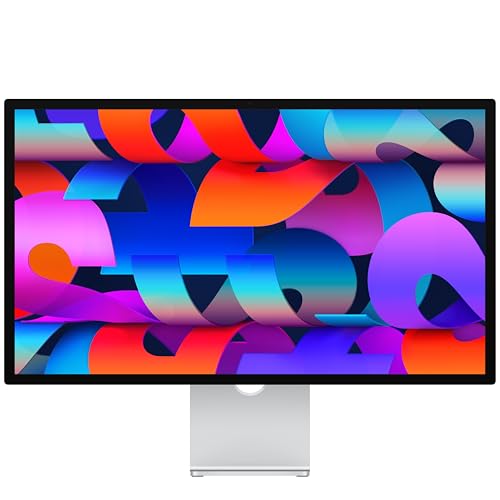
This is the webcam monitor we'd buy for a Mac. Its 12MP Center Stage camera follows you as you shift in your chair, and Macworld calls it the biggest upgrade over the 2022 model, now perfectly fine for Zoom and FaceTime. Three mics and six speakers handle the rest, and PCMag rates the audio among the best it has heard in a monitor.
Say you're in a design review and need to show a paper sketch. Desk View gives a top-down shot of your desk while keeping your face on screen, so there's no second camera to set up. Edge Light turns the screen edges into a soft ring light for a dim room. Between calls, the 5K panel keeps text razor sharp, and one Thunderbolt 5 cable charges a MacBook at 96W.
But the base stand only tilts, so the camera may sit below eye level unless you pay for the height stand. It's 60Hz with no HDR, the warranty is one year, and PC users lose some features. So would we buy it? On a Mac, yes. For Windows, the Samsung Smart Monitor M9 (#2) is the better pick.
Best for: Mac users who take a lot of calls and want the best built-in camera, mics and speakers
Skip it if: You use a Windows PC. The Samsung Smart Monitor M9 (#2) is the better pick.
Pros
- Sharp 5K text at 218 ppi
- 12MP Center Stage camera with Desk View
- Among the best speakers in any monitor
- Thunderbolt 5 with 96W charging and daisy chain
- Bright 582-nit panel with full P3 coverage
- Beautiful, solid aluminum build
Cons
- Only 60Hz, no HDR or adaptive sync
- Base stand only tilts; height costs extra
- No HDMI or DisplayPort inputs
- Settings need a Mac; PC users lose features
- One-year warranty
Hands-on reviews behind this pick
 Macworld
Show the verdict
The webcam is the biggest upgrade and is now fine for Zoom and FaceTime, and the hub gains Thunderbolt 5, but the panel is unchanged from 2022 and the whole package is poor value.
- PCMag
Show the verdict
A modest refresh that stays a gorgeous Mac monitor: bright 5K panel, full sRGB and P3, superb speakers and Thunderbolt 5 daisy chaining, held back by 60Hz, no HDR and a short warranty.
- RTINGS
Show the verdict
A 5K screen built to finish an Apple setup, with Thunderbolt 5, an accurate sRGB mode, webcam and strong speakers, but no HDR and limited picture quality make it a poor pick outside the Mac.
2. Samsung Smart Monitor M9 M90SF (32-inch OLED): Best OLED Computer Monitor with Webcam
If you want a camera built into a premium screen for a Windows PC, start here. The Smart Monitor M9 pairs a 32-inch 4K QD-OLED panel with a webcam in the center of the top bezel. PCMag measured full sRGB and about 98.7% DCI-P3, and the matte finish is nearly glare-free.
Picture a client call in the morning. The camera sits centered above the screen, so you look at the person you're talking to, and the speakers carry voices well. At night, the same screen runs streaming apps through Tizen with no computer at all. One USB-C cable carries video and 90W of charging, and the stand lifts, tilts and pivots.
There are real catches. SDR brightness measured only about 233 to 250 nits, the camera defaults to an ultra-wide view that makes you look small until you adjust it, and the hub is USB 2.0. WIRED also hit HDR trouble on a MacBook. So would we buy it? For a Windows desk in a dim room, yes. On a Mac, the Apple Studio Display (#1) is the better pick.
Best for: Windows users who want an OLED screen, a built-in camera and TV apps in one
Skip it if: You use a Mac or work in a bright room. The Apple Studio Display (#1) is the better pick.
Pros
- Gorgeous 4K QD-OLED with near-perfect contrast
- Built-in 4K webcam, no clip-on needed
- Full smart TV and cloud gaming built in
- USB-C with 90W charging
- Strong speakers for a monitor
- Height, tilt and pivot stand
Cons
- Dim SDR brightness (about 233 to 250 nits)
- Webcam defaults to a very wide view
- Light on ports, USB 2.0 only
- No swivel and fiddly monitor controls
- HDR and playback bugs reported on Mac
Hands-on reviews behind this pick
- PCMag
Show the verdict
The most impressive smart monitor PCMag has tested and an Editors' Choice: a gorgeous 4K OLED that works as a work screen, TV and gaming display, with a 4K webcam, but pricey and light on ports.
- WIRED
Show the verdict
The first smart monitor that can truly replace a TV, with bright OLED HDR, a 4K webcam and good speakers, but SDR is dim, ports are limited, controls frustrate and Mac use brought bugs.
3. Samsung Smart Monitor M8 M80F (32-inch): Best Smart Monitor with Detachable Webcam
This is the value pick for a big screen with a camera. The Smart Monitor M8 M80F is a 32-inch 4K VA screen, and its SlimFit 2K camera clicks onto the top with a magnet. It tilts, has a lens cover, and comes off entirely when you're done.
Say your home office is also the guest room. During the day, the camera sits on top for calls and one USB-C cable charges your laptop at 65W. In the evening, you pop the camera off, open a streaming app with the solar remote, and the monitor becomes a small TV. Her World had it set up in under five minutes, and the interface ran without lag.
The honest gap is evidence. The reviews so far are hands-on impressions, and none tested the camera's sharpness or the screen's color. It's also 60Hz, with one HDMI port and USB 2.0. So would we buy it? For a mixed work and TV room, yes. If image quality on calls matters most, the Apple Studio Display (#1) has the proven camera.
Best for: Home workers who want a big 4K screen, smart TV apps and a removable camera
Skip it if: You need a camera with proven image quality. The Apple Studio Display (#1) is the better pick.
Pros
- Detachable magnetic webcam with a privacy cover
- Built-in smart TV apps, no PC needed
- USB-C with 65W charging and video
- Height, tilt and pivot stand
- Speakers sound better than most monitors
Cons
- Only 60Hz
- Just one HDMI port and USB 2.0 hub
- Big 32-inch footprint on small desks
- Needs a Samsung account for smart apps
- No independent webcam quality test found
Hands-on reviews behind this pick
- Her World
Show the verdict
A large, crisp 4K screen that blends work and streaming well, with fast Tizen menus, useful Multi View and a magnetic camera that clicks on in seconds; just make room on your desk first.
- PureReviews (YouTube)
Show the verdict
A premium-feeling smart monitor that doubles as a TV and game streaming hub, with a thin snap-on webcam and lens cover, fully adjustable stand, USB-C input and speakers better than a laptop's.
4. ASUS BE24EQK: Best Budget Computer Monitor with Webcam
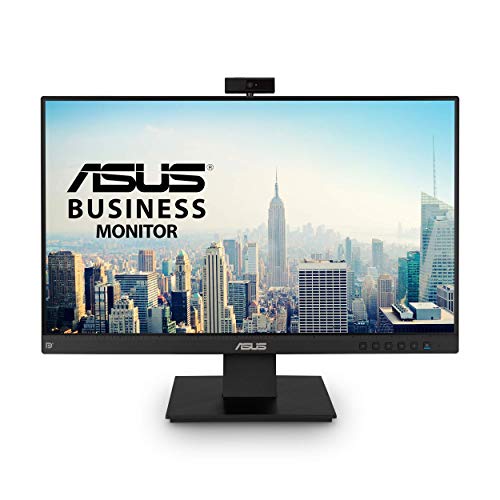
If the budget is tight and you just want a camera on the screen, this is it. The ASUS BE24EQK is a 24-inch 1080p IPS office monitor with a 2MP webcam on top, two mics and 2W speakers. Both Expert Reviews and Monitornerds measured a Delta E under 2, so colors look right without fiddling.
Picture a front desk where someone hops on short Teams calls between visitors. The camera rotates to frame them, a physical shutter closes when it's not needed, and the supplied USB cable connects the camera to the PC. HDMI, DisplayPort and VGA cover new and old computers.
But the camera is the weak part. Expert Reviews found it grainy outside well-lit rooms, with shaky auto exposure and no autofocus, and the mic sounded boxy, though fine for calls. The stand only tilts, and there's no USB-C. So would we buy it? For a basic office desk, yes. For a much better camera and a bigger screen, the Samsung Smart Monitor M8 M80F (#3) is the step up.
Best for: Offices and home desks that need a cheap screen with a camera and mics built in
Skip it if: You want a sharper camera and USB-C. The Samsung Smart Monitor M8 M80F (#3) is the better pick.
Pros
- Cheapest way to get a built-in webcam and mics
- Webcam rotates and has a privacy shutter
- Good factory color accuracy (Delta E under 2)
- Light and easy to set up anywhere
- VESA mount for a better arm
Cons
- Grainy 2MP webcam that needs a bright room
- Tilt-only stand with a large base
- No USB-C or USB hub
- Only about 275 to 280 nits measured
- Weak 2W speakers
Hands-on reviews behind this pick
 Expert Reviews
Show the verdict
A bargain for anyone who needs a bigger screen and a webcam that doesn't film up their nose, but the panel, tilt-only stand, grainy webcam and tube-like mic are all barebones.
- Monitornerds
Show the verdict
A solid work-from-home monitor with good out-of-box and calibrated accuracy plus a useful webcam for calls, held back by weak contrast, a tilt-only stand and no usable USB ports.
Best computer monitors with webcam buying guide for 2027
Is a monitor's built-in webcam as good as a separate webcam?
Sometimes, but it depends on the monitor. The Apple Studio Display's 12MP Center Stage camera is good enough for daily Zoom and FaceTime calls, and the Samsung Smart Monitor M9 has a 4K camera centered in its bezel. At the budget end, the ASUS BE24EQK's 2MP camera is grainy in dim rooms, which a decent separate webcam would beat. The big win with a built-in camera is that it's always centered and never falls off. If image quality matters more than convenience, light your face well, or pair a plain screen from our work-from-home screens with one-cable docking with a dedicated webcam.
Do monitors with webcams have privacy shutters?
Most do, in different ways. The ASUS BE24EQK has a physical shutter on its rotating camera, and the Samsung Smart Monitor M8 M80F's SlimFit camera has a lens cover and detaches completely with a magnet. The Apple Studio Display and Samsung Smart Monitor M9 build the camera into the bezel, so there's no camera to take off; on those, a sliding cover is a cheap add-on if you want one. If you share the room with family or guests, a detachable or shuttered camera is the simplest reassurance.
Do webcam monitors work with both Mac and Windows?
Yes, but some features depend on the computer. The Apple Studio Display works with Windows over Thunderbolt or USB-C with DisplayPort, though PCMag notes a few features are disabled, and you need a Mac for settings. The Samsung Smart Monitor M9 works with either, but WIRED couldn't get HDR running on a MacBook. The Samsung M8 M80F connects over USB-C or HDMI, and the ASUS BE24EQK needs its USB cable plugged in so your computer sees the camera. For a Mac with no compromises, the Apple is the safe choice; for Windows, the Samsung M9.
Where should a monitor webcam sit for good video calls?
At or slightly above eye level, so you're not filmed from below. That's why stand height matters on a camera monitor: the Samsung Smart Monitor M9 and M8 M80F lift, tilt and pivot, while the ASUS BE24EQK and the base Apple Studio Display only tilt, so a riser or the height-adjustable stand helps. Sit about an arm's length back, face a window or lamp rather than putting it behind you, and check your framing; the Samsung M9 starts very wide until you adjust it. For a bigger list of screens across uses, see the monitors we rank highest for any desk.
Which webcam monitor is best for editing photos or using touch?
The Apple Studio Display is the strongest for color, with 99% DCI-P3 and sharp 5K text, and the Samsung Smart Monitor M9's QD-OLED covers about 98% of DCI-P3 with deep contrast. Neither is a hardware-calibrated editing screen, though. If color work comes first, see screens calibrated for editing photos. None of these four has a touchscreen; for that, monitors you can tap, swipe and draw on cover desk and portable options.
Best computer monitors with webcam: frequently asked questions
What is the best computer monitor with a webcam?
The Apple Studio Display (2026) is our top pick. Its 12MP Center Stage camera, three mics and six speakers beat the other built-in setups, and its 5K screen is very sharp. For Windows, get the Samsung Smart Monitor M9, and on a budget, the ASUS BE24EQK.
Are monitors with built-in webcams worth it?
Yes, if you take a lot of calls and want a tidy desk with a centered camera that never falls off. The Apple Studio Display and Samsung Smart Monitor M9 have cameras good enough for daily calls. A budget model like the ASUS BE24EQK is convenient, but its camera is grainy in dim light.
Does the Apple Studio Display webcam work with Windows?
It works as a display with Windows PCs that have Thunderbolt or USB-C with DisplayPort, but PCMag notes a few features are disabled, and settings need a Mac. If you use Windows, the Samsung Smart Monitor M9 is the better choice for a premium camera monitor.
Can I remove the webcam from a monitor?
On some models. The Samsung Smart Monitor M8 M80F's SlimFit camera attaches magnetically and comes off completely. The ASUS BE24EQK's camera stays on but has a physical shutter, and the Apple Studio Display and Samsung Smart Monitor M9 build the camera into the bezel.
Do webcam monitors have good speakers and microphones?
The best ones do. The Apple Studio Display's six speakers and three mics are among the best in any monitor, and the Samsung M9 and M8 M80F have 5W speakers that beat most monitors. The ASUS BE24EQK's 2W speakers and mics work for calls but sound thin.