
The 4 Best Dell Laptops for Business in 2027
Latitude is gone, and Dell's new Pro names trip up IT buyers. We weighed speed, ports, repairs and battery for the best Dell laptops for business in 2027.

Affiliate Disclosure: As an Amazon Associate, we may earn a commission from qualifying purchases, and it never changes our picks.
Our picks at a glance

10.0/10Score

$2,503.20
as of Nov 11, 2026, 11:42 UTC

9.6/10Score
$3,058.99
as of Nov 11, 2026, 11:42 UTC

9.0/10Score
$839.98 $1,399.99 Save 40%
as of Nov 11, 2026, 11:42 UTC
Limited time deal
8.8/10Score
$2,019.99
as of Nov 11, 2026, 11:42 UTC
Product prices and availability are accurate as of the date/time indicated and are subject to change. Any price and availability information displayed on Amazon.com at the time of purchase will apply to the purchase of this product.
How we rank best Dell laptops for business?
We start with Work Performance, because spreadsheets, code and video calls need a chip that stays fast all afternoon. Ports and Serviceability count just as much: built-in Ethernet and HDMI save dongles, and replaceable memory or batteries save repair bills. Battery Life comes next, since a flight or a site visit shouldn't end with a hunt for an outlet. Design and Build covers weight, keyboard and toughness for daily travel, and Value checks you're paying for the work you do. That puts the Dell Pro Max 14 first.
 Work Performance25%
Spreadsheets, analysis, CAD and video calls all day need a chip that holds its speed under sustained load.
Ports and Serviceability25%
Ports and Serviceability25%Ethernet, HDMI and replaceable memory or batteries save dongles, downtime and repair bills across a work fleet.
 Battery Life20%
Road warriors and field crews need a laptop that outlasts a flight, a site visit or a full workday.
 Design and Build15%
Weight, keyboard and durability decide whether a work laptop survives daily travel and years of use.
 Value15%
Business laptops range widely in cost, so the right tier depends on the work, not on the longest feature list.
Best Dell laptops for business compared
Swipe sideways to see every spec.
| Product | Score | Display | Processor | Graphics | Memory |
|---|---|---|---|---|---|
| 10.0 | 14-inch IPS, 1920 x 1200 or 2560 x 1600, 300-400 nits | Intel Core Ultra 5 225H/235H up to Core Ultra 7 265H | Intel Arc Pro 140T or NVIDIA RTX PRO 500 Blackwell 6GB | 16GB to 64GB LPCAMM2, replaceable module | |
| 9.6 | 16-inch IPS, 1920 x 1200 60Hz or 2560 x 1600 120Hz | Intel Core Ultra 5 235H up to Core Ultra 9 285H | Intel Arc Pro or NVIDIA RTX PRO 500/1000/2000 Blackwell | 16GB to 64GB DDR5, two SO-DIMM slots | |
| 9.0 | 13.4-inch 2.5K (2560 x 1600) IPS touch, 30-120Hz, 500 nits | Intel Core 5 320, 6 cores, up to 4.6GHz | Integrated Intel Graphics | 8GB LPDDR5X, soldered (16GB or 32GB options) | |
| 8.8 | 14-inch FHD IPS, 400-nit or 1,100-nit glove-touch | Intel Core Ultra 5 125U/135U or Core Ultra 7 165U | Intel integrated; reviewed units had NVIDIA RTX 500 Ada | 8GB to 64GB DDR5 SO-DIMM |
1. Dell Pro Max 14 (MC14250): Best Dell Laptop for Business Overall
This is the Dell we'd put on most business desks that run real workloads, because it doesn't slow down when the work runs long. In LaptopMedia's 30-minute full CPU load it held high clocks at about 80 C.
Say you kick off a big code build at 4 p.m.. It runs as fast as the one you did at 9 a.m. Built-in Ethernet, HDMI 2.1, two Thunderbolt 4 and two USB-A ports mean no adapters at client sites. And in year three, IT can swap the LPCAMM2 memory module, up to 64GB, or reach the SSD, 72Wh battery and Wi-Fi card behind eight captive screws. It ships with Windows 11 Pro, a 100W USB-C charger and a 12-month warranty you can extend with ProSupport.
But configure it with care. The base 1200p screen measured 319 nits and about half of sRGB, there's only one M.2 slot, and at about 4 lb it's heavy for a 14-inch. So would we buy it? For analysts and engineers, yes, with 32GB. Want a bigger screen and a NumPad? That's the Pro Max 16 (#2). Mostly email on planes? The XPS 13 (#3) is far lighter.

Best for: Engineers, analysts, developers and IT buyers who want workstation power and easy servicing in a 14-inch

Skip it if: You mostly do email and documents and want the lightest bag. The Dell XPS 13 (#3) is the better pick.
Pros
- Strong sustained CPU speed and cool running under load
- Replaceable LPCAMM2 memory, up to 64GB
- Ethernet, HDMI 2.1, two Thunderbolt 4 and two USB-A
- Big 72Wh battery: about 12.5h of video playback
- Easy access to SSD, battery, Wi-Fi card and fan
- Optional NVIDIA RTX PRO 500 Blackwell GPU
Cons
- Base 1200p panel covers only about half of sRGB
- Only one M.2 SSD slot
- Fan stays audible at idle in performance mode
- Heavy for a 14-inch at about 4 lb
- Two-step touchpad click feels less crisp
Hands-on reviews behind this pick
- LaptopMedia
Show the verdict
A serious, practical business workhorse with excellent sustained CPU speed, cool thermals, great ports and real upgrade access, but the cheapest screen and 16GB setups hold it back.
- LaptopMedia (YouTube)
Show the verdict
A teardown showing a laptop that is easy to service: captive screws, a swappable LPCAMM2 memory module, one M.2 slot, a 72Wh battery and a replaceable Wi-Fi card, all reachable in minutes.
2. Dell Pro Max 16 (MC16250): Best 16-Inch Dell Laptop for Business
Think of this as the Pro Max 14 with more room. You get a 16-inch screen, a full NumPad and, the part IT teams love, two RAM slots and two M.2 slots. So when 16GB starts to feel tight, you add memory instead of buying a new laptop.
Here's where it earns its keep: budget season. Last year's actuals sit on the left half of the screen, this year's plan on the right, and you key line items on the NumPad all afternoon. The 64Wh battery lasted 10 hours 4 minutes of video in LaptopMedia's run. Ports cover Ethernet, HDMI 2.1, two Thunderbolt 4 and USB-A, with Windows 11 Pro and a 100W charger in the box. The keyboard splits opinion, and we side with the review that called it superb, since it covered the Intel model sold on Amazon.
The real catch is heat and graphics. It averaged 89 C under a long full load, charges only through a side USB-C port, and Amazon configs skip the RTX PRO GPUs. Worth it over the 14-inch? Only for the screen, NumPad and second SSD slot. If you carry it every day, the lighter Pro Max 14 (#1) makes more sense.
Best for: Engineers and analysts who want a 16-inch screen, a NumPad and upgradeable RAM and storage
Skip it if: You carry your laptop every day and want the same power in a smaller bag. The Dell Pro Max 14 (#1) is the better pick.
Pros
- Two RAM slots and two M.2 slots for easy upgrades
- Strong sustained CPU power for long workloads
- Optional certified NVIDIA RTX PRO Blackwell GPUs
- Ethernet, HDMI 2.1, two Thunderbolt 4 and USB-A
- Long battery: over 10h video on the 64Wh pack
- MIL-STD tested recycled magnesium build
Cons
- Base 1200p screen covers only about half of sRGB
- Runs hot under long full CPU load
- No dedicated charging port, uses a side USB-C
- Speakers distort at high volume
- Amazon stock is mostly integrated-graphics configs
Hands-on reviews behind this pick
- LaptopMedia
Show the verdict
Understated competence: a sturdy, upgradeable 16-inch workstation with a superb keyboard, strong sustained CPU power and 10-hour battery, let down mainly by its dull base-model screen.
- StorageReview
Show the verdict
A cost-conscious workstation with outstanding battery life, solid build and ISV certification; the entry RTX PRO 1000, mushy keyboard and AMD feature cuts keep it a value pick.
3. Dell XPS 13 (2026): Best Light Dell Laptop for Business Travel
If your business runs on email, documents and the odd slide deck, this is the Dell to carry. It weighs 2.2 lb, and it ran 14 hours 26 minutes of web browsing for Tom's Guide and almost 16 hours in Engadget's office benchmark. That's a full workday with charge to spare.
So picture a two-day trade show. You update the order sheet at the booth, then rework the pitch deck in the hotel lobby once the floor closes, on a 2.5K 120Hz touchscreen that measured 105% of sRGB. A 65W USB-C charger is in the box. Just know the two USB-C ports are the only ones, so pack an adapter for HDMI, USB-A or wired headphones. Dell ships it with Windows 11 Home, so check the listing says Pro if your office needs it.
Here's the honest catch. The 8GB of memory is soldered, and Windows bogs down once a couple dozen tabs pile up. Get 16GB if you can. Our call? For a road warrior doing office work, it's the smart buy. For analysis or engineering, the Pro Max 14 (#1) is the one. Not set on Dell? Compare our best laptops across every brand.
Best for: Small-business owners and frequent flyers who mainly write, email and present
Skip it if: You run heavy spreadsheets, code or CAD. The Dell Pro Max 14 (#1) is the better pick.
Pros
- Only 2.2 lb with a sturdy aluminum build
- Sharp 2.5K 120Hz touchscreen, good outdoors
- About 14 to 16 hours of battery in lab tests
- 512GB SSD on the common config
- Quiet, cool and comfortable on the lap
- IR camera for Windows Hello face login
Cons
- 8GB RAM slows down with many tabs open
- Core 5 320 is slower than older XPS 13 chips
- Only two USB-C ports and no headphone jack
- Blurry, washed-out 1080p webcam
- Mechanical trackpad, top area doesn't click
- Tinny speakers with little bass
Hands-on reviews behind this pick
 Engadget
Show the verdict
Thin, light, long-lasting and well built, but 8GB of RAM makes Windows feel like wading through mud and the chip is slower than past XPS models, so the 16GB version is the one worth buying.
- Tom's Guide
Show the verdict
An Editor's Choice budget laptop with few compromises: a sturdy, light aluminum build, a sharp and vivid touchscreen, solid everyday speed and long battery life, held back only by a so-so webcam.
- Just Josh
Show the verdict
The best laptop at its price they have used, with a great build, bright color-accurate screen and long battery life, but its low performance limits it to basic tasks and it won't grow with you.
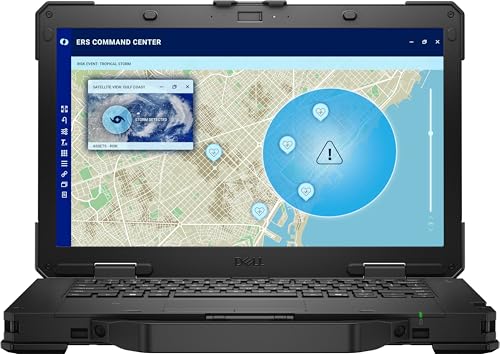
4. Dell Pro Rugged 14 (RB14250): Best Rugged Dell Laptop for Field Crews
For crews who work outdoors, this is the only Dell here we'd trust on a site. It's MIL-STD-810H tested, IP53 sealed against dust and splashes, and built for 3-foot drops. PCMag measured almost 1,000 nits on the bright screen, so you can read it in direct sun.
Now picture a long storm-repair shift. You pull up a wiring diagram with gloves on, the passive pen marks up a work order, and when the first battery runs low you swap it without shutting down. With both packs, PCMag got nearly 22 hours of video. The RS-232 serial port talks to older equipment, and Ethernet, HDMI 2.1 and Thunderbolt 4 sit behind sealed covers. Dell backs it with a three-year warranty, the longest here.
But it's a field tool. It weighs 4.49 lb, its U-series chips are modest, and the 720p webcam is washed out. The two batteries also charge one after the other, which takes hours. Reviewed units had an RTX 500 GPU, while Dell US lists integrated graphics only. Is it worth the weight? For field crews, yes. For an office, the Pro Max 14 (#1) is the smarter buy.
Best for: Field technicians, utilities, construction crews and first responders
Skip it if: You work at a desk or in client offices, not outdoors. The Dell Pro Max 14 (#1) is the better pick.
Pros
- MIL-STD-810H tested, IP53, 3-foot drop rated
- 1,100-nit touch screen readable in sunlight
- Hot-swap twin batteries: nearly 22h in PCMag's test
- Serial, Ethernet, HDMI and TB4 behind sealed covers
- Comfortable keyboard and glove-friendly buttons
- Three-year warranty and spare parts from Dell
Cons
- Bulky: 4.49 lb and 1.32 inches thick
- Only a 1080p 16:9 screen
- Washed-out 720p webcam
- Small touchpad
- IP53 resists splashes, not submersion
- No optical drive
Hands-on reviews behind this pick
- PCMag
Show the verdict
One of the best semi-rugged laptops around: ultra-durable, sunlight-readable and long-running on twin batteries, civilized enough for daily use and an Editors' Choice for field workers.
- StorageReview
Show the verdict
Exceptionally well built and durable, with great ports, a surprisingly good keyboard and hot-swap batteries; not a performance machine, but a strong pick for field use and edge AI.
Best Dell laptops for business buying guide for 2027
What replaced Dell Latitude laptops for business?
The Dell Pro line did. Dell folded Latitude into Dell Pro in 2025, which is why Amazon listings still say things like "Replaces Latitude 5550". The workstation tier is Pro Max, and the semi-rugged models are Pro Rugged.
Then 2026 brought another rename, to Dell Pro 3, Pro 5 and Pro 7, with the Pro 5 taking over from the Latitude 5000 class. But as of November 2026, Amazon US still sells the 2025 models, so those are the names you'll shop by, and the ones on this list.
So here's the quick decoder for this list. Pro Max 14 and Pro Max 16 are the workstations for heavy work. Pro Rugged 14 is the field machine. And the XPS 13 sits outside the business line: it's Dell's light premium laptop, without the extra ports or the long standard warranty.
Which Dell laptop tier fits your kind of business work?
Match the laptop to the heaviest thing you do each week, not the longest spec sheet. If that's analysis, code or engineering files, get the Pro Max 14, or the Pro Max 16 when you want a NumPad and a bigger screen.
If your day is email, documents and video calls between flights, the XPS 13 is lighter and lasts longer than either workstation. And if you work outdoors in rain, dust or full sun, only the Pro Rugged 14 will cope.
Buying for a few people without an IT department? Picture the new hire's first morning: a Pro Max with built-in Ethernet and HDMI plugs straight into the office setup, while an XPS 13 needs an adapter. If the team mostly writes and browses, our guide to lower-cost laptops for small teams covers cheaper options from other brands.
Does a business laptop need Ethernet, upgradeable RAM and Windows 11 Pro?
For most office fleets, yes to all three, and they're the quiet reason the Pro Max models top this list. Built-in Ethernet and HDMI mean no lost dongles before a client meeting. Upgradeable memory means a laptop can grow from 16GB to 32GB instead of being replaced in year three.
The Pro Max 14 uses a single swappable LPCAMM2 module up to 64GB, and the Pro Max 16 has two RAM slots and two SSD slots. The XPS 13's memory is soldered, so buy the amount you'll need on day one.
Windows 11 Pro matters if your company manages devices centrally. Dell ships the Pro Max models with it, but the XPS 13 comes with Windows 11 Home from Dell, so check the exact listing. Fleet managers should also look for a vPro chip, which Dell offers on some Pro Max and Pro Rugged processors. Warranty is the other trap: the Pro Max and XPS start at 12 months, while the Pro Rugged 14 includes three years.
When does a business need a Dell Pro Max workstation laptop?
You need one when your work keeps the processor busy for long stretches: big data models, compiling code, engineering files or long exports. A thin everyday laptop is built for short bursts, while the Pro Max 14 held high clocks through a 30-minute full load.
Say you re-run a large data model or compile a big codebase first thing every day. On a workstation it's done before your first meeting. On the XPS 13, with its 8GB and slower chip, you'll be waiting and closing tabs.
One caution on graphics. The Pro Max 16 listings on Amazon use integrated Arc Pro graphics, and RTX PRO versions are sold direct by Dell. If your work leans on 3D, rendering or video, see our picks of laptops built for creative and GPU-heavy work before you buy.
Is a rugged Dell laptop worth it for field work?
Yes, if your laptop lives in trucks, on job sites or out in the weather. One dropped tailgate or a rain shower can end a normal laptop, and the lost workdays add up fast.
The Pro Rugged 14 is MIL-STD-810H tested, IP53 sealed and built for 3-foot drops. Its 1,100-nit touch screen works with gloves, and hot-swap batteries ran nearly 22 hours of video in PCMag's run. It also has an RS-232 serial port for older equipment and a three-year warranty.
But IP53 means splash-resistant, not waterproof, and it weighs 4.49 lb. If your field work is mostly client visits and offices, the Pro Max 14 or XPS 13 is easier to carry all day.
Best Dell laptops for business: frequently asked questions
What is the best Dell laptop for business?
For most business buyers, it's the Dell Pro Max 14. It keeps its CPU speed under long workloads, has Ethernet, HDMI 2.1 and two Thunderbolt 4 ports, and its memory can be swapped. Want a bigger screen and a NumPad? Get the Pro Max 16. Travel light? The XPS 13.
What replaced the Dell Latitude?
The Dell Pro line replaced Latitude in 2025, with Pro Max for workstations and Pro Rugged for field use. A 2026 rename to Pro 3, 5 and 7 followed, but Amazon still sells mostly 2025 models. For business work, we'd buy the Dell Pro Max 14.
Dell Pro vs Dell XPS for business: which should I buy?
Buy a Dell Pro Max if you need ports, upgrades and sustained speed; the Pro Max 14 has Ethernet, HDMI and swappable memory. Buy the XPS 13 if you mainly write and email on the road: it's 2.2 lb and lasts 14 to 16 hours, but has only two USB-C ports and 8GB.
Is a Dell Pro Max worth it over a regular business laptop?
It's worth it if your work loads the processor for long stretches, like analysis, code or engineering files. The Pro Max 14 held high clocks through a 30-minute full load and still lasted about 12.5 hours of video. For email and documents only, the lighter XPS 13 is enough.
Do Dell business laptops come with Windows 11 Pro?
The Pro Max 14 and Pro Max 16 ship with Windows 11 Pro from Dell. The XPS 13 ships with Windows 11 Home from Dell, though some Amazon sellers list Pro, so check the listing. If your company manages devices, the Pro Max 14 is our pick.


