
The 10 Best Gaming Laptops in 2027
Pack the charger and some gaming laptops top 8 lb. We compared 29 expert reviews to rank the best gaming laptops by GPU, weight and budget. Pick yours.

Affiliate disclosure: As an Amazon Associate, TechFloe earns from qualifying purchases.
Our picks at a glance
Best Gaming Laptop Overall
Lenovo Legion Pro 7i Gen 10 (16-inch, RTX 5080)
Plugged in at a desk, this laptop holds high settings at 1440p and up. The RTX 5080 holds its full 175W with almost no throttling, and the 240Hz OLED makes dark dungeons look inky. Three hours into a weekend raid, frame rates stay put, though the fans get loud. It's heavy, so it lives on a desk. This listing is the 275HX model with 32GB and 1TB.
10.0/10Score

$3,829.00
as of Nov 28, 2026, 06:32 UTC
Best Thin 16-Inch Gaming Laptop
Asus ROG Zephyrus G16 (2026)
A serious gamer who carries the laptop to work or class will like this one. It's about 4.3 lb of aluminum, its 240Hz OLED is one of the brightest around, and it lasts 12 to 14 hours of light use. Answer email on a train all morning, then play at night without hunting for an outlet. The thin body holds the RTX 5080 back, and RAM is soldered. This listing has 32GB and 2TB.
10.0/10Score
$3,489.99
as of Nov 28, 2026, 06:16 UTC
Best Gaming Laptop for Work and Play
Razer Blade 16 (2026)
For the gamer who also takes the laptop into client meetings. It's a slim 4.71 lb aluminum unibody with a 240Hz OLED, Thunderbolt 5 and a UHS-II SD reader. Dock it to two monitors at the office on Monday, then game at home on Friday. This listing is the RTX 5070 Ti version, while reviewers mostly ran RTX 5090 units. Owners report sleep problems, and the screen is glossy.
9.7/10Score
$3,499.99
as of Nov 28, 2026, 06:16 UTC
Best 18-Inch Desktop Replacement Laptop
Alienware 18 Area-51 (2025, RTX 5080)
A desktop replacement for players who want a huge screen and rarely move the laptop. RTINGS ran this exact RTX 5080 configuration and found smooth AAA play with minimal throttling on a fast, matte 300Hz panel. Haul it from the dorm to home for winter break and you'll feel all 9-plus pounds. Battery is short and the fans get loud. Look for the optional Cherry MX keyboard.
9.1/10Score
$4,128.00
as of Nov 28, 2026, 06:32 UTC
Best OLED Gaming Laptop for HDR
HP HyperX OMEN MAX 16 (2026, RTX 5070 Ti)
For a 1440p gamer who cares most about the screen. HP's 240Hz OLED reaches about 1100 nits in HDR, and the chassis is built for RTX 5090 power, with two RAM and two SSD slots. Fire up an HDR racer with the lights off and the headlights glow against true black. Reviewers ran pricier GPUs than this RTX 5070 Ti, and it's heavy and loud flat out. This listing has 32GB and 1TB.
9.0/10Score
$3,199.99
as of Nov 28, 2026, 06:32 UTC
Best 14-Inch Laptop for Gaming on the Go
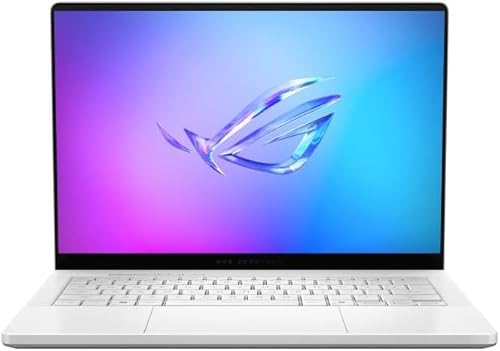
Asus ROG Zephyrus G14 (2025, RTX 5070 Ti)
The small gaming laptop for commuters and frequent flyers. About 3.5 lb, a 3K 120Hz OLED, an aluminum shell and an RTX 5070 Ti with 12GB of VRAM. It slips into a carry-on, and the light 200W charger plus USB-C charging keep the bag light. The GPU is capped near 110W, so bigger laptops with the same chip are faster. This listing has the Ryzen AI 9 HX 370, 32GB and 1TB.
9.0/10Score
$2,999.99
as of Nov 28, 2026, 06:32 UTC
Best RTX 5090 Laptop for Max Frame Rates
MSI Raider 16 Max HX (B2W, RTX 5090)
The fastest 16-inch laptop here belongs on the desk of an enthusiast. Its RTX 5090 with 24GB of VRAM topped PCMag's comparison charts more often than not, and the 240Hz OLED is bright with little glare. Load a heavy mod pack at max settings and it keeps going. It's bulky, loud in Apex mode and feels plastic for the money. Compare its listing with the Legion Pro 7i first.
9.0/10Score
$4,052.86
as of Nov 28, 2026, 06:32 UTC
Best Full-Power RTX 5070 Ti Laptop
Acer Predator Helios Neo 16 AI (PHN16-73, RTX 5070 Ti)
Value hunters who play at a desk can get a full-power RTX 5070 Ti here. It gets the GPU's full 140W, with some of the best results reviewers have seen for that chip, and the 240Hz IPS is very bright. PC Gamer's unit ran Cyberpunk at RT Ultra well above 60 fps with frame generation. It's thick, hot and short on battery, and this listing ships with 16GB of RAM.
8.5/10Score
$2,199.99
as of Nov 28, 2026, 06:32 UTC
Best Budget Gaming Laptop for Students
Acer Nitro V 16S AI (2025, RTX 5060)
Students and first-time PC gamers get one laptop for class and play. It's about 4.5 lb, lasts around 11 hours of browsing, and the matte 180Hz screen beats most budget panels. Spend all day in the library, then play at native 1200p back in your room. The RTX 5060 runs at about 85W, and the small charger struggles in Turbo mode. This listing has the Ryzen AI 7 350, 16GB and 1TB.
8.4/10Score
$1,428.52
as of Nov 28, 2026, 06:32 UTC
Best Cheap Gaming Laptop for 1080p
Alienware 15 (2026, DA15265, RTX 5050)
A tough, sturdy laptop for a first PC gamer on a tight budget. The RTX 5050 runs modern games well at 1080p with DLSS help, and TechRadar saw 134 fps in Total War: Warhammer 3. The build feels solid for the money. The screen is dim and washed out, the 512GB SSD fills fast and the fans whine. This listing ships with one 16GB stick, so plan to add a second.
7.3/10Score
$1,239.99
as of Nov 28, 2026, 06:32 UTC
Product prices and availability are accurate as of the date/time indicated and are subject to change. Any price and availability information displayed on Amazon.com at the time of purchase will apply to the purchase of this product.
How we rank best gaming laptops for you?
We weigh gaming performance first: the GPU tier, the power it actually gets and how well it holds up over a long session. Display quality comes next, since resolution, refresh rate and brightness decide whether you see the frames you paid for. Portability and battery follow, because weight and the charger matter the day you carry it to class or on a trip. Value checks what each step up really buys you. Design and build cover cooling, noise, keyboards and room to upgrade. That puts the Lenovo Legion Pro 7i first.
Gaming Performance30%
The GPU tier and the wattage it runs at decide your frame rates, settings and how long the laptop stays current.
Display Quality20%
Resolution, refresh rate and brightness decide whether you actually see the frames and HDR highlights your GPU makes.
Portability and Battery20%
Weight, charger size and unplugged runtime decide whether the laptop comes to class or on a trip, or stays home.
Value15%
Each GPU step costs a lot, so the extra money should buy frames you'll notice, not specs your screen can't show.
Design and Build15%
Cooling, fan noise, keyboard comfort and upgradeable RAM and SSD slots shape every long session and the laptop's lifespan.
Best gaming laptops compared
Swipe sideways to see every spec.
| Product | Score | Display | Processor | Graphics | Memory |
|---|---|---|---|---|---|
| 10.0 | 16-inch 2560x1600 OLED, 240Hz, G-SYNC, 500 nits SDR | Intel Core Ultra 9 275HX (24 cores) | Nvidia RTX 5080, 16GB GDDR7, up to 175W | 32GB DDR5-6400, 2 slots, up to 64GB | |
| 10.0 | 16-inch 2560x1600 OLED, 240Hz, Pantone Validated | Intel Core Ultra 9 386H (16 cores) | Nvidia RTX 5070 Ti (12GB) or RTX 5080 (16GB) | 16, 32 or 64GB LPDDR5X-8533, soldered | |
| 9.7 | 16-inch 2560x1600 OLED, 240Hz, Calman Verified | Intel Core Ultra 9 386H (16 cores) | Nvidia RTX 5070 Ti, RTX 5080 or RTX 5090 | 32GB or 64GB LPDDR5X-9600, soldered | |
| 9.1 | 18-inch 2560x1600 IPS, 300Hz, G-Sync | Intel Core Ultra 9 275HX (24 cores) | Nvidia RTX 5080, 16GB GDDR7 | 32GB DDR5, 2 slots, replaceable, up to 64GB | |
| 9.0 | 16-inch 2560x1600 OLED, 240Hz, VRR, 500 nits SDR | Intel Core Ultra 9 290HX Plus (24 cores) | Nvidia RTX 5070 Ti, 12GB GDDR7 | 32GB DDR5-6400, 2 slots, up to 64GB | |
| 9.0 | 14-inch 2880x1800 OLED, 120Hz, 100% DCI-P3 | AMD Ryzen AI 9 HX 370 (12 cores, 24 threads) | Nvidia RTX 5070 Ti, 12GB GDDR7, up to 110W | 32GB LPDDR5X-8000, soldered | |
| 9.0 | 16-inch 2560x1600 OLED, 240Hz, 100% DCI-P3 | Intel Core Ultra 9 290HX Plus (24 cores) | Nvidia RTX 5090, 24GB GDDR7, up to 175W | 32GB DDR5-6400, 2 slots, up to 128GB | |
| 8.5 | 16-inch 2560x1600 IPS, 240Hz, G-Sync | Intel Core Ultra 9 275HX (24 cores) | Nvidia RTX 5070 Ti (12GB), up to 140W | 16GB DDR5, two slots | |
| 8.4 | 16-inch 1920x1200 IPS, 180Hz, matte | AMD Ryzen AI 7 350 (8 cores) | Nvidia RTX 5060, 8GB, about 85W | 16GB DDR5, 2 slots, replaceable | |
| 7.3 | 15.3-inch 1920x1200 IPS, 165Hz, 300 nits, 62.5% sRGB | AMD Ryzen 7 260 (8 cores, 16 threads) | Nvidia RTX 5050, 8GB, about 85W | 16GB DDR5-5600, single stick, 2 slots |
1. Lenovo Legion Pro 7i Gen 10 (16-inch, RTX 5080): Best Gaming Laptop Overall

$3,829.00
as of Nov 28, 2026, 06:32 UTC
Get the Legion Pro 7i if you want the most gaming laptop for your money at the top end. Its RTX 5080 ran at the full 175W with no throttling in Mash IT's run of this exact 275HX configuration, and RTINGS saw minimal throttling across long sessions on the 2026 version. The 16-inch 240Hz OLED adds G-SYNC, deep blacks and 500 nits SDR.
Saturday afternoon at your desk: a new ray-traced release at 1600p, a second monitor on the DisplayPort 2.1 USB-C port and a cable in the 2.5GbE jack. Two RAM slots and two M.2 slots mean you can go to 64GB or drop in a second SSD for your game library. Nothing needs a subscription.
The catch is size and sound. It weighs about 5.7 lb, the 400W brick pushes your bag toward 8.5 lb, and the fans get loud, so plan on a headset. On battery you'll get roughly an hour of play. Is the 2026 290HX Plus model worth extra? Barely, so buy whichever costs less. Carry yours every day? The Asus ROG Zephyrus G16 (#2) is far easier to live with.
Best for: Desk-based PC gamers who want high settings at 1440p and above, a top OLED and parts they can upgrade later.
Skip it if: You carry your laptop daily. The Asus ROG Zephyrus G16 (#2) weighs about 4.3 lb and lasts far longer unplugged.
Pros
- Excellent sustained RTX 5080 gaming performance
- Vivid 240Hz OLED with G-SYNC
- Comfortable keyboard with per-key RGB and numpad
- RAM, both SSD slots and Wi-Fi are replaceable
- Minimal throttling in long sessions
Cons
- Heavy: about 5.7 lb plus a huge 400W brick
- Fans loud and keyboard warm under load
- About 1 to 1.5 hours of gaming on battery
- Glossy OLED reflects more than rivals
- No Thunderbolt 5, SD reader or IR face unlock
- Plastic interior feels below its price
Hands-on reviews behind this pick
RTINGS
Show the verdict
Excellent for gaming: its RTX 5080 holds high frame rates even with ray tracing and barely throttles, and the 240Hz OLED looks superb, but it is heavy, hot, loud and lasts 1.5 hours gaming.
PCMag
Show the verdict
A slick premium gaming laptop with a flashy redesign, top-end speed and a vibrant 240Hz OLED, but its steep price and plastic build keep it from standing out against cheaper rivals.
Just Josh
Show the verdict
One of the fastest and most comfortable gaming laptops, with a great OLED and keyboard; the RTX 5080 is the config to buy, and last year's 275HX model is fine if it costs less.
2. Asus ROG Zephyrus G16 (2026): Best Thin 16-Inch Gaming Laptop

$3,489.99
as of Nov 28, 2026, 06:16 UTC
Carrying a gaming laptop every day is easier with the Zephyrus G16. It packs an RTX 5080 into an aluminum shell of about 4.3 lb, and the 2026 Core Ultra 9 386H finally gives it a workday of battery: Notebookcheck got 12h21m of browsing and Jarrod'sTech almost 14.5 hours of video.
Say you take notes through two lectures, edit a group slideshow at lunch and still have charge for a quick match on the bus home. Performance barely drops on battery, though gaming unplugged lasted only 55 minutes for Tom's Guide. At your desk, Turbo mode is the sweet spot; Manual mode is about 40% louder for about 8% more frames, per Jarrod'sTech. A fast SD reader is built in, too.
Now the trade-offs. Memory is soldered, the 250W brick adds about 1.3 lb, and the OLED uses PWM dimming that flicker-sensitive eyes may notice. Bigger, cheaper RTX 5080 machines run about 13% faster at 1440p. Want those extra frames and don't mind the weight? Go back to the Lenovo Legion Pro 7i (#1).
Best for: Gamers who carry one laptop for work or school and want an RTX 5080, a bright OLED and real all-day battery.
Skip it if: You want every last frame for the money. The Lenovo Legion Pro 7i (#1) runs its RTX 5080 at full power.
Pros
- Bright, color-rich 240Hz OLED with Pantone validation
- Around 12-14 hours of web use in lab battery tests
- Thin, sturdy aluminum body at about 4.3 lb
- Some of the best speakers on a Windows laptop
- Keeps nearly full speed on battery power
- Two M.2 slots for adding storage
Cons
- RAM is soldered and can't be upgraded
- Heavy 250W brick with a proprietary plug
- Thinner chassis holds the RTX 5080 back
- Single-zone keyboard backlight; keyboard divides reviewers
- OLED uses PWM dimming at most brightness levels
- No Thunderbolt 5
Hands-on reviews behind this pick
Notebookcheck
Show the verdict
A clear step up on last year: a brighter OLED, a more efficient chip, more GPU power and a strong keyboard, build and sound, though the RTX 5080 is held back and the cost is hard to swallow.
Tom's Guide
Show the verdict
The 2026 model finally fixes battery life and hits harder in CPU and GPU work, with a sleek design and vivid screen, but the keyboard and heavy brick remain and it costs far too much.
Show the verdict
His favorite portable 16-inch gets better battery, a brighter OLED and cooler running, but it costs a fortune, RAM is soldered, and the RTX 5070 Ti version is the smarter buy than the RTX 5080.
3. Razer Blade 16 (2026): Best Gaming Laptop for Work and Play

$3,499.99
as of Nov 28, 2026, 06:16 UTC
Pick the Blade 16 if your gaming laptop doubles as your work computer. It's the best-connected machine on this list, with Thunderbolt 5, Thunderbolt 4, HDMI 2.1 and a UHS-II SD reader, wrapped in a 4.71 lb aluminum unibody that looks at home in a boardroom. Its 240Hz OLED is Calman Verified and measured about 90% DCI-P3.
Plug one cable into a Thunderbolt dock on Monday morning and you're driving monitors and Ethernet; unplug on Friday for game night. This listing pairs the RTX 5070 Ti with 32GB and 1TB. Most reviews ran RTX 5090 units, so treat their numbers as a guide: Tom's Hardware's lasted 12h46m in its battery test.
The risk is reliability. Blade owners on Razer's Insider forum keep reporting lid-close sleep failures that leave older models hot in a bag, and a long-term 2026 owner sees the same thing, with about 4 hours of real battery once the Nvidia GPU wakes. RAM is soldered and the screen is glossy. Want the slim formula with fewer quirks? The Zephyrus G16 (#2) is the safer buy.
Best for: Professionals and creators who want one slim, premium laptop for docking at work and gaming at home.
Skip it if: You need a laptop that sleeps reliably in a bag. The Asus ROG Zephyrus G16 (#2) is slim without the reported quirks.
Pros
- Nearly 13 hours in Tom's Hardware's battery test
- Gorgeous 240Hz OLED, 90% DCI-P3 measured
- Slim, rigid aluminum unibody that looks professional
- Thunderbolt 5 and Thunderbolt 4 plus a UHS-II SD reader
- Best-in-class per-key keyboard lighting
- Strong gaming and GPU performance for its thickness
Cons
- Multi-core CPU speed trails rivals and the 2025 model
- Very glossy screen picks up glare
- Fans get loud under heavy load
- RAM is soldered and can't be upgraded
- Sleep and idle power-draw problems reported
- No haptic trackpad at this level
Hands-on reviews behind this pick
Tom's Hardware
Show the verdict
Keeps up with rival RTX laptops in games and blows them away on battery, with a gorgeous OLED and elegant build, but multi-threaded work lags and the as-tested build costs a fortune.
Show the verdict
A refresh that goes backwards: slower than the 2025 Blade in most games and many creative apps, hotter under CPU load, with an idle power bug; only the longer light-use battery life really improves.
Show the verdict
Razer's best Blade 16 yet, with far better battery, a brighter OLED and great build, yet still hard to recommend: high cost, louder fans, soldered RAM and quirks make the Zephyrus G16 the safer pick.
4. Alienware 18 Area-51 (2025, RTX 5080): Best 18-Inch Desktop Replacement Laptop

$4,128.00
as of Nov 28, 2026, 06:32 UTC
Buy the Area-51 18 if you want a desktop's screen size and power in something that can still fold shut. RTINGS ran this exact Ultra 9 275HX and RTX 5080 setup and found smooth AAA gaming, a fast 300Hz screen with VRR and minimal throttling. The matte 18-inch panel hit about 570 nits for Hardware Canucks, so a lamp behind you won't wash it out.
It suits someone who games in two or three fixed places. Think a dorm desk in term time and a bedroom at home over the holidays, with the ports at the back so cables stay put. There are two RAM slots and three M.2 slots, and the optional Cherry MX ultra-low-profile keyboard is a treat for long typing sessions.
Weight defines it. PCMag measured 9.56 lb and Jarrod'sTech 11.4 lb with the charger, both on RTX 5090 units of the same chassis, and PCMag got only 2:25 of video playback. Wi-Fi is soldered and the glass bottom rules out lap use. Need this kind of power in a 16-inch body? The Lenovo Legion Pro 7i (#1) is far easier to move.
Best for: Gamers replacing a desktop who want an 18-inch 300Hz screen and move the laptop only between a few fixed spots.
Skip it if: You'll carry it at all. The Lenovo Legion Pro 7i (#1) has the same GPU in a 16-inch body near 5.7 lb.
Pros
- Smooth AAA gaming with minimal throttling
- Bright, fast 300Hz 18-inch screen with G-Sync
- Optional Cherry MX mechanical keyboard
- Upgradeable RAM and three M.2 slots
- Most ports on the back, including 5Gbps Ethernet
- Superb build and striking RGB lighting
Cons
- Extremely heavy: about 9-9.6 lb
- Short battery life, about 2.5 hours
- Loud fans in higher modes
- No mini-LED or OLED screen option
- Wi-Fi is soldered; slow Alienware software
- Glass bottom panel blocks lap use
Hands-on reviews behind this pick
Show the verdict
Tested the exact Ultra 9 275HX/RTX 5080 300Hz unit: an excellent gaming laptop with smooth AAA play, a fast 300Hz screen, VRR and upgrades, but loud fans and a bulky, heavy body.
Show the verdict
Tested an RTX 5090/64GB unit: blazing performance, a bright 300Hz screen, a top mechanical keyboard and stunning RGB, but short 2:25 battery, extreme price scaling and no mini-LED cost it marks.
Show the verdict
Tested an RTX 5090 unit: Alienware's most powerful laptop, with great build and cool full-load temps, but the heaviest he has tested in years; best as a portable desktop for people who move it rarely.
5. HP HyperX OMEN MAX 16 (2026, RTX 5070 Ti): Best OLED Gaming Laptop for HDR

$3,199.99
as of Nov 28, 2026, 06:32 UTC
Choose the OMEN MAX 16 if HDR games and films matter as much as frame rates. Its 240Hz OLED measured about 487 nits SDR and close to 1100 nits HDR for Notebookcheck, and Crimson Tech found its anti-reflective layer better than Razer's and Lenovo's. This RTX 5070 Ti listing is the value route into the same chassis and screen.
Be clear on what the reviews cover. Notebookcheck and Crimson Tech ran 2026 RTX 5090 units, while RTINGS and PCMag tested 2025 models, so expect fewer frames than their charts but the same screen, keyboard and cooling. Picture a late-night HDR racing session in a dark room: bright headlights against true black, and a keyboard deck that stays cool under your hands. Two RAM and two M.2 slots let you add memory or storage later.
It's big, though. Notebookcheck weighed its unit at 6.45 lb, the CPU touched 100C in Performance mode for Crimson Tech, and the fans get very loud in the top modes. Light-use battery won't cover a school day. Want an OLED you can carry? The Asus ROG Zephyrus G14 (#6) weighs about 3.5 lb.
Best for: Desk gamers who want a top HDR OLED at 1440p and the option to add RAM and storage later.
Skip it if: You want a quiet or portable laptop. The Asus ROG Zephyrus G14 (#6) has an OLED in a 3.5 lb body.
Pros
- Gorgeous 240Hz OLED with G-Sync, up to 1100 nits HDR
- Strong, consistent gaming performance
- Upgradeable: 2 RAM slots and 2 M.2 slots
- Sturdy build and a full-size keyboard with numpad
- Quiet fans under light loads
- Good speakers for a gaming laptop (most reviewers)
Cons
- Large and heavy at about 6.5 lb
- Very loud fans in its two fastest power modes
- CPU runs near 100C in top modes
- Short battery life in gaming and HX-chip use
- No Thunderbolt 5, SD reader or Advanced Optimus
- Some screen wobble
Hands-on reviews behind this pick
Show the verdict
Tested the 290HX Plus/RTX 5090 OLED unit: a loud, proud performance machine with a true 175W GPU, upgradeable RAM and SSDs and a superb OLED, but it is big, heavy and noisy at full tilt.
Show the verdict
Tested the 2025 Ultra 9 275HX/RTX 5080 IPS model: an excellent, sturdy gaming laptop with high, steady frame rates, VRR and upgradeable RAM and storage, held back mainly by very loud fans.
Show the verdict
Tested the 2025 275HX/RTX 5090 OLED unit: potent performance, a premium chassis, a 240Hz OLED and good value next to the Blade 16, but battery life ran out far too quickly at 2:29.
6. Asus ROG Zephyrus G14 (2025, RTX 5070 Ti): Best 14-Inch Laptop for Gaming on the Go
$2,999.99
as of Nov 28, 2026, 06:32 UTC
Everywhere you go, the G14 goes too. Jarrod'sTech ran this exact Ryzen AI 9 HX 370, RTX 5070 Ti and 32GB version and called it the best portable gaming laptop of 2025. It weighs about 3.5 lb, and the 3K OLED is gorgeous.
Here's where it fits: a carry-on bag on a work trip, a hotel desk at night and a few rounds of a shooter before bed. The 200W charger is small, and 100W USB-C charging works for lighter loads, so one compact brick can cover a day of meetings. Jarrod'sTech also saw the slowest sleep drain he's recorded, so it's ready when you lift the lid.
The limits are real. The GPU tops out near 110W, well below a full-power RTX 5070 Ti, so the Acer Predator Helios Neo 16 AI (#8) is quicker with the same chip. Memory is soldered, there's one M.2 slot and no Ethernet, and the keyboard center gets hot under load. Want more slim options? See our list of gaming laptops light enough to carry every day.
Best for: Commuters, travelers and students who want real RTX gaming and an OLED in a 14-inch bag-friendly body.
Skip it if: You want the most frames from an RTX 5070 Ti. The Acer Predator Helios Neo 16 AI (#8) runs it at full power.
Pros
- About 3.5 lb with RTX 5070 Ti power
- Gorgeous 3K 120Hz OLED
- Premium all-aluminum build with little flex
- Excellent battery life for a gaming laptop
- Comfortable keyboard and touchpad
- Light 200W charger plus USB-C charging
Cons
- RAM is soldered and can't be upgraded
- GPU runs below full 140W power
- Expensive for a 14-inch laptop
- Fans very loud when maxed out
- Single-zone RGB; tiny arrow keys
- No Ethernet; one M.2 slot
Hands-on reviews behind this pick
Show the verdict
Tested the RTX 5080 config: the reviewer's favorite gaming laptop, with huge performance in a svelte 3.5 lb body, a mesmerizing OLED and great typing, but battery life needs watching.
Show the verdict
Tested the exact HX 370/RTX 5070 Ti/32GB unit: the best portable gaming laptop he tested in 2025, mixing portability, performance, build and battery, with no major dealbreakers beyond soldered RAM.
7. MSI Raider 16 Max HX (B2W, RTX 5090): Best RTX 5090 Laptop for Max Frame Rates

$4,052.86
as of Nov 28, 2026, 06:32 UTC
The Raider 16 Max HX is for the player who wants the fastest laptop money buys. PCMag and Jarrod'sTech both tested this exact RTX 5090 and Core Ultra 9 290HX Plus configuration; PCMag found it topped its comparison group more often than not and named it the best high-end gaming laptop. The 24GB of VRAM gives heavy mods and 3D work plenty of headroom.
Imagine a sim racing rig in a spare room: the laptop on a stand, pedals in a USB-A port, a capture card on Thunderbolt and a cable in the 2.5GbE jack. The keyboard stays cooler than most, per Jarrod'sTech, and the OLED reached 506 nits for PCMag. Two RAM slots take up to 128GB.
Size is the downside. PCMag says the kit came to almost 10 lb with the charger and didn't fit a commuter backpack's sleeve. Apex mode runs the fans flat out with the CPU above 100C, there's no G-Sync, and the plastic shell feels cheap for the money. Most players will be happier with the Lenovo Legion Pro 7i (#1), which keeps G-SYNC. Buy the Raider when it's priced below the Legion.
Best for: Enthusiasts who want maximum RTX 5090 frame rates and 24GB of VRAM, and who play plugged in at a desk.
Skip it if: You want G-Sync and a sturdier build. The Lenovo Legion Pro 7i (#1) is the better all-round flagship.
Pros
- One of the fastest 16-inch gaming laptops tested
- Sharp, vivid 240Hz OLED with little glare
- 13+ hours in PCMag's video battery test
- Easy upgrades: 2 RAM slots and 2 M.2 slots
- Plenty of ports, including SD reader and 2.5GbE
- Keyboard stays cool under load
Cons
- Heavy: about 5.7-5.9 lb, near 10 lb with charger
- Fans loud, especially in Apex mode
- CPU can run above 100C in top modes
- No Advanced Optimus or G-Sync
- Plastic build feels cheap for the price
- Poor webcam and mic; loose touchpad on one unit
Hands-on reviews behind this pick
Show the verdict
Editors' Choice and PCMag's top high-end pick: peerless gaming speed and a gorgeous OLED justify the price, with 13 hours of video battery, though it is bulky, heavy and loud.
Show the verdict
One of the fastest laptops he has tested, easy to upgrade and cool where you touch, but a plastic build, loud Apex mode, hot CPU, no G-Sync and a poor camera make it a buy-on-sale pick.
Show the verdict
Tested the RTX 5080 version: one of the fastest gaming laptops you can buy, with a gorgeous, very bright OLED, nice RGB and good sound, at an unusually low price if you can find it in stock.
8. Acer Predator Helios Neo 16 AI (PHN16-73, RTX 5070 Ti): Best Full-Power RTX 5070 Ti Laptop

$2,199.99
as of Nov 28, 2026, 06:32 UTC
Full RTX 5070 Ti power usually costs flagship money, but not on the Helios Neo 16 AI. The GPU gets its full 140W and even touched 160W for Crimson Tech, who saw the highest RTX 5070 Ti score he'd recorded. That's why it outruns the thinner G14 (#6) with the same chip.
Tom's Guide's unit, with the same Ultra 9 275HX and RTX 5070 Ti, ran Counter-Strike 2 at 228 fps and Forza Horizon 5 Extreme up to 112 fps at 1600p. So a Friday night of 1600p shooters on a bright 240Hz panel is well within reach. Those reviewers had 32GB, while this listing has 16GB, so budget for more RAM; the two slots make that easy. Clear out the preinstalled apps on day one, too.
It's a desk laptop. It weighs about 5.95 lb, runs hot and loud under load, and lasted 4h11m in Tom's Guide's battery test. If you like Acer's mix of price and power, compare Acer's Nitro and Predator line-up ranked. Need something you can carry instead? Look at the Acer Nitro V 16S AI (#9).
Best for: Desk gamers who want the most RTX 5070 Ti performance for the money and don't mind a thick, loud laptop.
Skip it if: You need to carry it or want quiet. The Asus ROG Zephyrus G14 (#6) is a 3.5 lb RTX 5070 Ti laptop.
Pros
- Full 140W RTX 5070 Ti, among the fastest for the GPU
- Very bright 240Hz IPS (PC Gamer measured 635 nits)
- Priced below most RTX 5070 Ti rivals
- Two M.2 slots, 2.5Gb Ethernet, plenty of ports
Cons
- Heavy and thick: about 5.95 lb, 1.05 inch
- Short battery life (Tom's Guide 4h11m)
- Runs hot and loud under load
- Lots of preinstalled bloatware
- Only 16GB RAM in this listing
Hands-on reviews behind this pick
PC Gamer
Show the verdict
A relative bargain among top-end gaming laptops, with solid RTX 5070 Ti performance and an exceptionally bright IPS screen, but it runs hot and has almost no battery life.
Show the verdict
A beautiful, bright 240Hz screen and smooth gaming, but ineffective cooling, a slow SSD hurt by bloatware, short battery life and a bulky body make it hard to recommend outright.
LaptopMedia
Show the verdict
Tested the OLED version with a 140W RTX 5070 Ti: powerful and well balanced for the price and 10-15% faster than the slimmer 16S, but its OLED screen brings notable drawbacks.
9. Acer Nitro V 16S AI (2025, RTX 5060): Best Budget Gaming Laptop for Students

$1,428.52
as of Nov 28, 2026, 06:32 UTC
The Nitro V 16S AI suits a student who needs one laptop for lectures and gaming. RTINGS ran this exact Ryzen AI 7 350, RTX 5060 and 16GB version, measured about 11 hours of browsing and named it its best budget gaming laptop. At about 4.5 lb, it's easy to carry across campus.
Here's a typical day: notes and research in the library from 9 to 5, then a co-op session in your room that evening. It runs demanding games at native 1920x1200, though heavy ray tracing needs lower settings or upscaling. Two RAM slots and two M.2 slots make it cheap to grow, and Crimson Tech found 100W USB-C charging works too.
The weak spot is the 135W charger. In Turbo mode, Jarrod'sTech saw the battery drain while plugged in, dropping to Balanced after about 2 hours of Alan Wake 2; Performance mode avoided it. The stock Wi-Fi card is poor and the keyboard gets hot. Is it the right buy on a mid budget? Often, but compare the strongest gaming laptops under $1,500, or drop to the Alienware 15 (#10).
Best for: Students and casual gamers who want long battery life and a light 16-inch laptop for class and 1080p play.
Skip it if: You want maximum frame rates in long sessions. The Acer Predator Helios Neo 16 AI (#8) runs a full-power GPU.
Pros
- Light for a 16-inch gaming laptop at about 4.5 lb
- Long battery life: about 8-11 hours of light use
- Bright, matte 180Hz screen that beats rivals
- Two RAM slots and two M.2 slots
- Steady performance in Balanced and Performance modes
- Quiet fans in light use
Cons
- Small 135W charger drains the battery in Turbo gaming
- RTX 5060 limited to about 85W, slower than rivals
- Keyboard gets hot under load
- Mushy keyboard and weak trackpad (some reviewers)
- Some lid and deck flex
- Poor stock Wi-Fi card
Hands-on reviews behind this pick
Show the verdict
Tested the Ryzen AI 7 350/RTX 5060/16GB/1TB unit: good for gaming at native 1200p with a bright 180Hz screen, steady performance and easy upgrades, but a hot keyboard, loud fans and a weak charger.
Show the verdict
Light, with a better screen and battery than rivals, but its tiny 135W charger can't keep up in Turbo mode, so the battery drains mid-game; fine in Performance mode, hard to recommend at full price.
Show the verdict
Tested a Ryzen 7 260/RTX 5060 unit: thin, very upgradeable, with a nice matte 180Hz screen and 8+ hours of light use, but the low-power GPU and plugged-in battery drain make it hard to recommend.
10. Alienware 15 (2026, DA15265, RTX 5050): Best Cheap Gaming Laptop for 1080p

$1,239.99
as of Nov 28, 2026, 06:32 UTC
The Alienware 15 is the lowest-cost pick here that we'd still hand to a new PC gamer. TechRadar and Windows Central both ran this exact Ryzen 7 260, RTX 5050, 16GB and 512GB version; the RTX 5050 handles modern games well with DLSS, and TechRadar got 134 fps in Total War: Warhammer 3. The chassis feels sturdier than its price suggests.
A teen's first gaming laptop on a bedroom desk: homework in the afternoon, an online match after dinner, Ethernet straight into the router. Parents weighing this kind of machine should also see durable gaming laptops parents can trust. Dell includes a 12-month McAfee+ trial that doesn't auto-renew.
Two upgrades help most. It ships with one 16GB stick, so a second stick unlocks dual-channel speed, and the 512GB SSD fills after a few big games. The 300-nit screen looks washed out, the fans are loud with a whine, and TechRadar got only 89 minutes of gaming on battery. Can you stretch? The Acer Nitro V 16S AI (#9) has a far better screen. For more low-cost options, browse budget gaming laptops that still run new games.
Best for: First-time PC gamers and families on a tight budget who want a sturdy 1080p gaming laptop with Ethernet.
Skip it if: Screen quality matters to you. The Acer Nitro V 16S AI (#9) has a brighter, matte 180Hz panel.
Pros
- Sturdy, well-built chassis for the price
- RTX 5050 plays modern games well with DLSS
- 165Hz screen and steady performance in long sessions
- Replaceable RAM and SSD; second RAM slot free
- Comfortable keyboard (RTINGS)
- Plenty of ports, including Ethernet
Cons
- Dim, washed-out screen: only 62.5% sRGB
- Single-channel RAM out of the box
- 512GB SSD leaves little room for games
- Loud fans with a high-pitched whine
- Keyboard gets warm in games
- Only one M.2 slot; no MUX switch
Hands-on reviews behind this pick
TechRadar
Show the verdict
Tested the exact Ryzen 7 260/RTX 5050/16GB/512GB unit for three weeks: impressive frame rates for little money in the US, but a dim, washed-out panel, single-channel RAM and a cramped SSD.
Windows Central
Show the verdict
Tested the exact Ryzen 7 260/RTX 5050 unit: the RTX 5050 runs plenty of modern games with DLSS help, but the 512GB SSD is too small, the fans are extremely loud and the keyboard gets warm.
Show the verdict
Tested a Ryzen 5 220/RTX 4050 unit: decent for 1080p gaming with excellent build, steady performance and replaceable parts, but loud whiny fans and a narrow-gamut screen; RTX 5050 models do better.
Best gaming laptops buying guide for 2027
Which gaming laptop GPU do you need for your screen and games?
Match the GPU to your screen and the games you play, not to the biggest number. For 1080p or 1200p esports and lighter AAA games, an RTX 5050 or RTX 5060 is enough: the Alienware 15 handles modern games with DLSS, and the Acer Nitro V 16S AI runs demanding titles at native 1920x1200 if you ease off heavy ray tracing. For high settings on a 1440p or 1600p screen, step up to an RTX 5070 Ti, as in the Predator Helios Neo 16 AI, OMEN MAX 16, Blade 16 or Zephyrus G14.
For 1600p at 240Hz with ray tracing on, an RTX 5080 (Legion Pro 7i, Zephyrus G16, Alienware 18 Area-51) or RTX 5090 (Raider 16 Max HX) earns its keep. Video memory climbs with each tier: 8GB on the 5050 and 5060, 12GB on the 5070 Ti, 16GB on the 5080 and 24GB on the 5090, which leaves more room for high-resolution textures. And don't pair a flagship GPU with a basic 1080p panel; you'd pay for frames the screen can't show.
Why does the same GPU run faster in one gaming laptop than another?
Because each maker sets its own power limit, and wattage decides speed. The Acer Predator Helios Neo 16 AI feeds its RTX 5070 Ti the full 140W, while the slimmer Zephyrus G14 runs the same chip at about 105 to 110W, so the Acer is faster. The Nitro V 16S AI and Alienware 15 cap their GPUs at about 85W, below full-power budget rivals.
Thin 16-inch designs pay a toll too. Bigger RTX 5080 laptops run about 13% faster at 1440p than the Zephyrus G16, while the Legion Pro 7i held its full 175W in games. Before you buy, check the GPU wattage on the spec sheet, not just the model name. A lower-wattage chip in a light body can still be the right call if you carry it every day.
How heavy are gaming laptops, and how long do their batteries last?
Expect 3.5 to 6.5 lb for most models, plus a charger, and about an hour of gaming on battery. The Zephyrus G14 is the lightest here at about 3.5 lb, then the Zephyrus G16 at about 4.3 lb, the Nitro V 16S AI at about 4.5 lb and the Blade 16 at 4.71 lb. The Legion Pro 7i, Raider 16 Max HX, Helios Neo 16 AI and OMEN MAX 16 sit between about 5.7 and 6.5 lb, and the Alienware 18 Area-51 tops 9 lb.
Light use is a different story. The Zephyrus G16 lasted about 12 to 14.5 hours of browsing or video and the Nitro about 11, enough for a day of classes. Gaming drains every model fast: Tom's Guide got 55 minutes from the G16 and Mash IT about an hour from the Legion. Chargers add weight as well, from the G14's 200W brick to the Legion's 400W one.
Is an OLED or IPS screen better on a gaming laptop?
OLED is better for most players, while IPS wins in bright rooms and on a budget. The 240Hz OLEDs on the Legion Pro 7i, Zephyrus G16, Blade 16, OMEN MAX 16 and Raider 16 Max HX give inky blacks, fast response and HDR highlights near 1100 nits. The G14's 3K OLED runs at 120Hz, fine for story games but slower for esports.
IPS still has a place. The Alienware 18 Area-51's matte 300Hz panel measured about 570 nits, and the Helios Neo 16 AI's IPS hit 635 nits, so lamps and windows matter less. Glossy OLEDs like the Legion and Blade reflect more, and the Zephyrus G16 uses PWM dimming that sensitive eyes may notice. At the low end, screens vary a lot: the Nitro's matte 180Hz panel looks good, while the Alienware 15's 300-nit screen looks washed out.
How much RAM and storage does a gaming laptop need?
Aim for 32GB of RAM and at least 1TB of storage if you play big new releases. Several picks ship that way, including the Legion Pro 7i, Zephyrus G16, Blade 16, OMEN MAX 16, Zephyrus G14 and Raider 16 Max HX. The Helios Neo 16 AI, Nitro V 16S AI and Alienware 15 start at 16GB, and the Alienware's single stick and 512GB SSD are its biggest weak spots.
Check whether memory is soldered before you buy. The Zephyrus G16, Zephyrus G14 and Blade 16 can't be upgraded, so pick the RAM you need up front. The Legion, Alienware 18, OMEN, Raider, Helios, Nitro and Alienware 15 have two RAM slots, and most add a second M.2 slot for more games. That way you can start with what you can afford and add memory later.
Best gaming laptops: frequently asked questions
What is the best gaming laptop?
The Lenovo Legion Pro 7i Gen 10 with an RTX 5080 is our pick for most serious players. It holds full GPU power in long sessions, pairs it with a 240Hz OLED and lets you upgrade RAM and storage. If you carry your laptop every day, the lighter Asus ROG Zephyrus G16 is the better buy.
Which GPU do I need in a gaming laptop?
For 1080p or 1200p play, an RTX 5050 or 5060 is enough, as in the Alienware 15 and Acer Nitro V 16S AI. For high settings at 1440p or 1600p, get an RTX 5070 Ti like the Acer Predator Helios Neo 16 AI. An RTX 5080 or 5090 makes sense for 240Hz play with ray tracing.
Can a gaming laptop last a full day on battery?
For light work, some can. The Asus ROG Zephyrus G16 lasted about 12 to 14.5 hours of browsing or video, and the Acer Nitro V 16S AI about 11 hours of browsing. Gaming is different: most models last around an hour unplugged, so keep the charger handy for long sessions.
Is OLED or IPS better for a gaming laptop?
OLED, for most people. The 240Hz OLEDs on the Legion Pro 7i, Zephyrus G16 and OMEN MAX 16 give deep blacks and bright HDR. IPS makes sense in a bright room: the Alienware 18 Area-51's matte 300Hz panel measured about 570 nits and handles glare better than a glossy OLED.
Is a gaming laptop as good as a gaming desktop?
Close, if you buy a big one. The Alienware 18 Area-51 and MSI Raider 16 Max HX deliver desktop-class frame rates, but they're heavy, loud under load and short on battery. Thin models like the Zephyrus G16 trade some speed for portability, so choose based on how often you'll move it.
